Appendix: Menu Options Lists
151
[File Numbering]: MP4 movies and photos are saved as files in folders. You can select the file
numbering method for those files. File numbers appear on screens in playback mode in a format such
as "101-0107". The first three digits indicate the folder number and the last four digits are different for
each file in a folder.
[m Reset]: File numbers will restart from 100-0001 every time you record on a memory card that has
been initialized.
[n Continuous]: File numbers will continue from the number following that of the last file recorded
with the camcorder.
• If the memory card you insert already contains a file with a larger number, a new file will be assigned
a number one higher than that of the last file on the memory card.
• We recommend using the [n Continuous] setting.
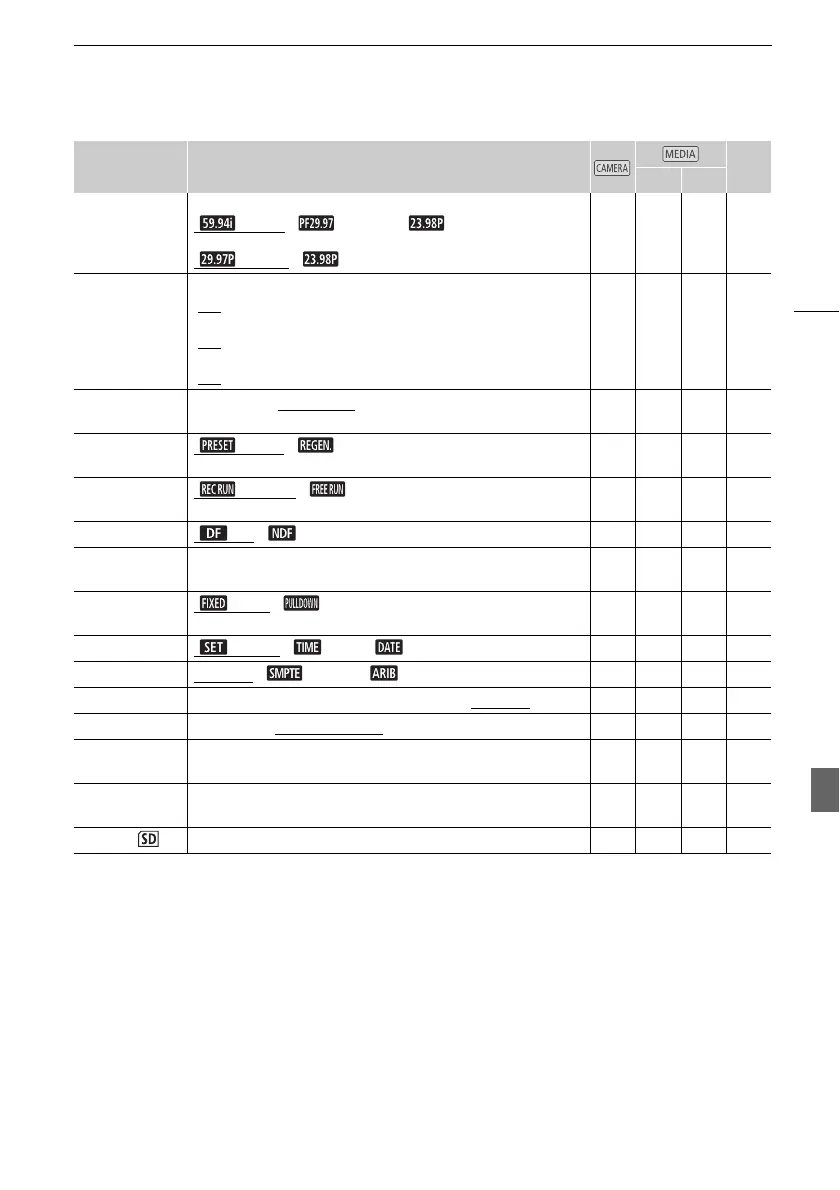
[Frame Rate] For AVCHD movies:
[
59.94i], [ PF29.97], [ 23.98P]
For MP4 movies:
[
29.97P], [ 23.98P]
z – – 51
[Slow & Fast
Motion]
When the frame rate is 59.94P:
[OFF
], [x2], [x2.5]
When the frame rate is 29.97P:
[OFF
], [x0.5], [x1.25], [x2], [x4], [x10], [x20], [x60], [x1200]
When the frame rate is 23.98P:
[OFF
], [x0.4], [x0.8]
z – – 52
[Video Snapshot
Length]
[C 2 sec], [D 4 sec], [F 8 sec] z – – 94
[Time Code
Mode]
[ Preset], [ Regen.] z – – 79
[Time Code
Running Mode]
[ Rec Run], [ Free Run] z – – 79
[DF/NDF] [ DF], [ NDF] z – – 80
[Initial Time
Code]
[Reset] z – – 79
[User Bit Output
Mode]
[ Fixed], [ Pulldown] z – – 81
[User Bit Type] [ Setting], [ Time], [ Date] z – – 81
[Color Bars] [j Off], [ SMPTE], [ ARIB] z – – 93
[1 kHz Tone] [ü -12 dB], [þ -18 dB], [ÿ -20 dB], [j Off] z – – 93
[File Numbering] [m Reset], [n Continuous] z z z –
[Available Space
in Memory]
[6], [7] z – – –
[Used Space in
Memory]
[6], [7] – z z –
[Initialize ] [6 Mem. Card A], [7 Mem. Card B] z z z 38
Menu item Setting options A
y }



 To Next Page