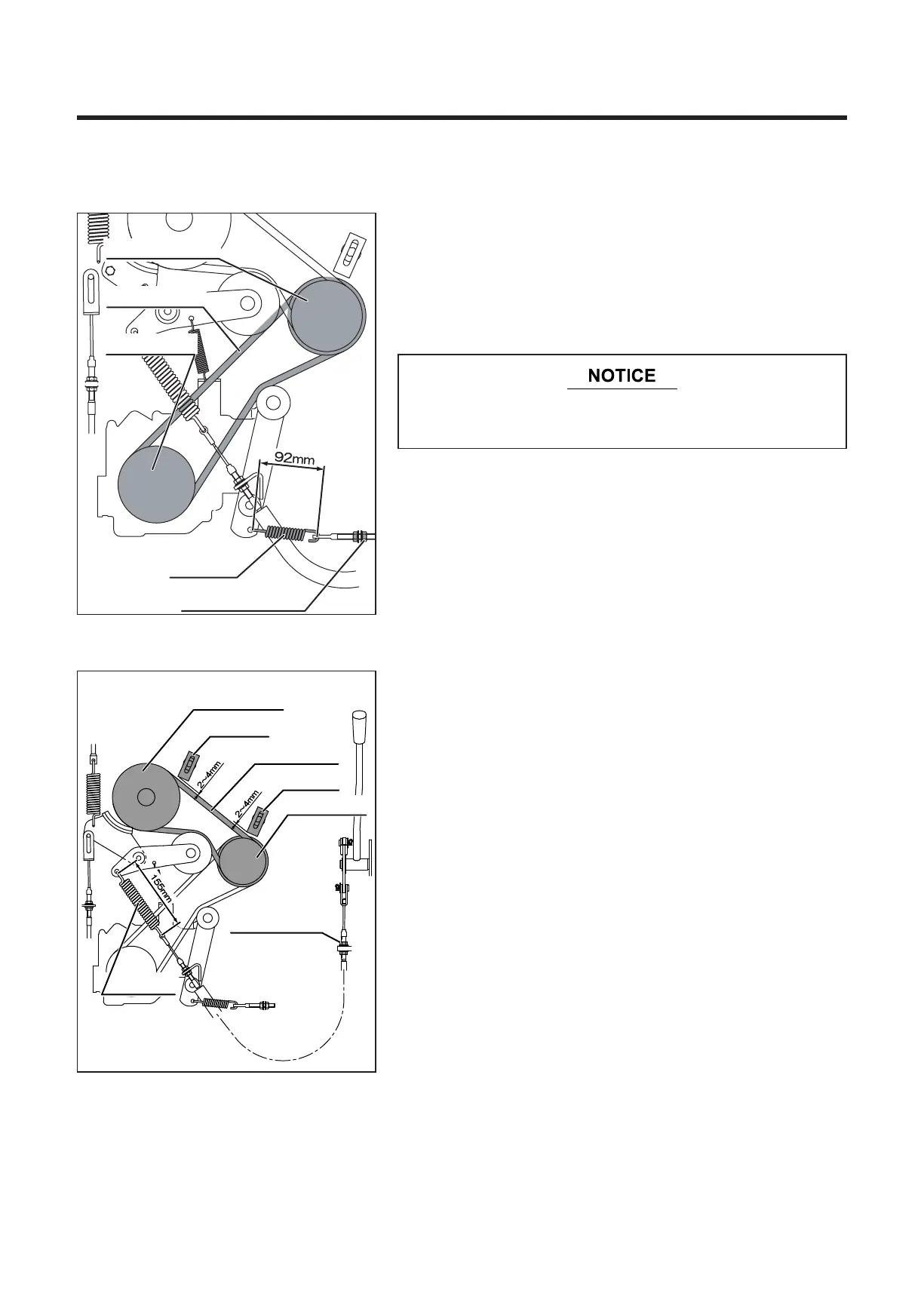
Adjust the adjusting nut to make the spring length 92 mm.
7.8.2 Blade Rotary V-Belt
Spring
Adjustment nut
Engine pulley
DrivingVbelt
HST pulley
5314M-0708-010E
Blade pulley
Engine pulley
Rotary V-belt
Guide “A”
Guide “B”
Adjustment nut “C”
Spring “D”
5314M-0708-020E
7.8 Adjustments
7.8.1 Driving V-Belt
* Perform maintenance without changing V-belt
tension. Adjust V-belt tension only after it slips.
Inspecting V-belt
Visually check for damage on V-belt. Replace any damaged
V-belt.
Adjusting V-belt
Inspecting V-belt
Visually check for damage on V-belt. Replace any
damaged V-belt.
Adjusting V-belt
After replacing V-belt, make adjustment as follows ;
1. Set the clearance “A” between the V-belt and the guides
“A” and “B” at 2 to 4 mm
2. Shift the blade clutch lever to "ON", loosen the adjusting
nut “C”, and adjust the length of the spring D to 160
mm. Then, tighten the adjusting nut “C”.


 To Next Page