System Installation
Install the Battery Harness
1. Route the battery harness connectors to the Gateway hub.
2. Connect the positive (+) red cable to the red power terminal on the Gateway hub.
3. Connect the negative (-) black cable to the black terminal on the Gateway hub.
4. Tighten the nuts on the power cables.
5. Install the rubber caps onto the terminals.
6. Route the battery harness from the Gateway hub over the boom mast and under the sprayer to the
batteries.
Important: Make sure that there is enough slack in the harness to raise and lower the boom
mast.
Install the Circuit Breaker
1. Disconnect the battery power cables.
2. Cut a length of wire from the battery harness positive (+) red cable.
The length of the wire must reach from the circuit breaker to the battery positive (+) terminal.
3. Strip the insulation from each cut end of the wire.
4. Crimp the provided ring terminals to the end of each cable.
Important: If the machine is so equipped, PinPoint
™
II must be wired to the main power
disconnect.
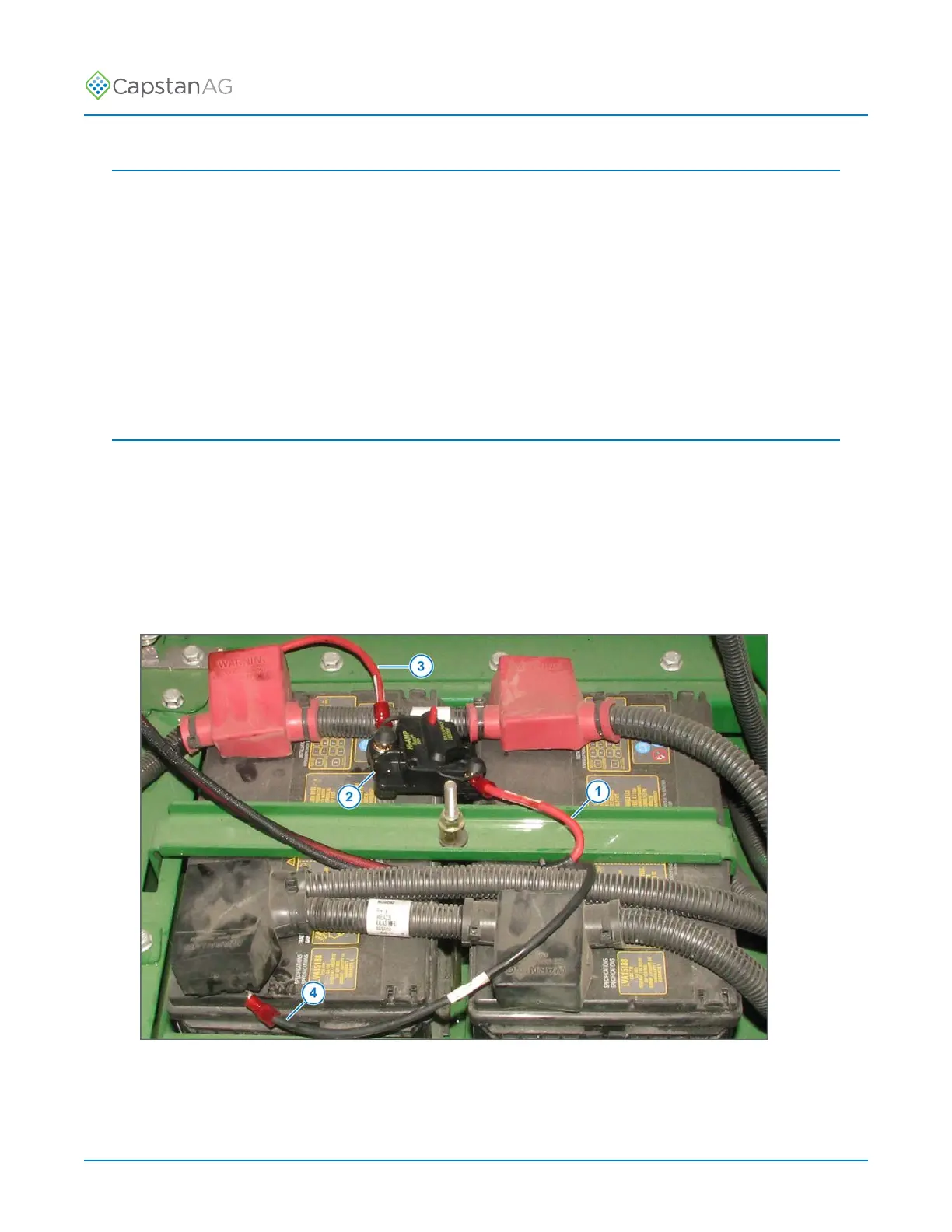
Fig. 17:
5. Connect the battery harness positive (+) red cable (1) to the circuit breaker (2).
From the battery positive (+) terminal, connect the positive (+) red cable (3) to the circuit breaker.
6. Connect the battery harness negative (-) black cable (4) to the battery ground terminal.
©
2020 Capstan Ag Systems, Inc. 28 PinPoint
™
II



 To Next Page