Operation
Overlap Distance
The PinPoint
™
system uses 1-meter-squares to record where spraying has occurred. Any nozzle
applying product that touches one of these squares will cause the system to consider this as an area
that has been applied. As the machine travels along, each nozzle looks to see if the approaching
square has been applied or not. If not, applying will continue. If so, the nozzle shuts off.
Note: The overlap distance is set to zero when calibrating the look ahead on times for overlap
control.
Change the Overlap Distance
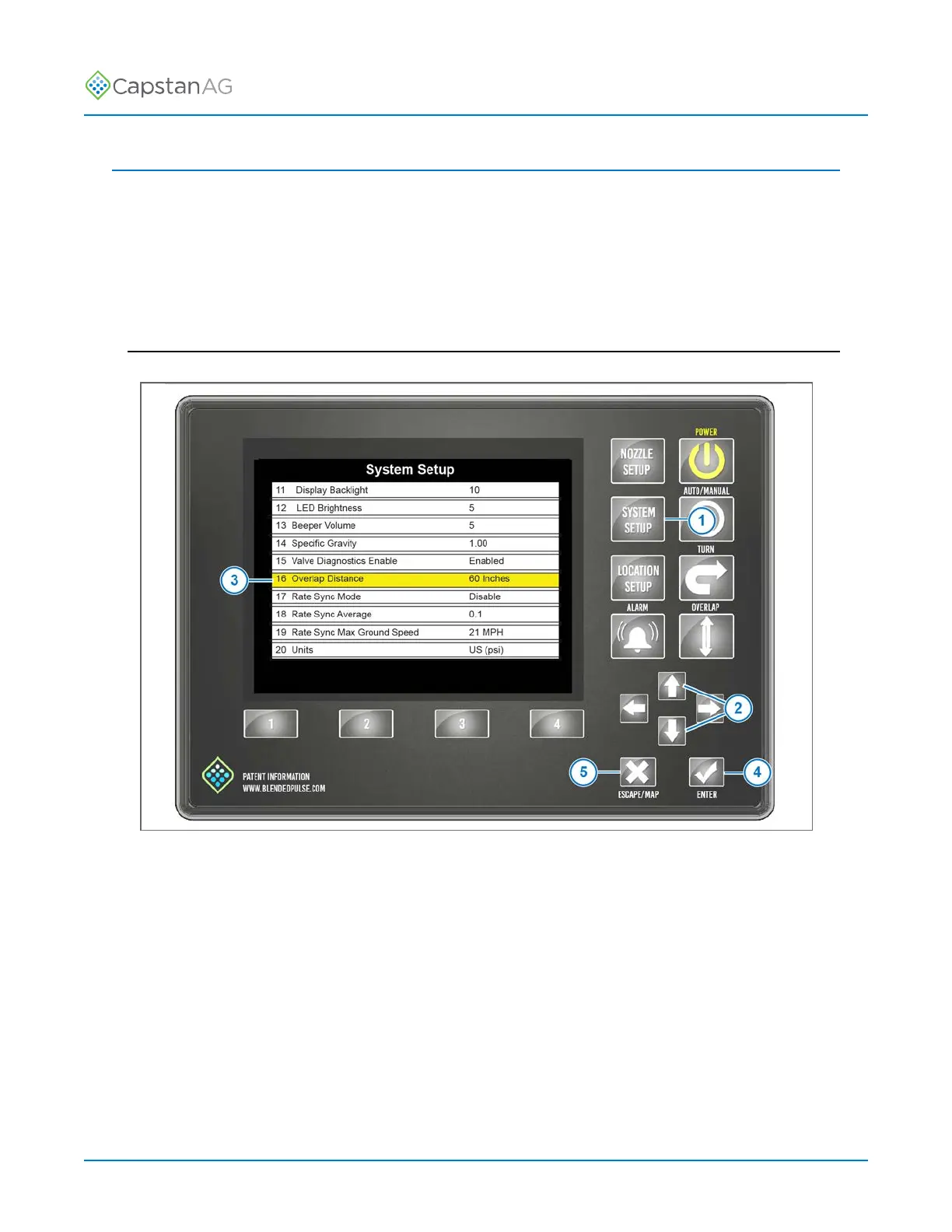
Fig. 52:
Overlap Distance in the System Setup Menu can be set to skip or overlap. The value is in inches.
Positive numbers cause intentional overlap, and negative numbers cause intentional skips.
1. Press the SYSTEM SETUP button (1).
2. Use the UP or DOWN arrow buttons (2) to move to the Overlap Distance (3).
3. Press the ENTER button (4).
4. Change the value of the overlap distance.
5. Press the ENTER button to save.
6. Press the ESCAPE button (5) to leave the System Setup Menu.
©
2020 Capstan Ag Systems, Inc. 89 PinPoint
™
II



 To Next Page