Operation
Chapter 6: Operation
Operate in Automatic Pressure Control (AUTO) Mode
Spraying is usually done in AUTO mode.
The PinPoint
™
II system default is manual mode, to change to AUTO mode:
1. Start the machine engine.
2. Press the POWER button to start the CapView and the rate controller.
3. Press the AUTO/MANUAL button to activate the automatic pressure control.
The LED light within the AUTO/MANUAL button indicates that the system is in automatic pressure
mode.
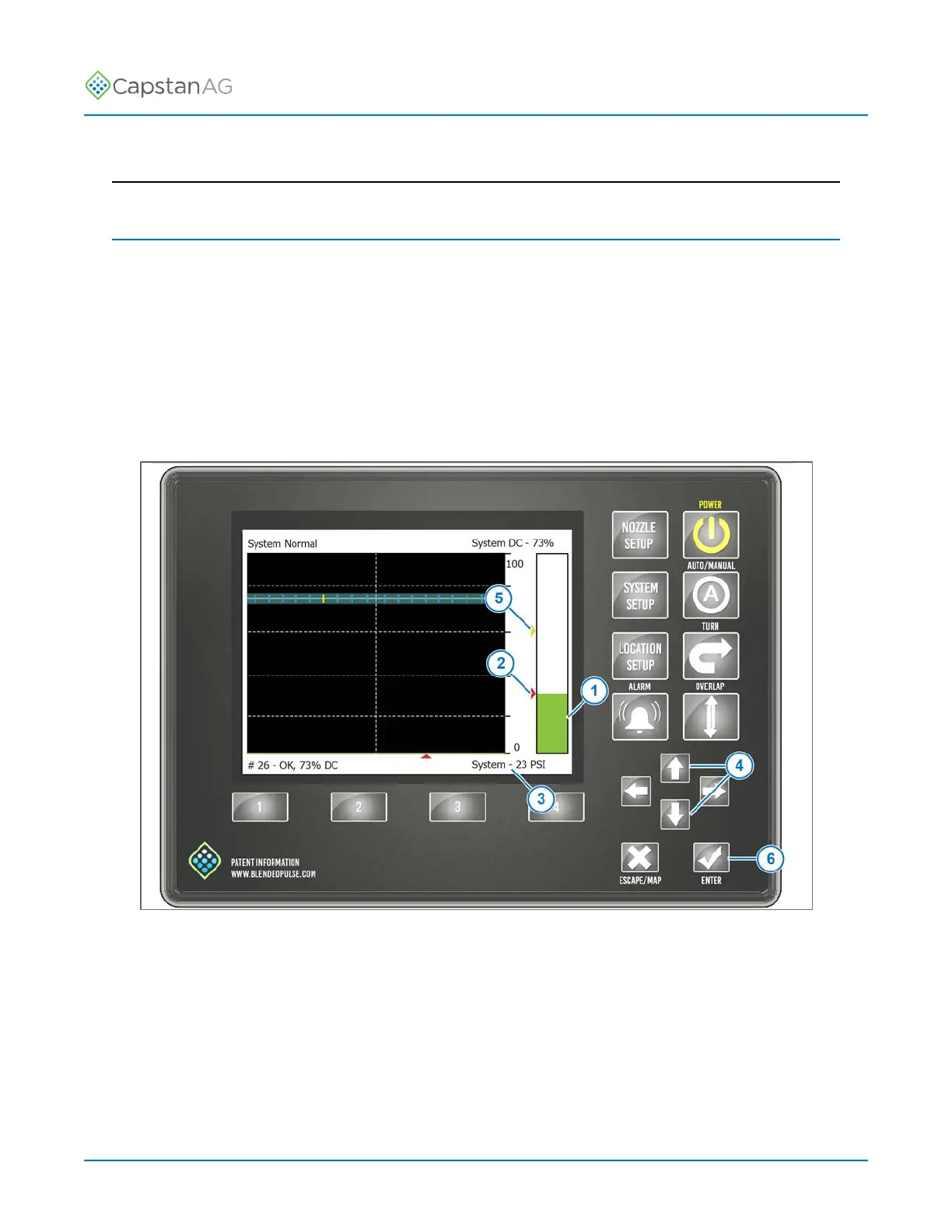
Fig. 36:
The green pressure bar (1) represents the pressure.
The red arrow (2) and the text on the bottom right corner (3) indicates the target pressure.
Use the UP or DOWN arrow buttons (4) to change the target pressure.
The yellow arrow (5) indicates the alternate target pressure. To change the alternate target pressure,
press the ENTER button (6).
©
2020 Capstan Ag Systems, Inc. 75 PinPoint
™
II



 To Next Page