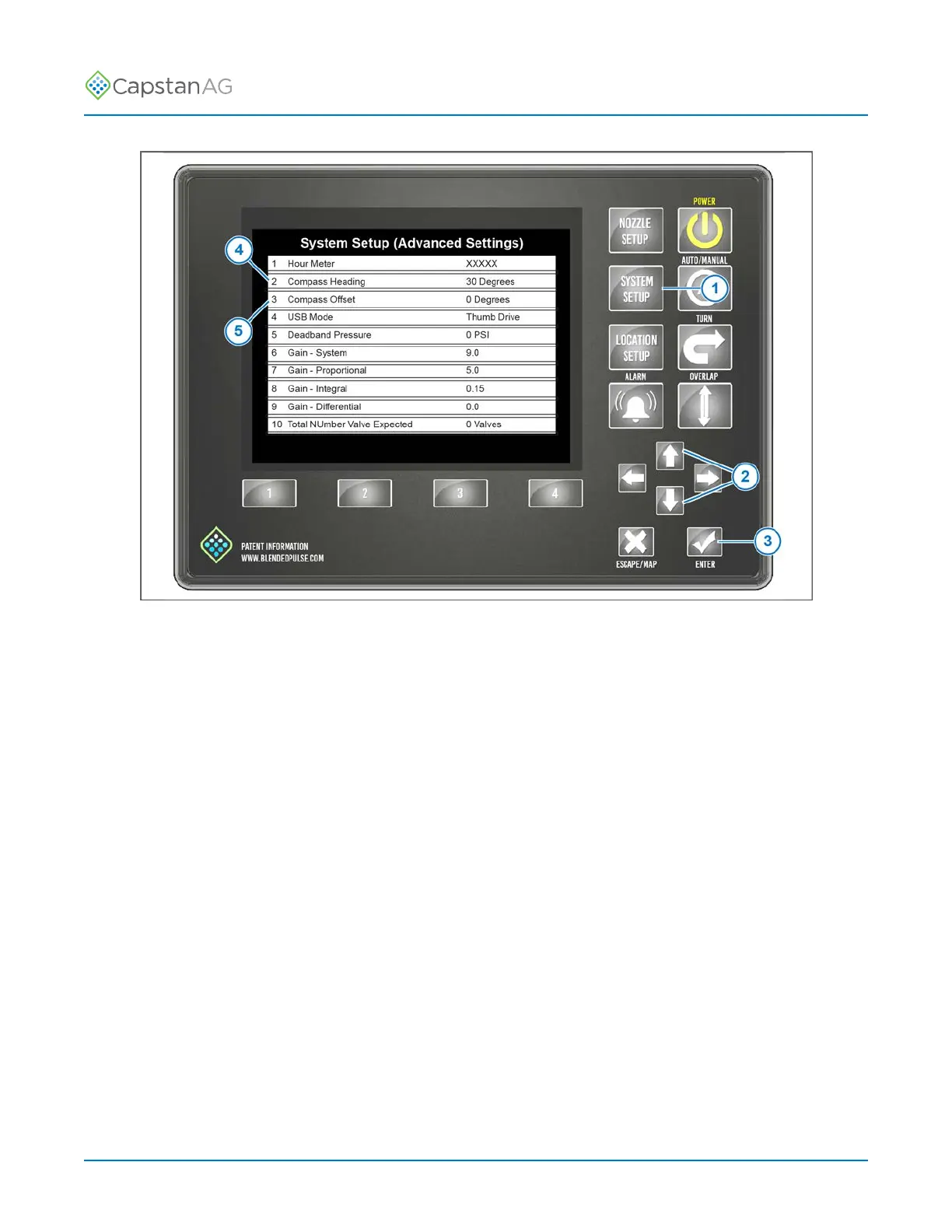
System Setup
Fig. 33:
2. Press the SYSTEM SETUP (1) button.
3. Use the up or down arrows (2) to select ADVANCED SETTINGS.
4. Press the ENTER button (3).
5. Use the up or down arrows to select Compass Heading (4).
6. Press the ENTER button.
7. Use the LEFT or RIGHT arrow button to select YES.
8. Drive the machine in a slow, smooth, right-hand circle until the machine is again facing north.
9. Stop the machine when it is facing north, and do not move the machine.
10.Press the ENTER button.
A heading value will show on the CapView.
Important: If 6502 shows on the CapView, an error has occurred. Do the compass calibration
procedure again.
Note: If the calibration fails twice, cycle the power and do the procedure again.
11.Use the UP or DOWN arrows to select Compass Offset (5).
12.Press the ENTER button.
13.Enter the value into the Compass Offset value.
This calibrates where North is in the plane of the earth.
After a couple of seconds, the Compass Heading should read 0 Degrees when facing north.
This may be off a few degrees. The compass only needs to be within 90 degrees to make backup
detection work correctly.
©
2020 Capstan Ag Systems, Inc. 65 PinPoint
™
II



 To Next Page