45
44
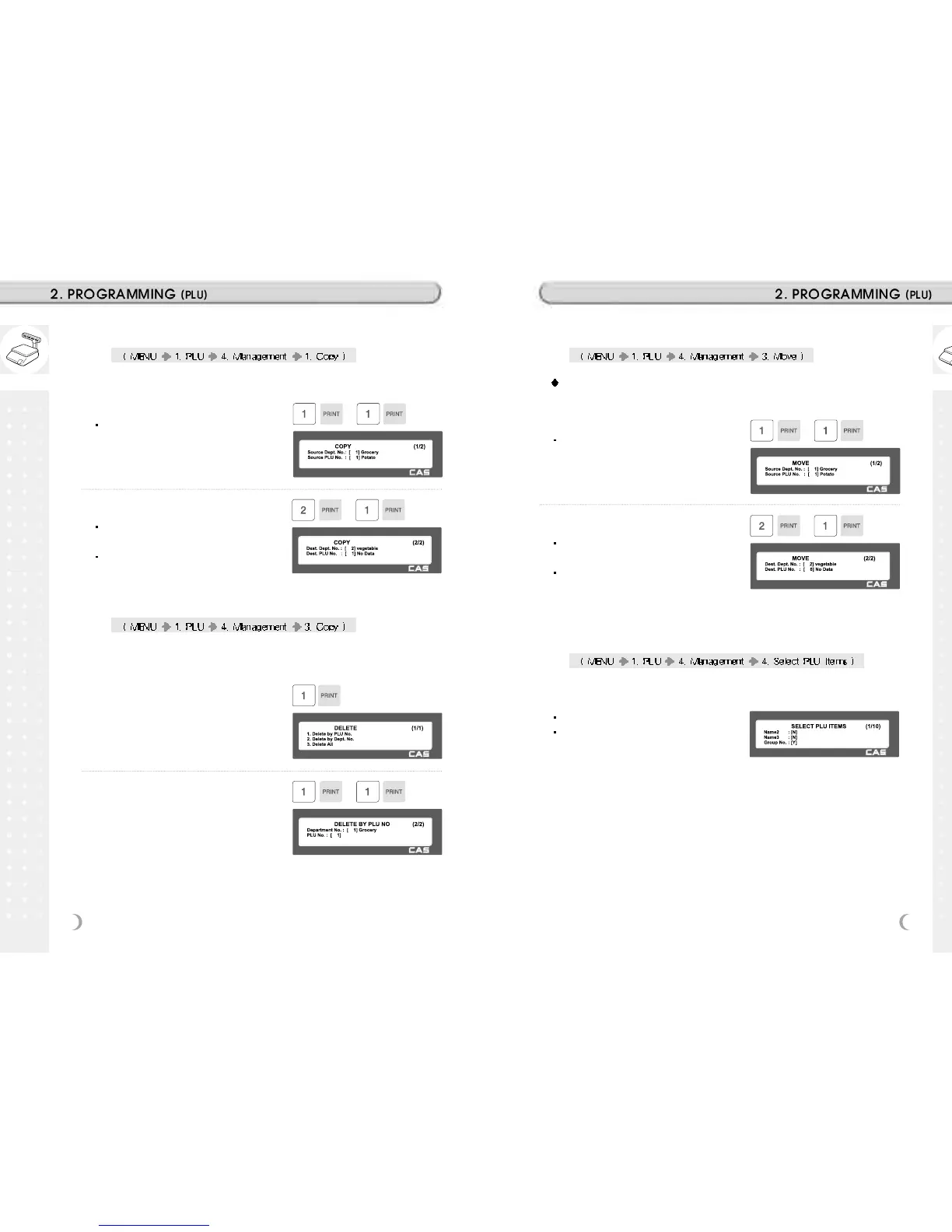
2.1.7 Copying PLU (Menu code 1141)
If there is a similar PLU, you can copy it.
1. Select Source
Enter the Department No. and PLU No.
that you wish to copy
EX) Source Department # = 1
2. Select Destination
Enter the Department number where the
new PLU(s) will be located
Enter the PLU number that you wish to
copy the Source PLU into
2.1.8 Deleting PLU (Menu code 1142)
There are three ways to delete PLU. Simply enter the number that you
wish to delete.
EX) Press 1 key to select Delete by PLU
No.
EX) Department No. : 1
PLU No. : 1
2.1.9 Moving PLU (Menu code 1143)
All the PLU information will move with commend (discount, Tax, barcode
type, etc)
1. Select Source
Enter the Department No. and PLU No.
which you wish to move
EX) Source Department # = 1
2. Select Destination
Enter the Department number where the
PLU(s) will be located
Enter the PLU number that you wish to
move the Source PLU into
EX) Destination Department # = 2
2.1.10 Selecting PLU field Items (Menu code 1144)
If you enter N, you cannot use that item when you create PLU.
To enter Y, press Y key or 1 key.
To enter N, press N key or 0 key.
Note: You can use the PG UP and PG DOWN keys to navigate from page
to page, or you can use the Arrow keys to go through each page 1 line at a
time.



 To Next Page