87
86
Programming Cutting Hall
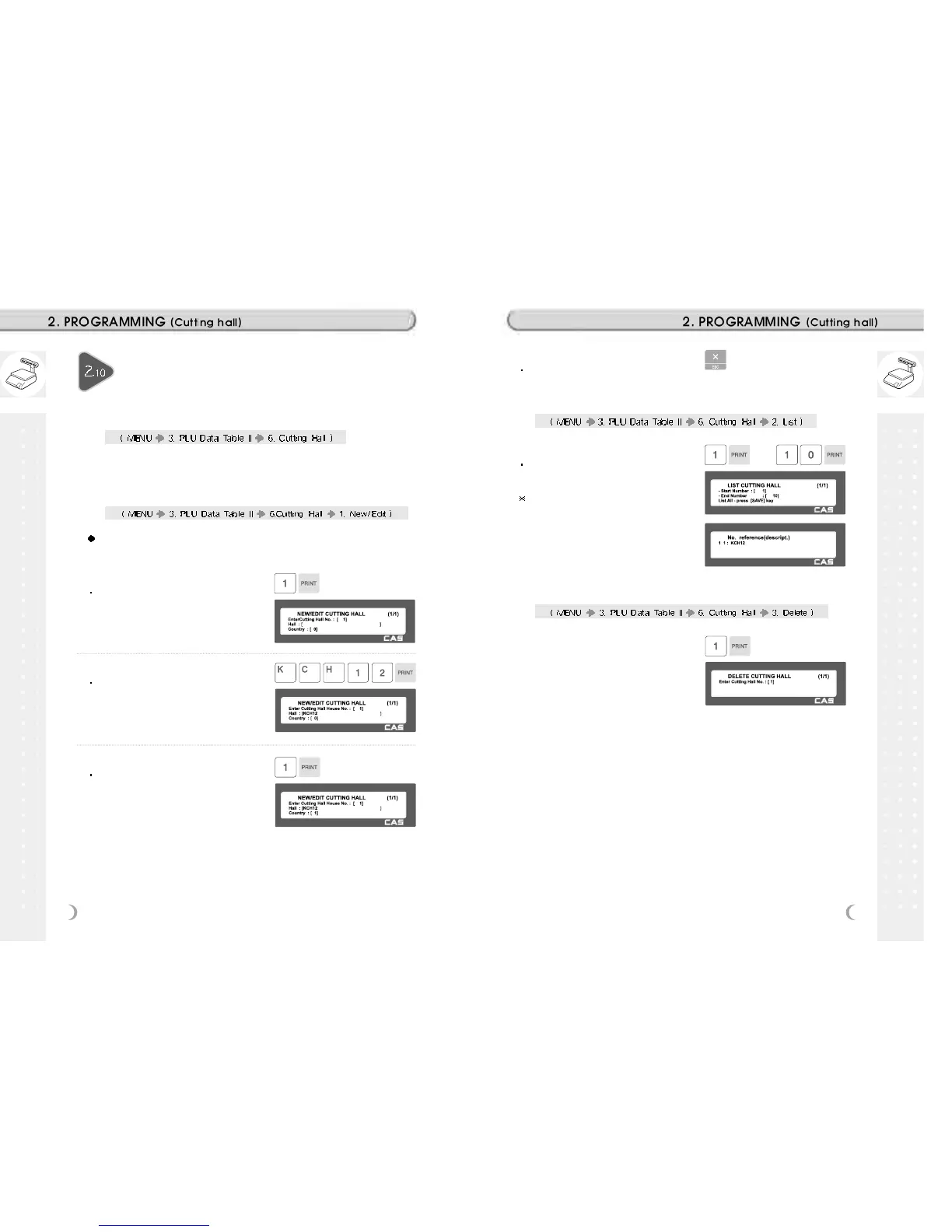
2.10.1 Cutting Hall (Menu code 1360)
You can use this cutting hall data when you program traceability.
2.10.2 New/Edit Cutting Hall (Menu code 1361)
You can press the SAVE key at anytime to save the current data and if
you want to exit without saving, press the ESC key.
1. Enter cuttting hall number
This value can be from 1 to 99
EX) Cutting hall no. = 1
2. Enter cutting hall information
Enter cutting hall name or registered
number.
EX) Cutting hall registered number =
KSH12
3. Cutting hall Country number
You can use country number which is
programmed at menu 1341 (See page 74)
EX) Cutting Hall Country no. = 1.
KOREA
4. Exit menu
If you want to exit, press ESC key.
2.10.3 List Cutting Hall (Menu code 1362)
1. Set the list range
Set the list range to check
EX) 1~10
If you want to print list, press the TEST
key.
2.10.4 Delete Cutting Hall (Menu code 1363)
1. Enter cutting hall number to delete
EX) Delete cutting hall no. 1



 To Next Page