89
88
Programming Store Data
2.11.1 Store Data (Menu code 1410)
This section shows how to create, edit, list and delete store, customer,
and advertisement message data.
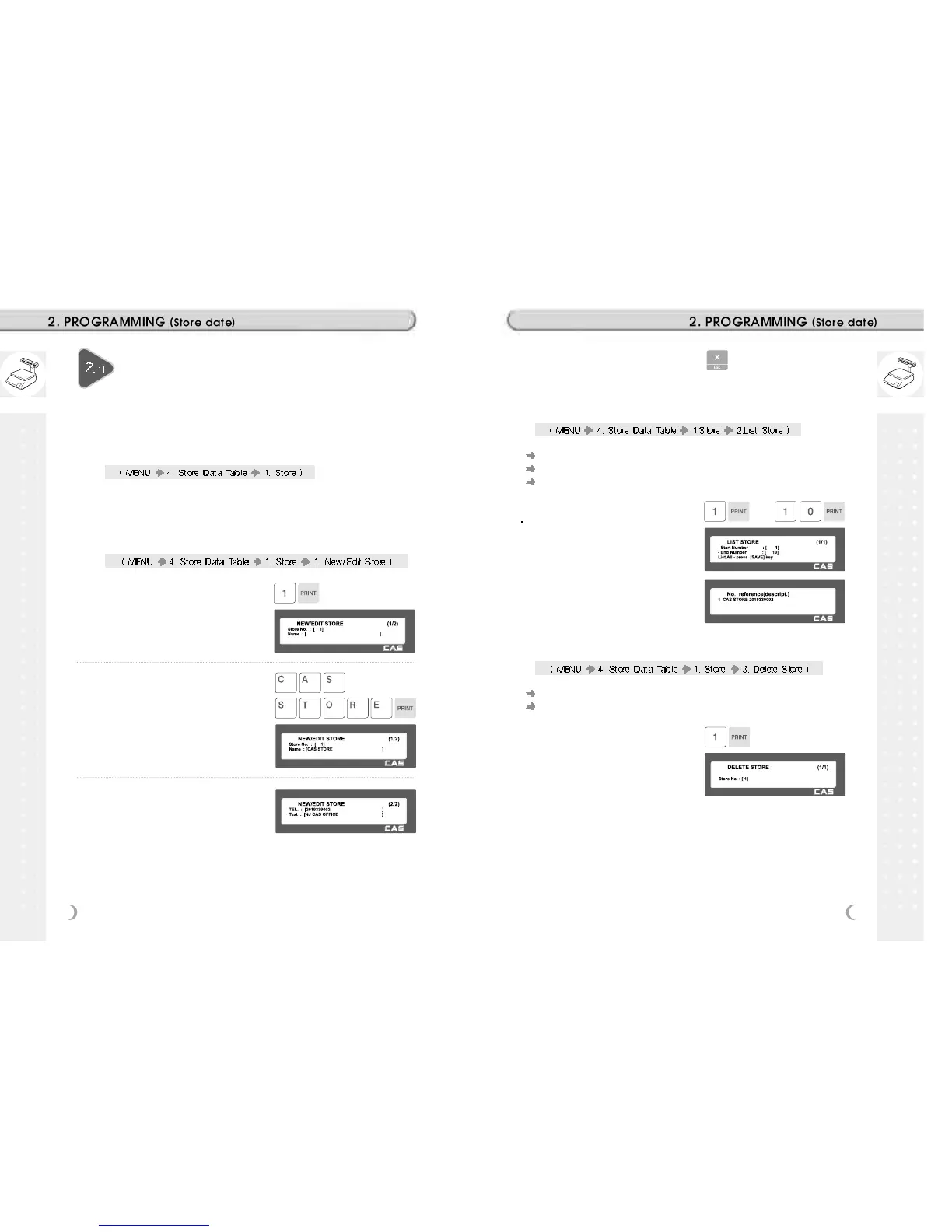
2.11.2 New/Edit Store (Menu code 1411)
1. Enter store number.
EX) #1
2. Press PRINT key and enter
appropriate text in NAME .
EX) NAME = CAS STORE
3. Press PRINT key, then user may
enter other store information such as
TELEPHONE NUMBER or any text
information.
EX) TEL.#=2019339002,
TEXT=NJ CAS office
This chapter explains how to access, program STORE data table (Price
Look Up) in CL5000 series.
4. Press PRINT key and user may go
back to STORE main menu by using
ESC key.
2.11.3 List Store (Menu code 1412)
This menu shows the list of STORE saved.
Press 2 in STORE menu to get into LIST STORE menu.
Press SAVE key to list all of STORE information saved.
1. Set the list range
Set the list range to check
EX) 1~10
2.11.4 Delete Store (Menu code 1413)
This menu is to delete the STORE user wish to.
Press 3 in STORE menu to get into DELETE STORE menu.
1. Store delete
EX) Store. 1



 To Next Page