71
70
Discount Programming
2.4.1 Discount (Menu code 1130)
You can set more easy and detailed sales promotion by CL - works (PC
progrom)
You have to set discount information for each PLU.
2.4.2 New/Edit Discount (Menu code 1131)
You can use the PG UP and PG DOWN keys to navigate from page to
page, or you can use the Arrow keys to go through each page 1 line at a
time.
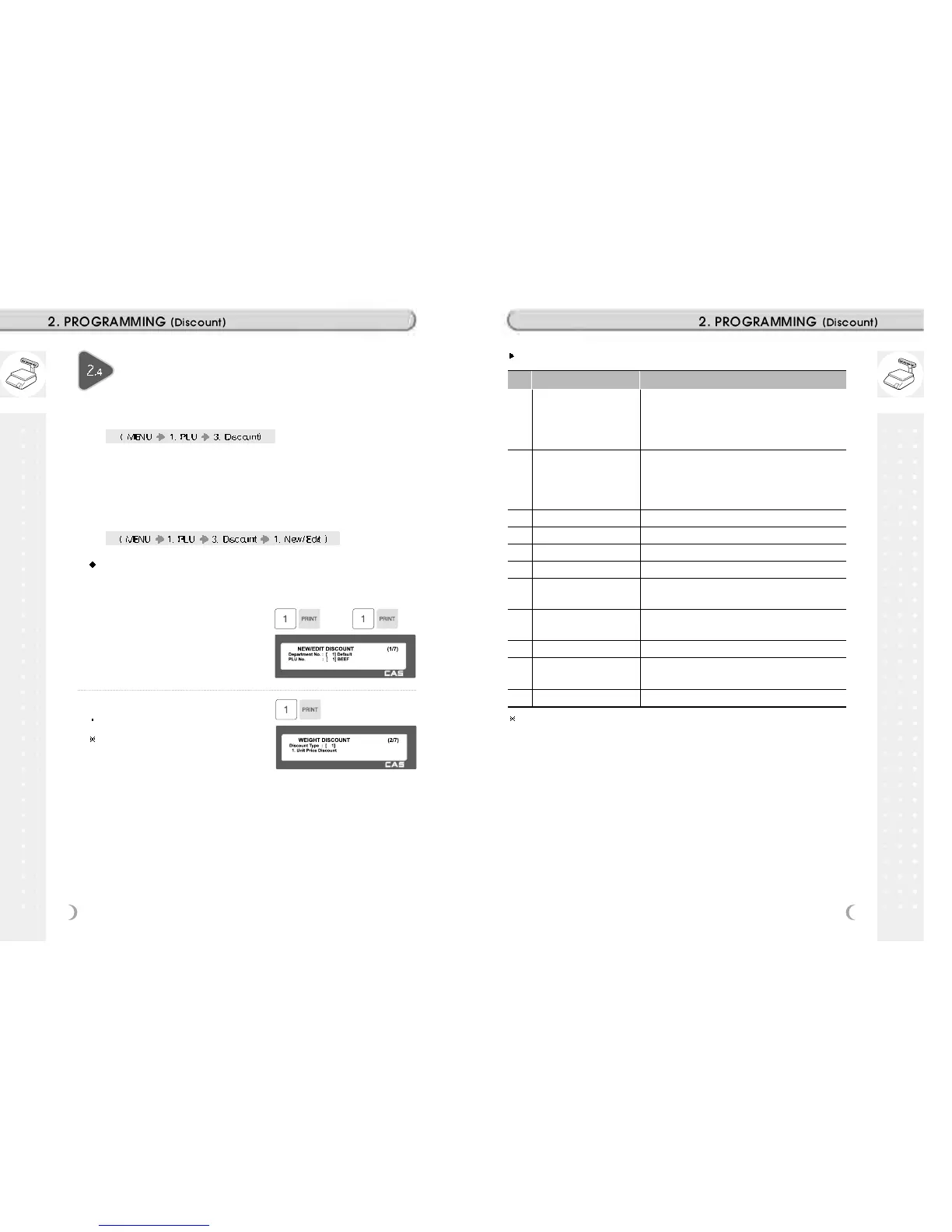
1. Enter department number and PLU
number.
EX) Department No = 1, PLU No = 1
2. Enter discount type
Refer to Discount Type table as below
Discount information can be different
depending on the discount type.
EX) 1. Unit Price Discount
Discount Type
# Type Description
1 Unit Price Discount
- By Weight PLU: Set the discount amount on unit price,
depending on weight.
- By Count/PCS PLU: Set the discount amount on unit
price, depending on number of items.
2 % Unit Price Discount
- By Weight PLU: set discount % of unit price,
depending on weight.
- By Count/PCS PLU: set discount % of unit price,
depending on number of items.
3 Total Price Discount - Set discount amount for total price.
4 % Total Price Discount - Set discount % of total price.
5 Fixed Price - Set a fixed amount for discount.
6 Free Item - Set free of charge item.
7 Free Addition - By Weight PLU: Set discount weight.
- By Count/PCS PLU: Set discount number
8 Total Price by total price
Set a discount amount of total price for current total
price.
9 % Total Price by Total Price - Set a discount % of total price for current total price
10 Unit Price by Total Price
- Set a discount amount of unit price for current total
price
11 Extra by Total Price - Set a discount number of item for current total price
Please refer to “Parameter” when user wants to also see the unit price
discounted on “Unit Price” segment together with total price discounted in
display



 To Next Page