CAL 2(Zero and Span Setting)
CAL
2-1(Set Multi Step and Zero)
Setting Method Display Part
Using numeric keys
~ Set
the multi step,
=Cancel
Set the zero after affirming stability of AD
value.
Note 1: Multi setting section consists of steps 1~5.
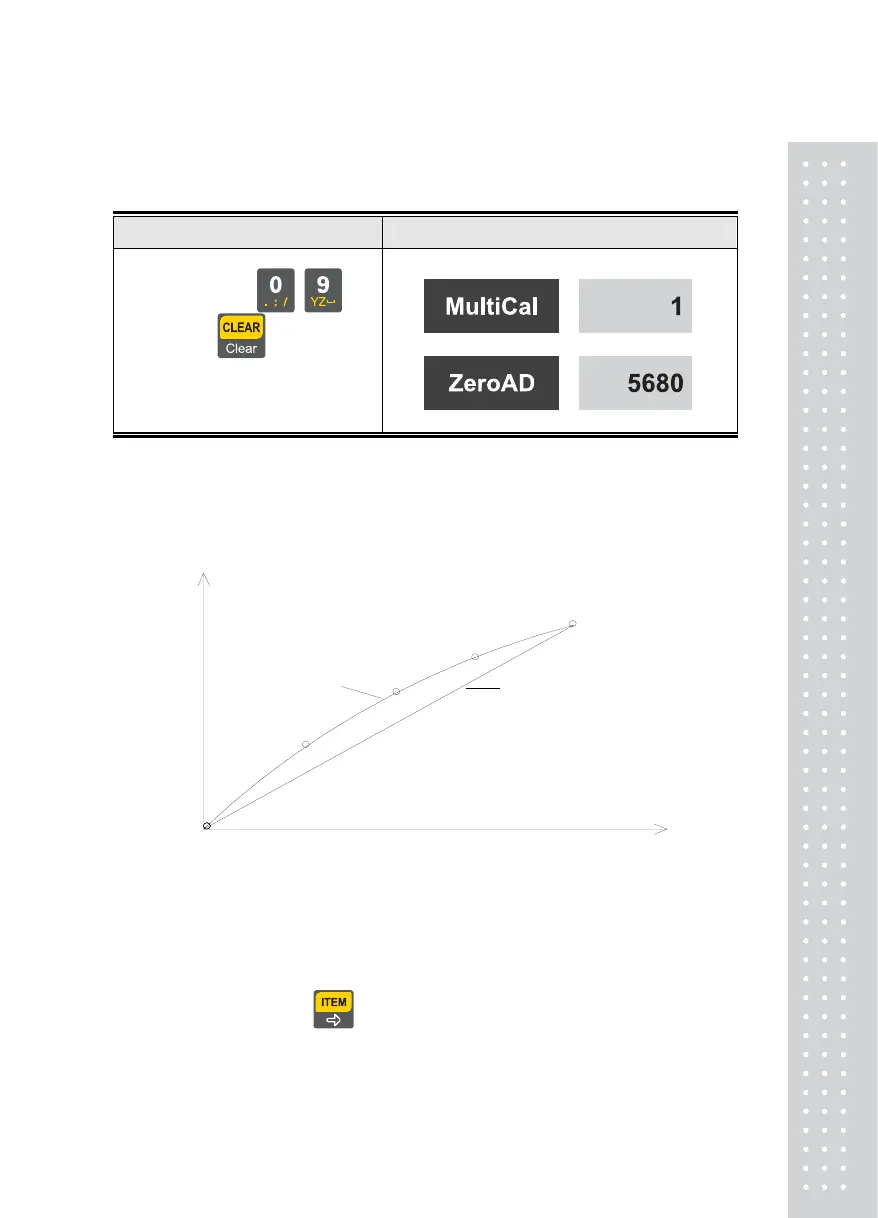
A function used to compensate for the load cell output by setting multiple points in
some section when actual curve of the load cell is not a straight line as shown below
(zero span)
Zero and Span points to interpolate weight from Load Cell
Multi-point
Multi-point
mV/V
Real curve
weight
(full span)
Multi-point
Ideal
Multi-point
Multi-point
Note 1. When the zero setting is completed without any error, it moves to the weight setting
without a key being pushed.
Note 2. When only span setting is desired with the zero set, it moves to
CAL 2-2 by pushing key after multi setting.
29



 To Next Page