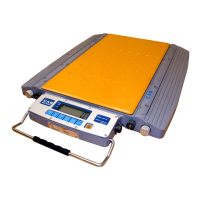
Operation Instruction
1. Serial communication
The indicator gets into self-check process after the power supply is connected. If the weight
on platform is within the startup zero setting range, it will enter automatic zero, and then the
weighing status. If the weight on platform exceeds the zero setting range, the indicator will
give tips and display weight.
2. key Operation
In the calibration and parameter setting status, some keys will perform the following functions:
1) [ZERO] key performs the "plus 1" function. After the [ZERO] key is pressed, the number displayed
in the last bit will be "plus 1", automatic zero will be made after it is added to 9.
2) [TARE] key performs the "shift" function. After the TARE key is pressed, the number shown in the
last bit will move to the right for one bit, and will move to the highest bit automatically after press tare
key when it is in the last bit at the right .
3) [HOLD] key performs “input” function, after the [HOLD] key is pressed the date will be input to
indicator which was set.
4) [CLEAR] key performs "exit" function, after [CLEAR] key is pressed the indicator will exit the
calibration state or setting state.
5) [ACCUM] key performs “switching parameter" function, after the [ACCUM] key is pressed the
indicator will come into the next parameter setting state.
3. Weighing Operation
1) ZERO :
Press [ZERO] key to enable the data within zero setting range of indicator to return to zero.
Zero setting can be performed only after the STABLE light is on.
2) TARE :
When the displayed weight in weighing status is positive and the STABLE light is on, press the
[TARE] key to deduct the indicated weight as tare weight . In this case, the indicator will show a net
weight of "0" and the NET WEIGHT light is on. Press the [TARE] key again when gross weight is 0,
the indicator will clear the tare weight value.
Note : Tare is not workable when gross weight is negative number.
① Inner code checking
Press [HOLD] and [ACCUM] key together in the normal weighing status, the indicator
will display the inner code.
② HOLD, average value :
You can choose this function by function setting P2. You can start or stop this function by[HOLD]
key after your choose this function.
Choose 2 for P2 parameter, press [HOLD]key, average value light is on, now the indicator
can estimate automatically, and after stabilization the indicator will calculate and display
average value, and will display the average value after lighting, and also will cancel
display average value after current value back to zero, now can weigh the next average value ;
Choose 3 for P2 parameter, press [HOLD] key in normal weighing status and peak value light is on,
and indicator now in the auto peak value working status, and it can keep the maximum weighing
data, and will cancel the data hold after the weight back to zero.
In above operation steps, we can cancel the average or hold function by press[HOLD]key anytime;
and will start this function after press[HOLD] key every time when startup .



 To Next Page