SECTION 3
3-40
Fine levelling
The “Fine levelling” mode can permits even more
sensitive working. In this case, the maximum equip-
ment speed is no longer available for boom and dip-
per movements.
This working mode must have been configured
beforehand on the display.
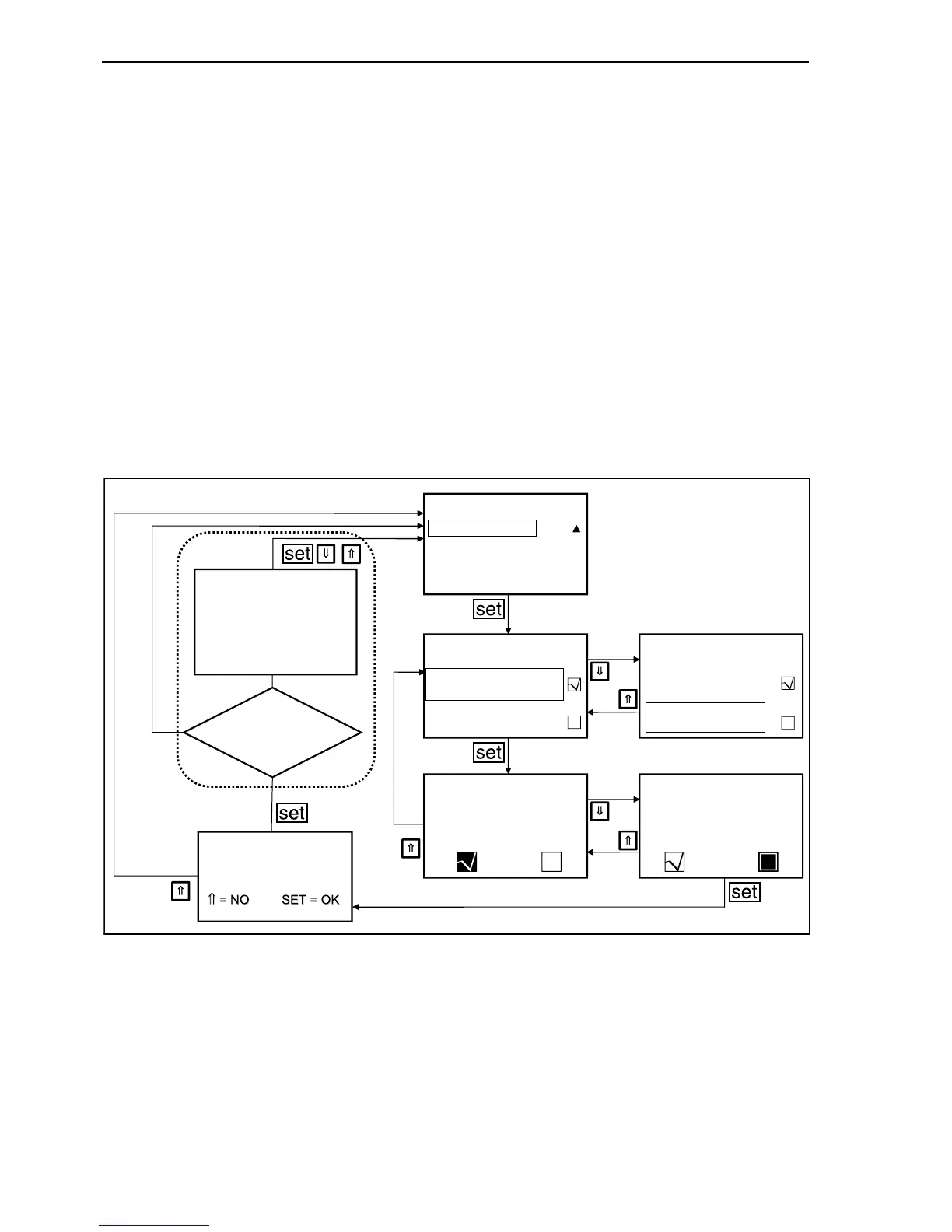
In operating mode depress repeatedly the arrow
button, until on main menu appears “MACHINE” on
grey background. Depress “set” button.
Depress the arrow buttons repeatedly until the bar is
on “LEVELLING SETTING”. Depress “set” button.
Press the arrow buttons until the control “FINE LEV-
ELLING” appears. Depress the “set” button.
Confirm the changes with the arrow buttons or leave
the existing setting. Depress the “set” button.
Confirm the change with the “set” button or keep the
old setting by depressing an arrow buttons.
F34127
MACHINE
LEVELLING
BASIC SETTING
SPEED LIMITATION
LEVELLING
LEVELLING
LEVELLING
PARAMETERS NOT
UPDATED. RE-TEST.
PRESS ANY KEY
Updating performed
by ESX?
Save changes?
LEVELLING
LEVELLING
SAVED LEVELLING
FINE LEVELLING
FINE LEVELLING
SAVED LEVELLING
FINE LEVELLING
FINE LEVELLING
NO
YE
60



 To Next Page