SECTION 3
3-64
BUCKET
OPENING/CLOSING SPEED PARAMETERS
SETTING
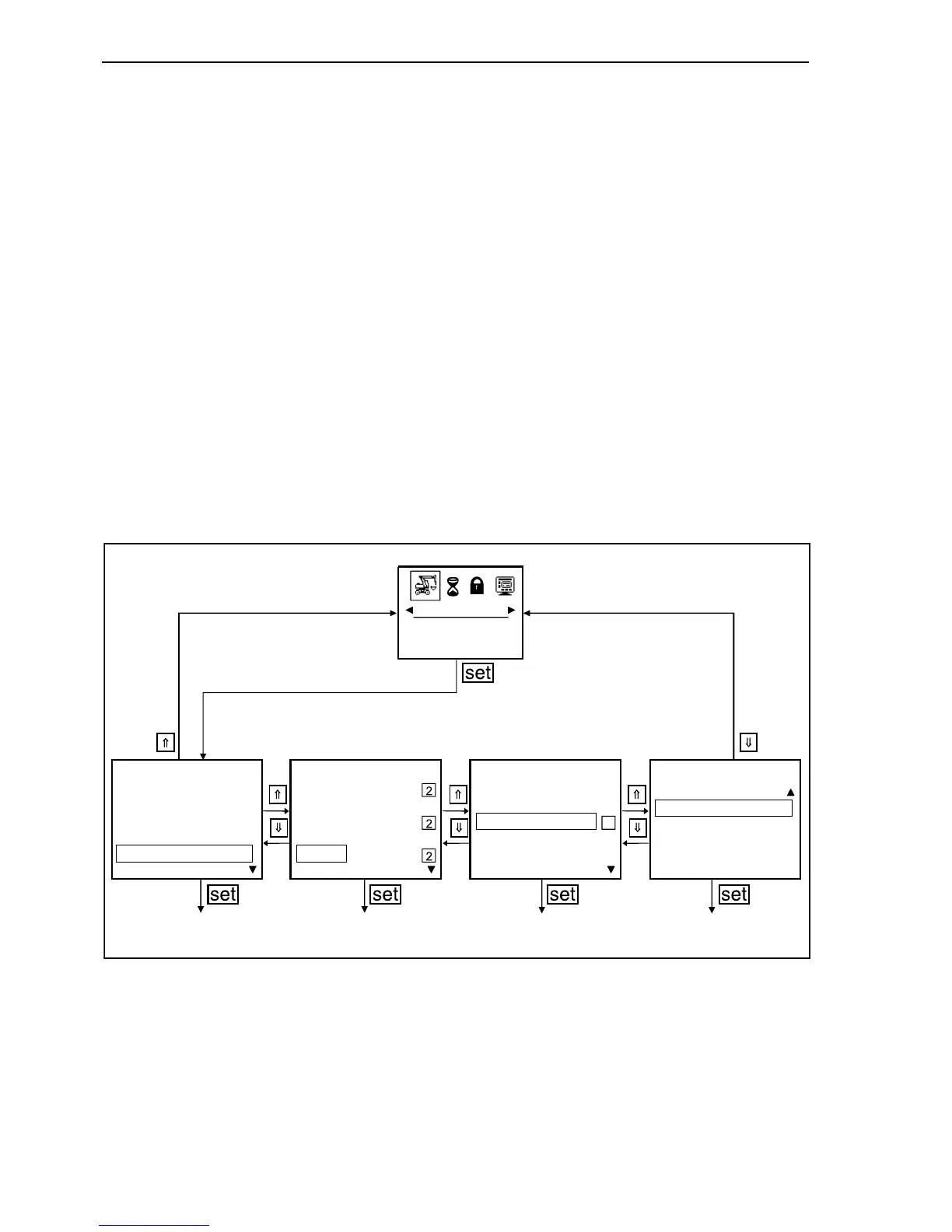
In the working mode, depress an arrow button until
“MACHINE” appears in the lower part of the display
and the machine symbol is marked by a frame.
Depress “set” button.
Depress the arrow buttons until the bar is on
“BUCKET”. Depress “set” button.
To get back to the “MACHINE” menu, depress the
button with the upward arrow (⇑) or downward arrow
button (⇓), until the beginning or the end of the dis-
play selection is reached. If, after reaching the end
or the beginning, the display scrolls in the same
direction, you return to the higher menu. If the but-
tons are not depressed for a prolonged period, the
return to the next higher menu is automatic.
Confirm with “set” button, the sub-menu “BUCKET”
is recalled. For the clamshell opening and closing a
percentage digit is shown so as to mark the relevant
speed. The delivery ex-works is performed with the
relevant 50% setting.
F34157
A
MACHINE
MACHINE MACHINE MACHINEMACHINE
DAMPING
LEVELLINGHAMMER
AUTO POWER BOOST
SHEARS
SPEED LIMITATION
BUCKET
BASIC SETTING
ROTARY CUTTERSWING POWER
90



 To Next Page