ATTACHMENTS
7-13
Depending on the working needs and conditions of
use, up to four hydraulic oil pressure and volume
flow configurations can be set for hydraulic shears.
For the first configuration - shears 1 - the machine is
delivered ex factory with the following parameter
settings:
- volume flow unlimited (9999)
- pressure unlimited (9999).
For shears 2 thru 4, the preset values are:
- volume flow unlimited (9999)
- pressure 0 bar (0 psi).
NOTE: to use the shears functions, the values
specified by the hammer manufacturer must be
adjusted as described below.
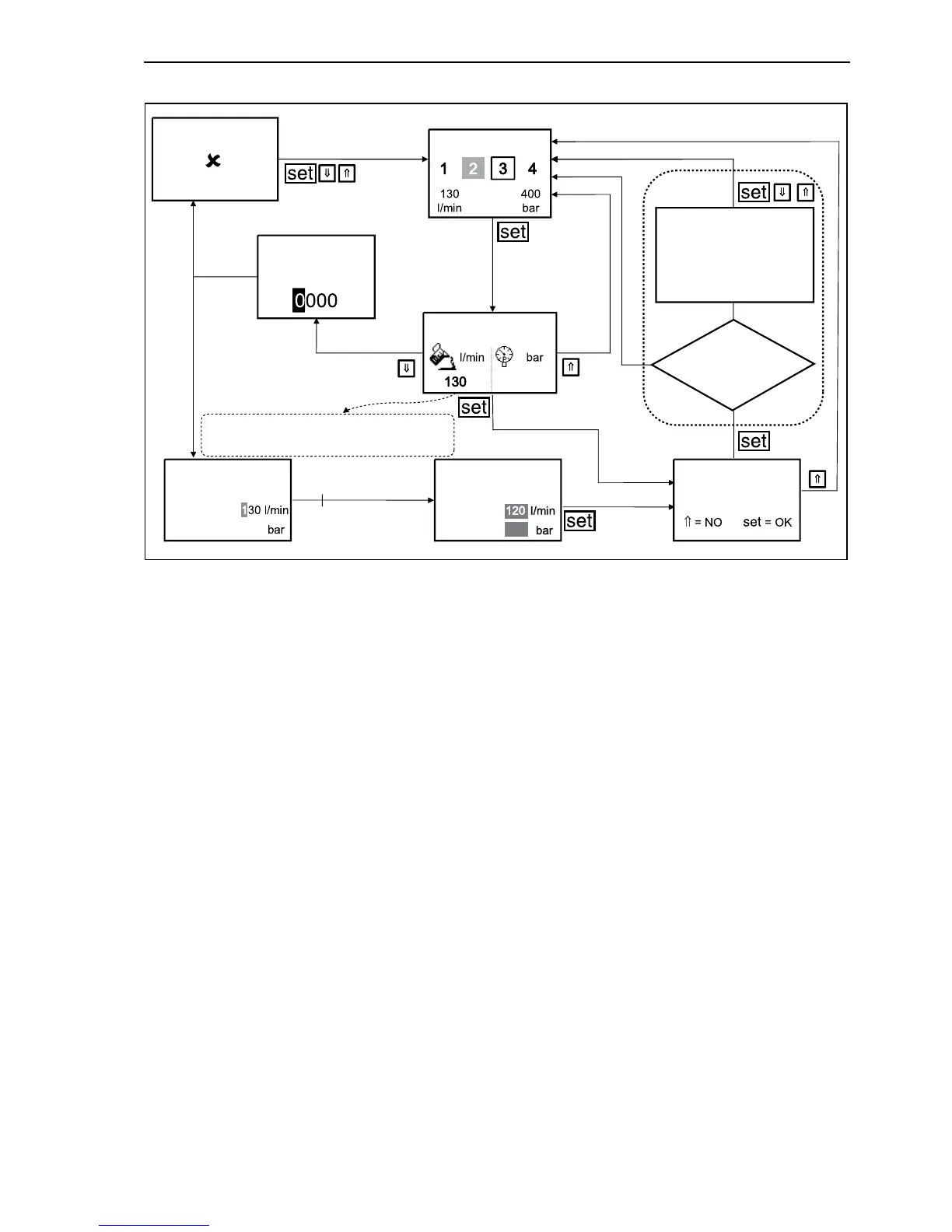
In the working mode, depress an arrow key until
“MACHINE” appears in the lower part of the display
and the machine symbol is marked by a frame.
Confirm with “set” button.
Depress the arrow keys until the bar is on
“SHEARS”. Confirm with “set” button.
To get back to the “MACHINE” menu, depress the
button with the upward arrow (⇑) or downward
arrow button (⇓), until the beginning or the end of
the display selection is reached.
When scrolling is continued on reaching the begin-
ning or the end of the list, the program returns to the
next higher menu. The return to the next higher
menu is automatic if the buttons are not pressed for
a prolonged period.
Confirm with “set” button, the sub-menu “SHEARS”
is recalled. The grey number field indicates actually
active shears 2 with the selected parameters for vol-
ume flow and pressure.
By means of the arrow buttons, you can set 4 differ-
ent shears settings. The selection is marked by a
frame around the number. In the example shown
shears 3 is preselected.
Depress “set” to confirm the selection of shears 3.
To activate the settings for shears 3 without any
changes, depress the “set” button. The following
options are available:
- to reject selected shears 3 and to retain the set-
tings for shears 2.
Depress the button with the upward arrow (⇑);
- to activate selected shears 3 with unchanged set-
tings. Depress the “set” button. The setting is
saved.
F34179
170
170 180
WRONG CODE
PRESS ANY KEY
Data input
Updating per-
formed by EHC?
INPUT CODE
SHEARS 3
SHEARS 3
SHEARS 3
SHEARS 3 SHEARS 3
PARAMETERS NOT
UPDATED. RE-TEST.
PRESS ANY KEY.
NO
YES
Save changes?
Displacement
Pressure
Displacement
Pressure
If the values displacement/pressure are
not defined “0” will be displayed.
20



 To Next Page