620 Series
8
Controls
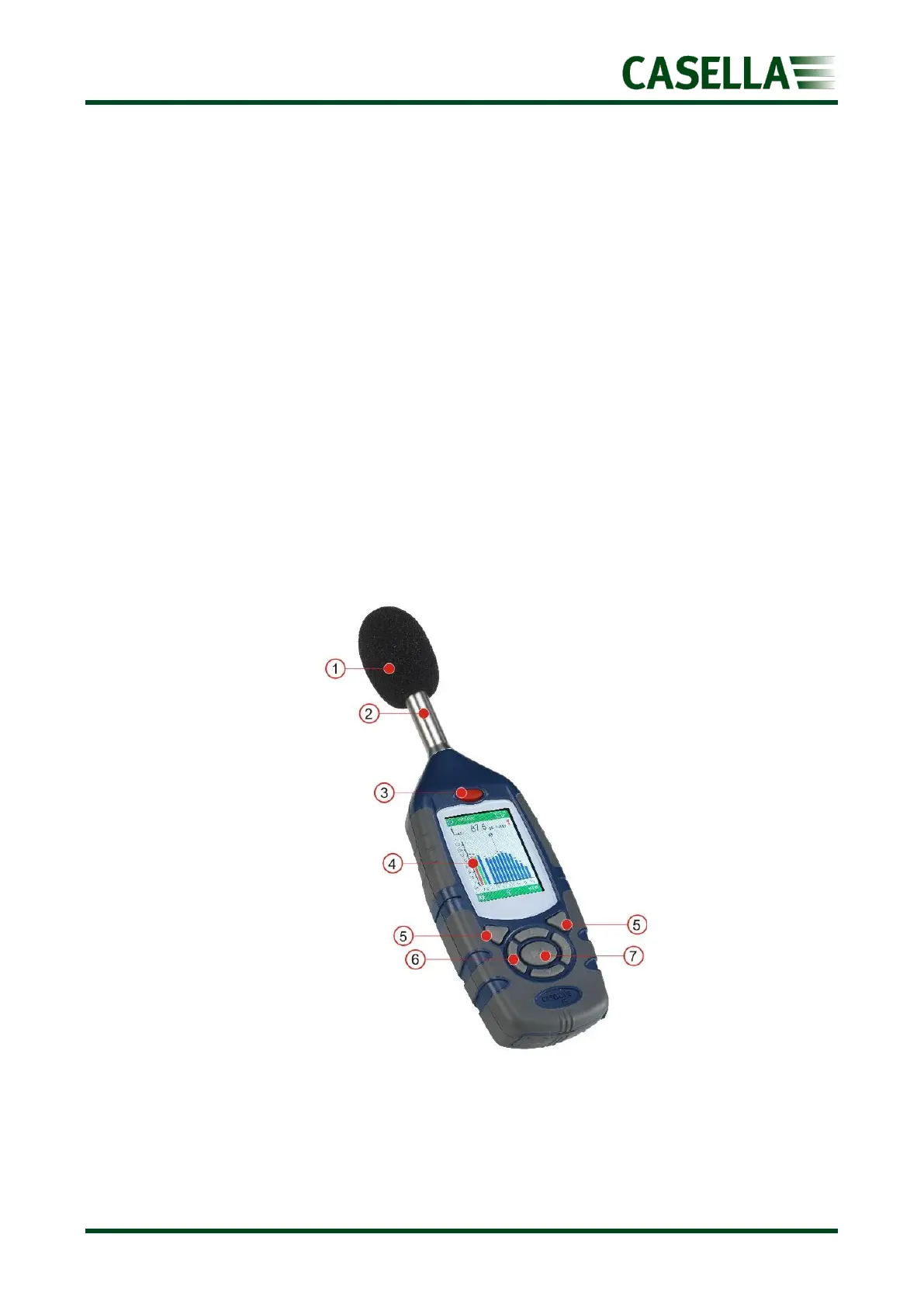
The 620 series has a compact, ergonomic and robust ‘rubber grip’ case design that fits
comfortably in the hand when not mounted on a tripod. Referring to figure 1 below, the
windshield (1) should be used at all times (except during Calibration) to cover and protect
the microphone, which is screwed onto the fixed pre-amplifier (2).
When the instrument is switched ON by pressing the red key (3) it will run through a
software initialisation and then default to a Stop mode, indicated by a Red Bar at the top and
bottom of the screen.
To navigate ‘within a screen’ use the Cursor Keys (6) but note that not all the screens have
navigable fields.
To navigate from one screen to another, use the left and right hand Soft Keys (5).
To start a measurement ‘run’, press the Run/Stop Key (7); to stop the run press the same key
again.
The instrument has a single measurement range of 140dB (RMS) and 143.3dB (C) peak. No
range adjustment is needed which greatly simplifies operation.
The 620 series measures all combinations of required parameters simultaneously with the
required frequency and time weighting.
Figure 1



 To Next Page