Appendix 269
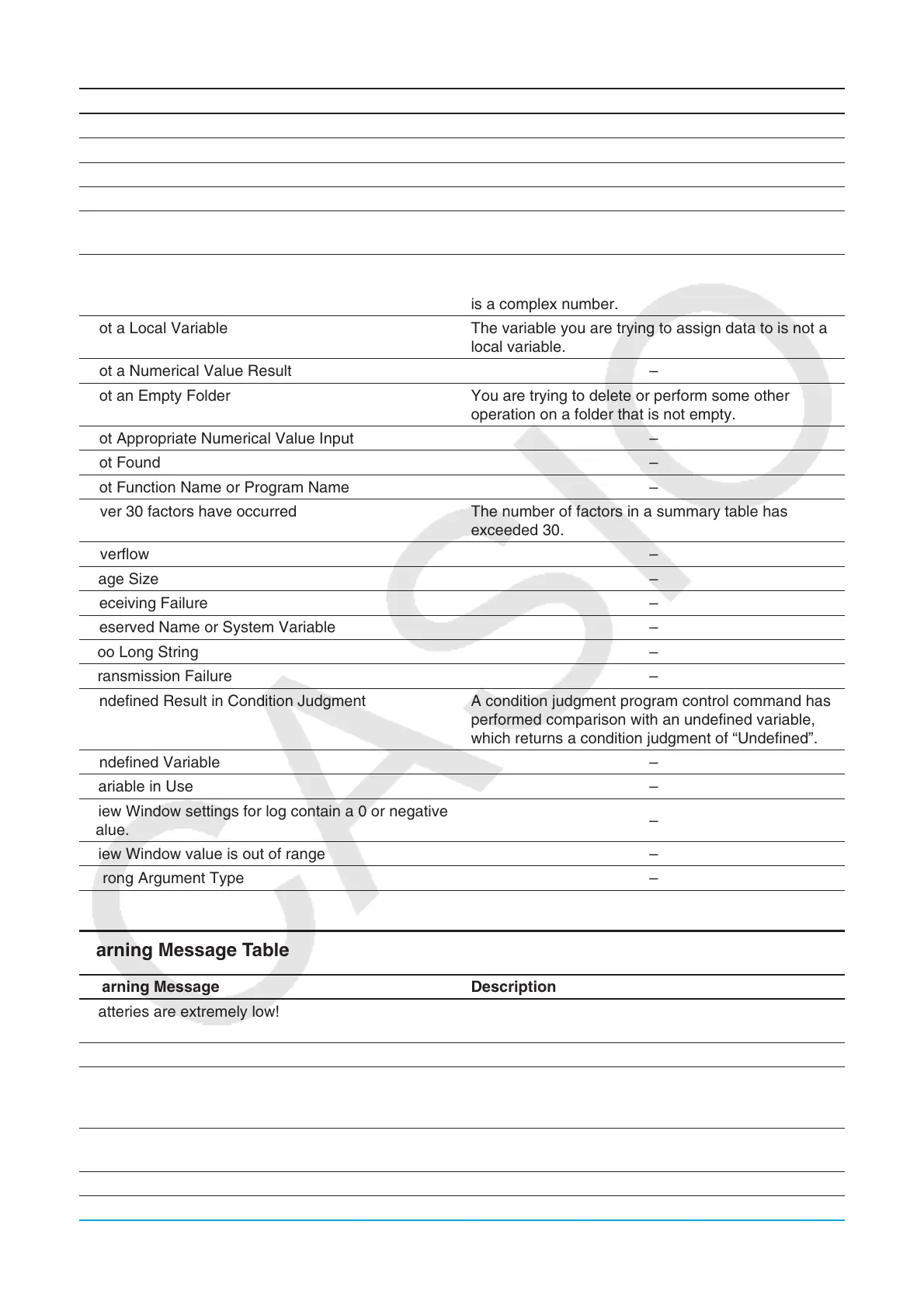
Error Message Description
No Solution –
No Stat Graphs Selected –
No Variable –
No word is specified –
Non-Algebraic Variable in Expression You are attempting to use a variable that cannot be
used in a calculation.
Non-Real in Calc The ClassPad is in the Real mode but the value you
are inputting or the result produced by a calculation
is a complex number.
Not a Local Variable The variable you are trying to assign data to is not a
local variable.
Not a Numerical Value Result –
Not an Empty Folder You are trying to delete or perform some other
operation on a folder that is not empty.
Not Appropriate Numerical Value Input –
Not Found –
Not Function Name or Program Name –
Over 30 factors have occurred The number of factors in a summary table has
exceeded 30.
Overflow –
Page Size –
Receiving Failure –
Reserved Name or System Variable –
Too Long String –
Transmission Failure –
Undefined Result in Condition Judgment A condition judgment program control command has
performed comparison with an undefined variable,
which returns a condition judgment of “Undefined”.
Undefined Variable –
Variable in Use –
View Window settings for log contain a 0 or negative
value.
–
View Window value is out of range –
Wrong Argument Type –
Warning Message Table
Warning Message Description
Batteries are extremely low!
Replace batteries immediately!
–
Can’t Solve! –
Can’t solve!
Adjust initial value or bounds.
Then try again.
NumSolve cannot solve an expression.
Insufficient memory for unit-to-unit communication.
Delete unnecessary eActivity contents.
–
Only the first selected function will be done. –






 To Next Page