Instruction Manual CertoClav Vacuum Pro 45 l — Model STE-45-T
42
11.2.2 Connecting to a LAN network
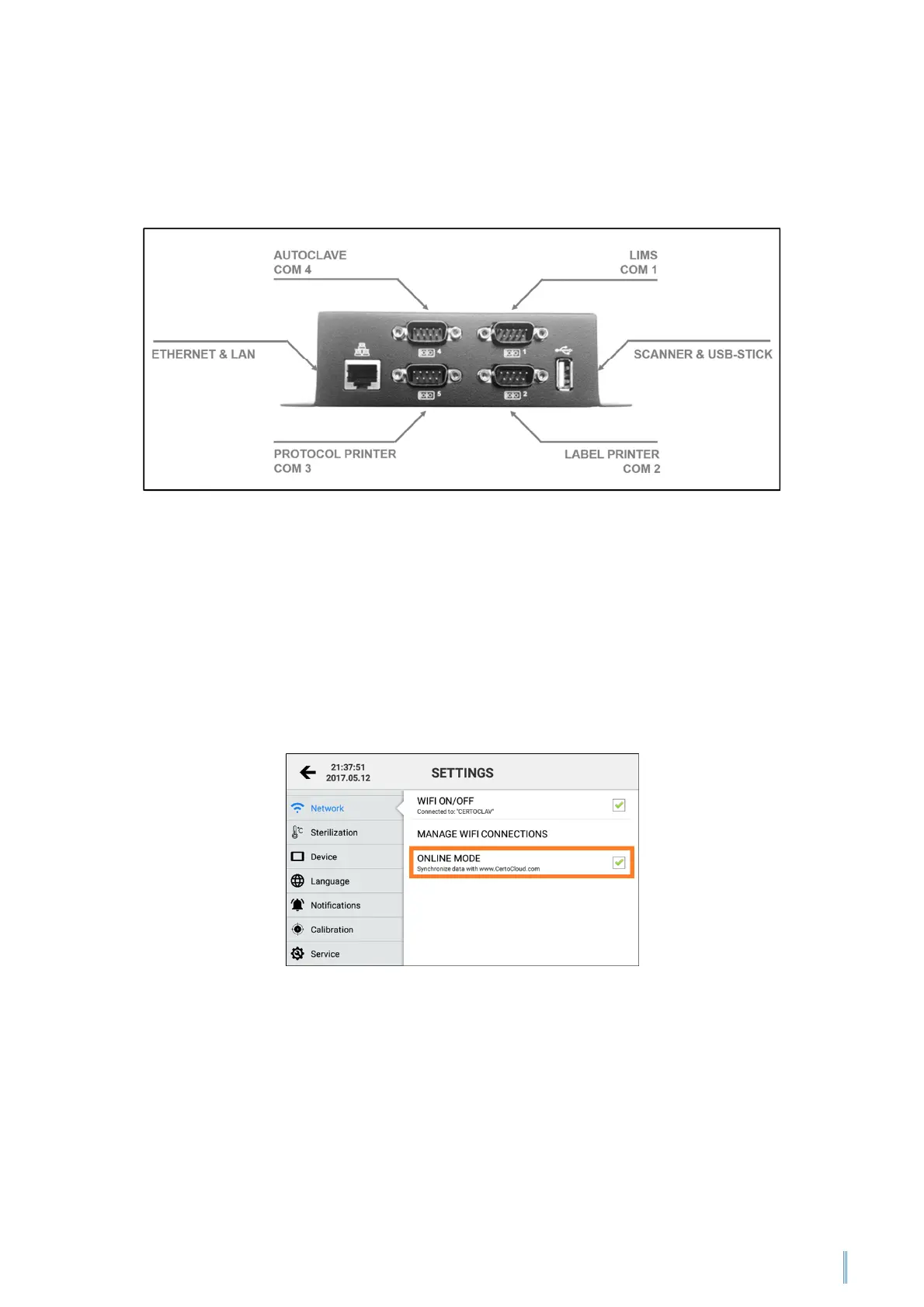
The autoclave can be connected to a LAN via an Ethernet cable. Connect the network
cable to the Ethernet port of the interface box.
11.2.3 Network communication
Online Mode needs to be activated if the autoclave data is to be synchronised with the
CertoCloud or the local CertoServer. If the CertoCloud is sued for synchronisation,
email and SMS notifications will also be available.
Navigate to the Settings Menu by clicking on the symbol at the top right of the
screen. Then press on “Network”. Now select Online Mode to activate or deactivate
the data synchronisation.
Note: If Online Mode is deactivated, your protocols will only be saved locally on the
autoclave. As soon as you reactivate Online Mode, all protocols saved locally up until
then are synchronised with the CertoCloud and are thus also available online in your
backup memory.


 To Next Page