16
Vu :
Your Smart Linux TV Player
+
Vu User Manual
+
This chapter will guide you through the whole installation process of Vu+. Please read each section
carefully to make sure that the system runs properly.
1. Connecting Signal Cable
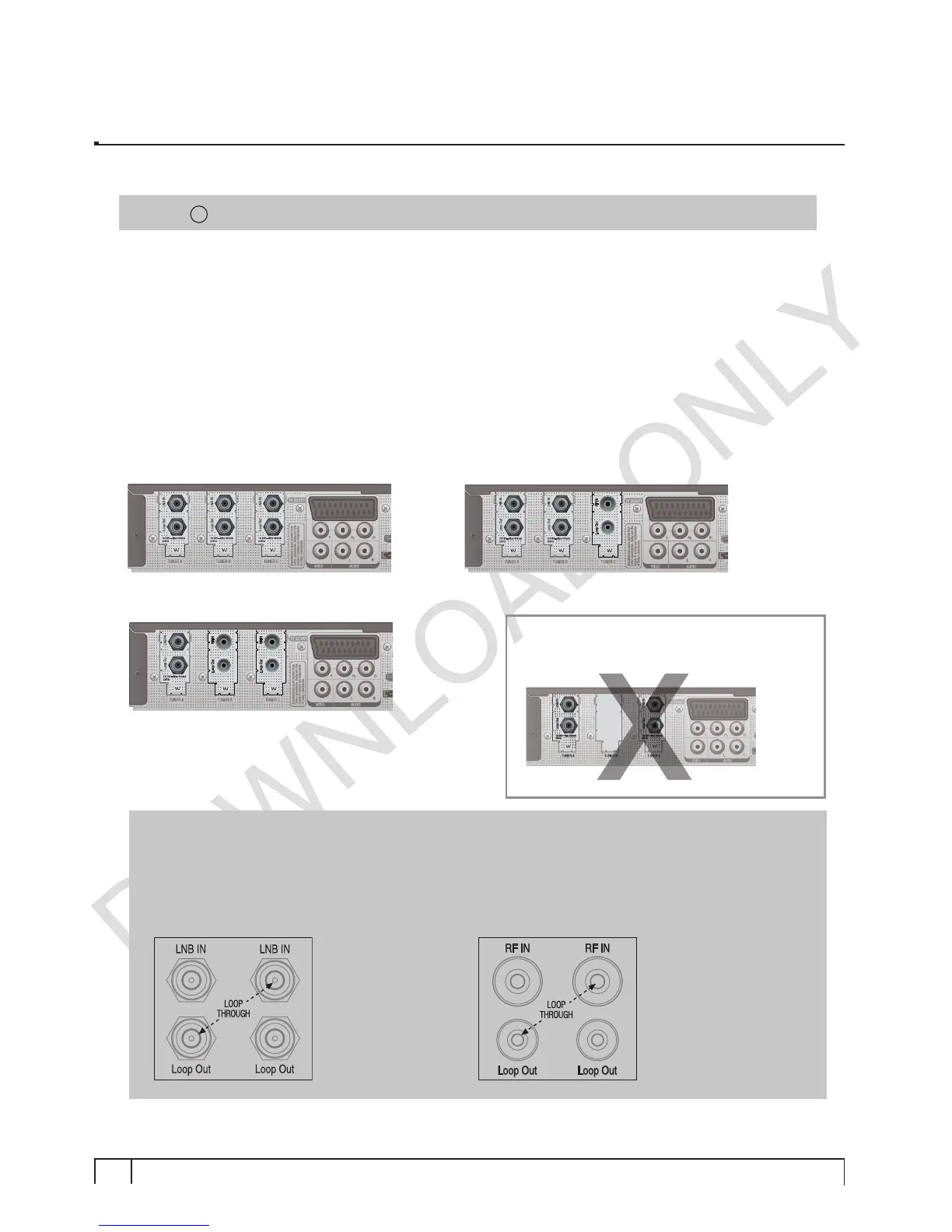
Vu+ Ultimo is designed to integrate three pluggable tuners. For the best use of Vu+ Ultimo the
following tuner combinations are recommended.
A. DVB-S2 + DVB-S2 + DVB-S2
C. DVB-S2 + DVB-C/T + DVB-C/T
NOTE :
Loop-through connection
Instead of using two or three separate signal cables, it is also possible to connect cables in
loop-through mode.
example A.
If two DVB-S2 tuners are mounted.
example B.
If two DVB-C/T tuners are mounted.
I. Installation of Vu+
NOTE :
i
means Remote control operation order.
B. DVB-S2 + DVB-S2 + DVB-C/T
NOTE
: Using tuner A & C without tuner B
is not supported.
A loop-through cable for
satellite is included in
the accessory box.
You need to purchase
a loop-through cable for
DVB-C/T
tuner.


 To Next Page