EasyManua.ls Logo

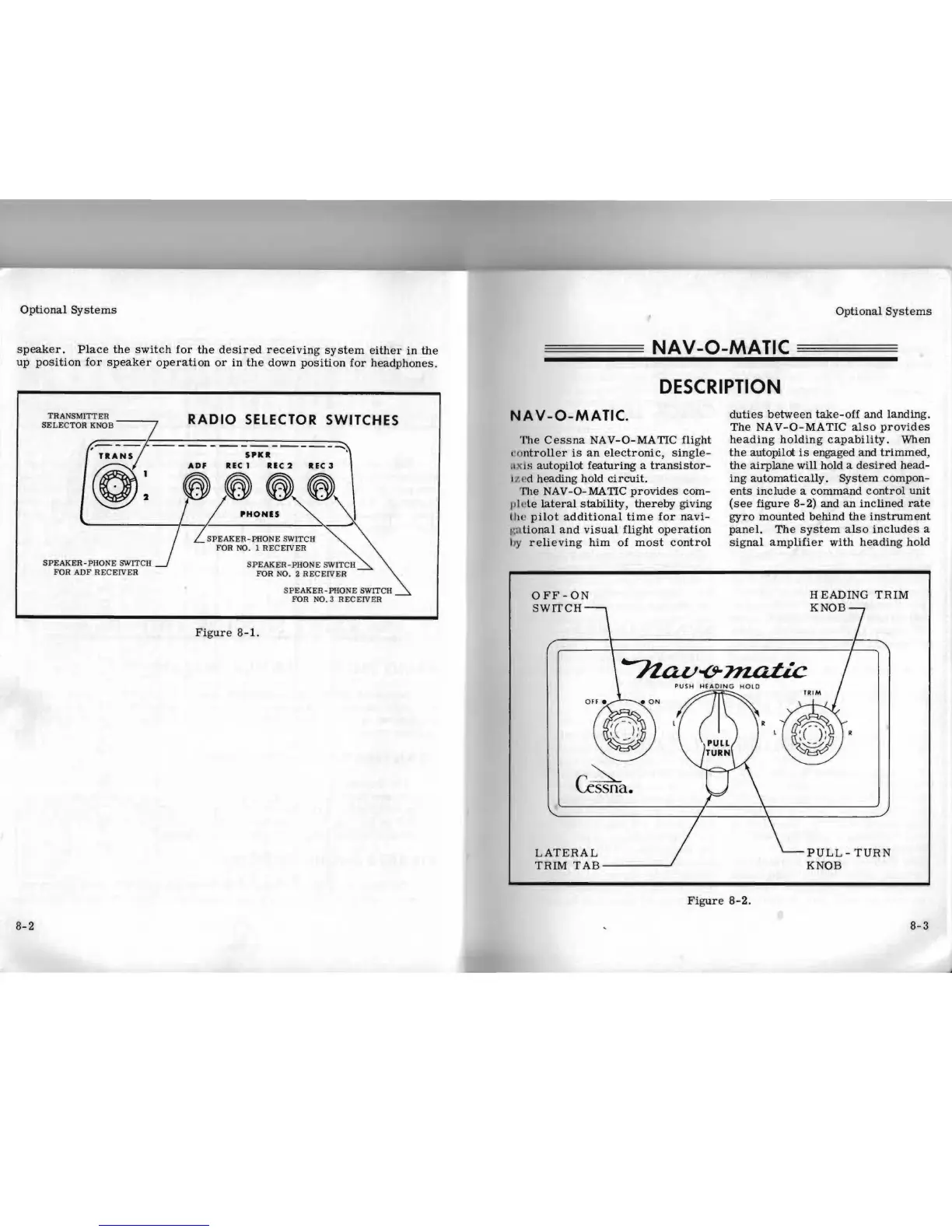
Cessna 210B - Nav-O-Matic; Section VIII - Optional Systems; Radio Selector Switches

Cessna 210B
42 pages
Print Icon
To Next Page IconTo Next Page
To Previous Page IconTo Previous Page
Loading...
Optional
Systems
speaker.
Place
the
switch
for
the
desired
receiving
system
either
in
the
up
position
for
speaker
operation
or
in
the
down
position
for
headphones.
TRA
N
SMITTER
RADIO
SELECTOR SWITCHES
SELE
C
TOR
KNOB
-----------------
........
5'1:1t
.
ADF
ItEC
1 ItIC 2
ItEC
3
g:
y~;
® ®,®
'HONIS
,
~~'
S
PEAKER-PHONE
SWITCH
FOR
NO. 1
RECEIVER
SPEAKER-PHONE
SWITCH
SPEAKER-PHONE
SWITCH
FOR
ADF
RE
C
EIVER
FOR
N
O.2
RECEIVER
S
PEAKER-PHON
E SWITCH
FOR
NO. 3
RECEIV
ER
Figure
8-1.
Optional
Systems
NA
V
-O-MATIC
DESCRIPTION
NA V -O-MATIC.
duties
between
take-off
and
landing.
The
NAV-O-MATIC
also
provides
The
Cessna
NAV-O-MA
TIC
flight
heading
holding
capability
. When
I'Imtroller
is
an
electronic,
single-
the
autopilot
is
engaged
and
trimmed
,
.I)
( \ S
autopilot
featuring
a
transistor-
the
airplane
will
hold a
desired
head-
j /.£'d heading hold
circuit.
ing
automatically.
System
compon-
TIle
NAV
-0-
MA
TIC
provides
com-
ents
include
a
command
control
unit
plet
e
lateral
stability,
thereby
giving
(see
figure
8-
2)
and
an
inclined
rate
Ihe
pilot
additional
time
for
navi-
gyro
mounted
behind
the
instrument
t',a
tional
and
visual
flight
operation
panel.
The
system
also
includes
a
lJy
relieving
him
of
most
control
signal
amplifier
with
heading
hold
OFF
-
ON
HEADING
TRIM
SWITCH
r
.
~
\..essna.
LATERAL
TRIM
TAB
KNOB
Figure
8-2.
8-3
KNOB-
PULL-TURN
8-2

Table of Contents

Related product manuals