BGX501-943-R01 Prometer 100 User Manual Page 19 of 72
6.3 Display Buttons
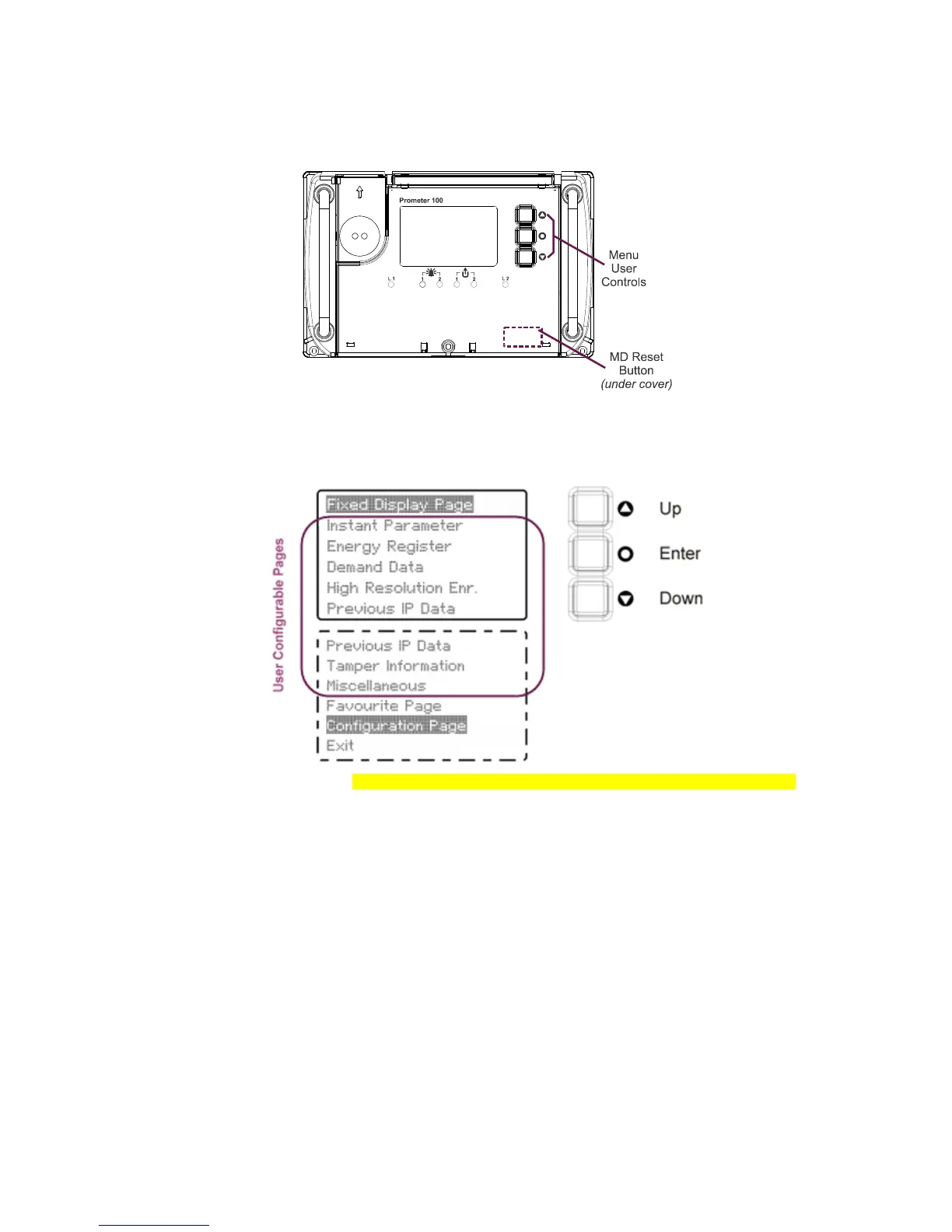
The meter has four user buttons. One button can be used for performing MD reset or for navigating through the
sealed button display sequence depending on the requirement and is behind a sealable door. The other three
buttons are used for navigating through the display and configuration menu options.
Figure 17: User Buttons
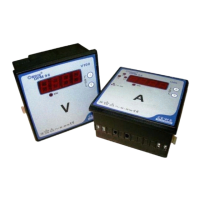
A page can be selected by pressing the enter button. A navigation screen will appear showing all the available
pages. The Up and Down buttons can then be used to choose a page. Press the Enter button to select your
choice.
Figure 18: Selecting a Page (instead of the word ‘Tamper’, ‘event’ can be used in the display menu)
Once you have selected a target page, you can then use the Up/Down buttons to scroll through that selected
page. Parameters are cyclically displayed in the selected page, i.e. after the last parameter in the list is
displayed, the display will return to the first in the list, and so on.
Press the Enter button to return to the immediate parent page.


 To Next Page