BGX501-943-R01 Prometer 100 User Manual Page 55 of 72
The Ethernet port has a 1-minute inactivity time-out period. If no activity is detected the Ethernet port will
disconnect after 1 minute.
Appendix D: How to Read Meters through Ethernet Port
This section discusses the reading a Prometer 100 meter through Ethernet port (TCP/IP connection).
Prerequisites:
Take static IP address, Subnet Mask and Gateway from network
M-Cubed (6.0.0.6)
Install the M-cubed on PC
Connect meter with PC using optical port or RS232 port
Configuring the static IP address, Subnet Mask and Gateway
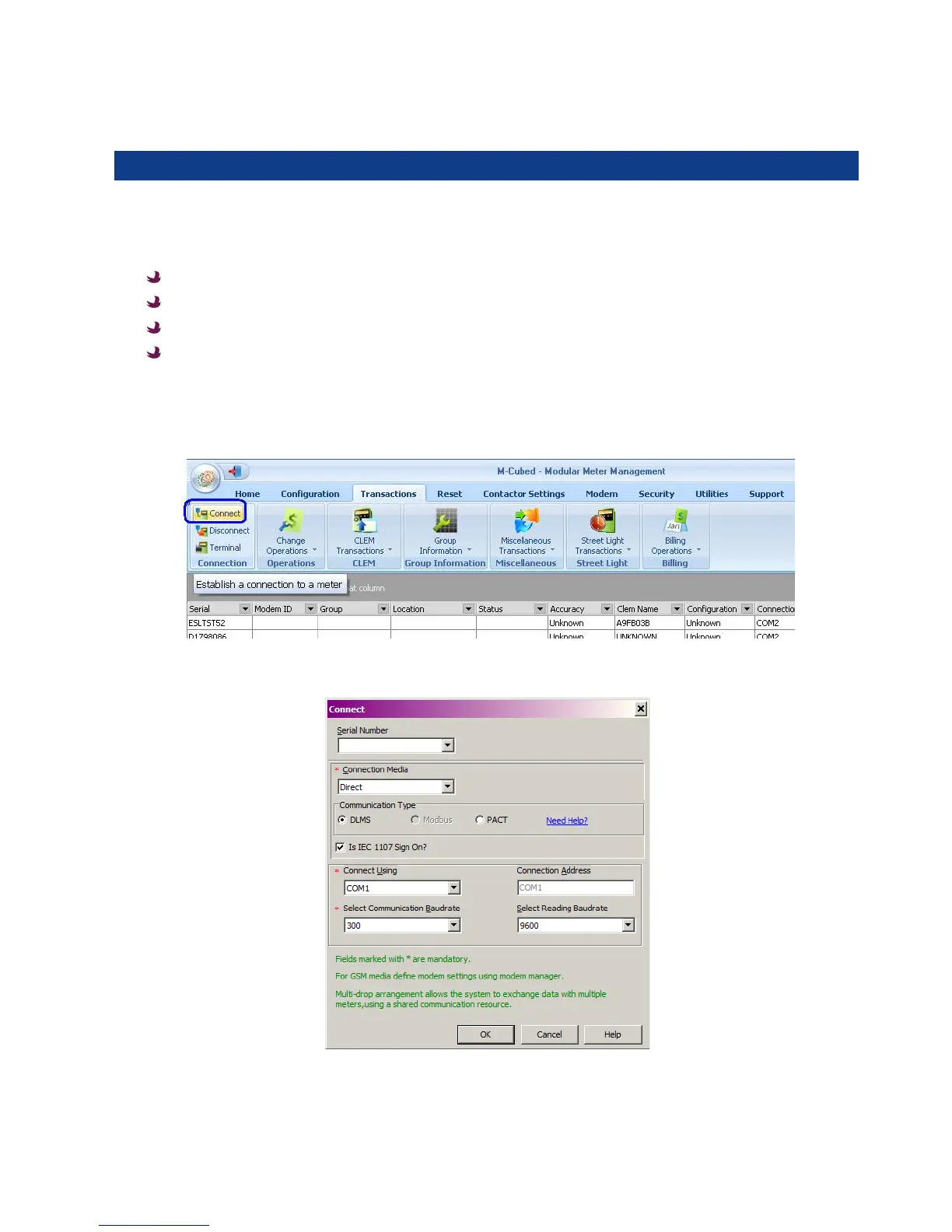
Connect Prometer 100 meter with PC on optical port
Select connection media, protocol, comport and baud rate. Click OK.


 To Next Page