EasyManua.ls Logo

Cewe Prometer 100 - Prometer 100-W Connections

Cewe Prometer 100
72 pages
Print Icon
To Next Page IconTo Next Page
To Previous Page IconTo Previous Page
Loading...
BGX501-943-R01 Prometer 100 User Manual Page 13 of 72
4.5 Connections to the Prometer 100-W
Connections to the Prometer 100-W are made on the meter terminal under the terminal cover.
Connect
R/L1
Y/L2
B/L3
N
CT IN
1
4
7
NC
CT OUT
3
6
9
NC
VT
2
5
8
11
Dual AUX
Supply
P/+ Terminal N/- Terminal
AUX 1
AUX 2 15 16
Digital Input/Output
8 Outputs and 4 configurable Inputs/Output
O/P 1
18, 19
I/O 1
32, 33
O/P 2
20, 21
I/O 2
34, 35
O/P 3
22, 23
I/O 3
36, 37
O/P 4
24, 25
I/O 4
38, 39
O/P 5
26, 27
O/P 6
28, 29
O/P 7 30, 31
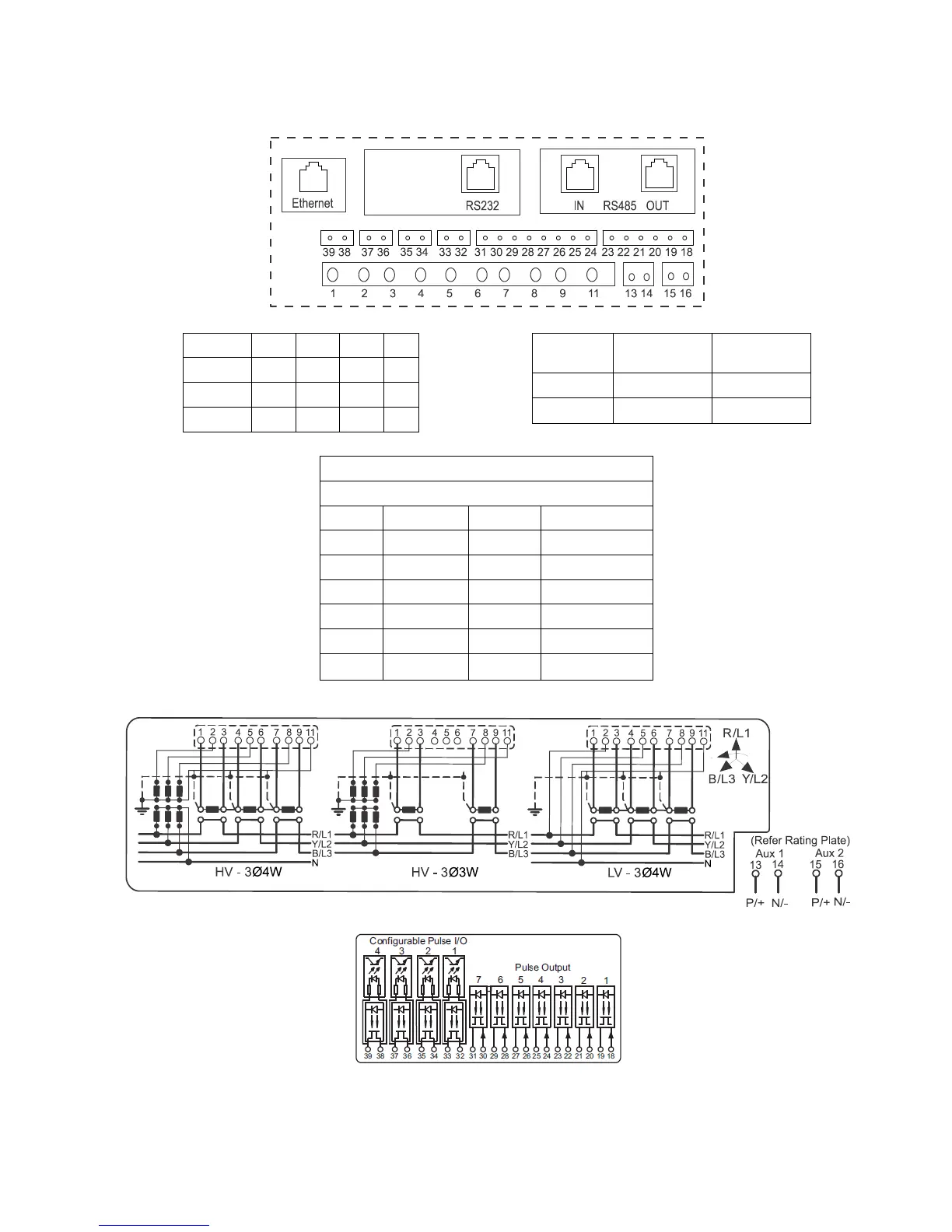
Figure 11: Rear Connector with Pin Details
Current, Voltage and Auxiliary supply connections
Pulse Input/ Output connections
Figure 12: Connection Diagram

Table of Contents

Related product manuals