12
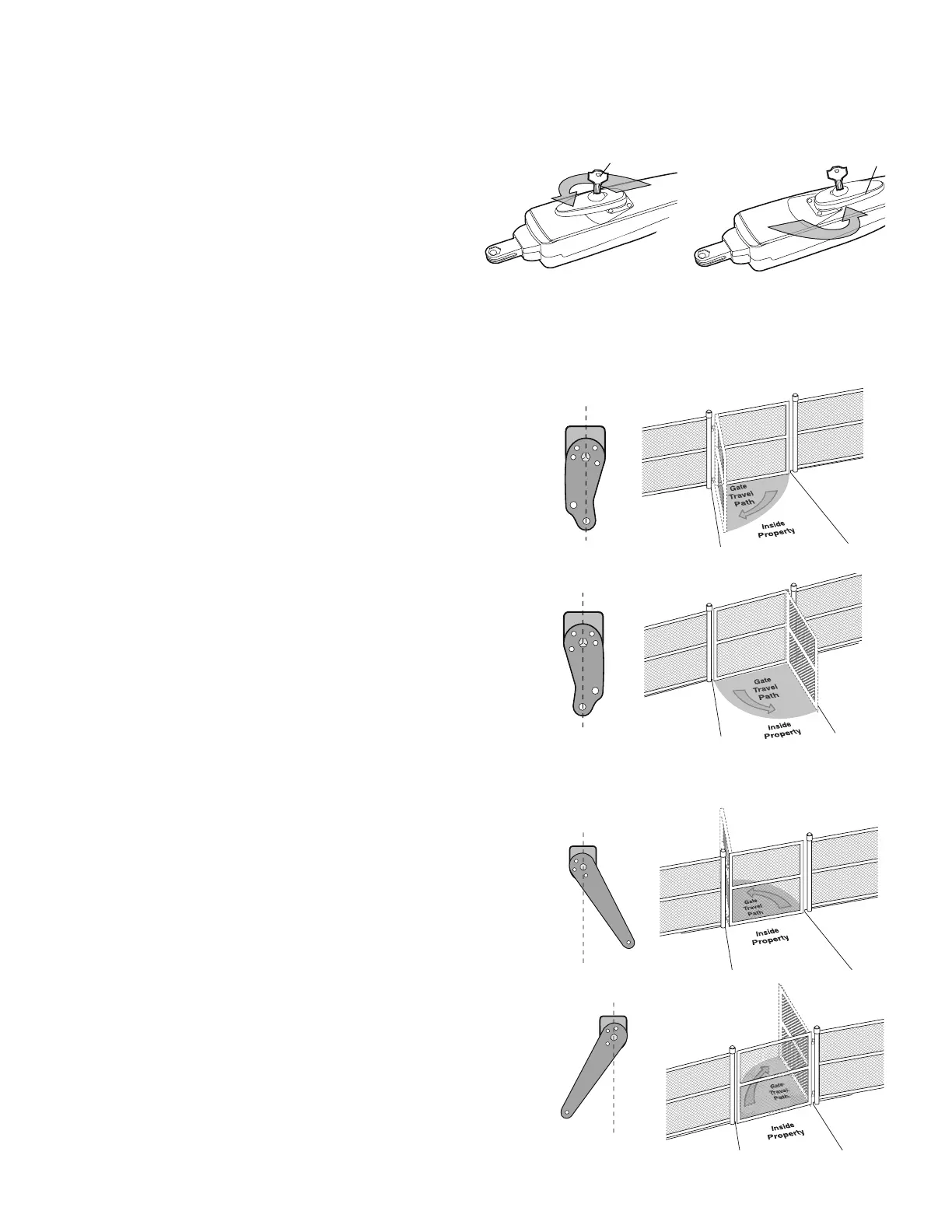
INSTALLATION » MANUAL RELEASE + DETERMINE POSITION OF THE PULL-TO-OPEN BRACKET
+ DETERMINE POSITION OF THE "OPTIONAL" PUSH-TO-OPEN BRACKET
Insert the key into the lock and turn it 180° counterclockwise.
Turn the release lever 180° counterclockwise.
The operator is now in manual mode.
MANUAL RELEASE
1
2
Key
Release Lever
1
2
The Pull-to-Open bracket can be assembled to work on a Left-Hand or a
Right-Hand gate.
Review the gate types and select the type of installation you will require.
DETERMINE POSITION OF THE PULL-TO-OPEN
BRACKET
NOTE:
If the Pull-to-Open bracket is not assembled correctly you will
damage the operator.
LEFT-HAND GATE
RIGHT-HAND GATE
The Push-to-Open bracket can be assembled to work on a Left-Hand or a
Right-Hand gate.
Review the gate types and select the type of installation you will require.
DETERMINE POSITION OF THE "OPTIONAL"
PUSH-TO-OPEN BRACKET
(NOT PROVIDED. SEE ACCESSORIES)
LEFT-HAND GATE
RIGHT-HAND GATE
1
1
1
1
OR













 To Next Page