13
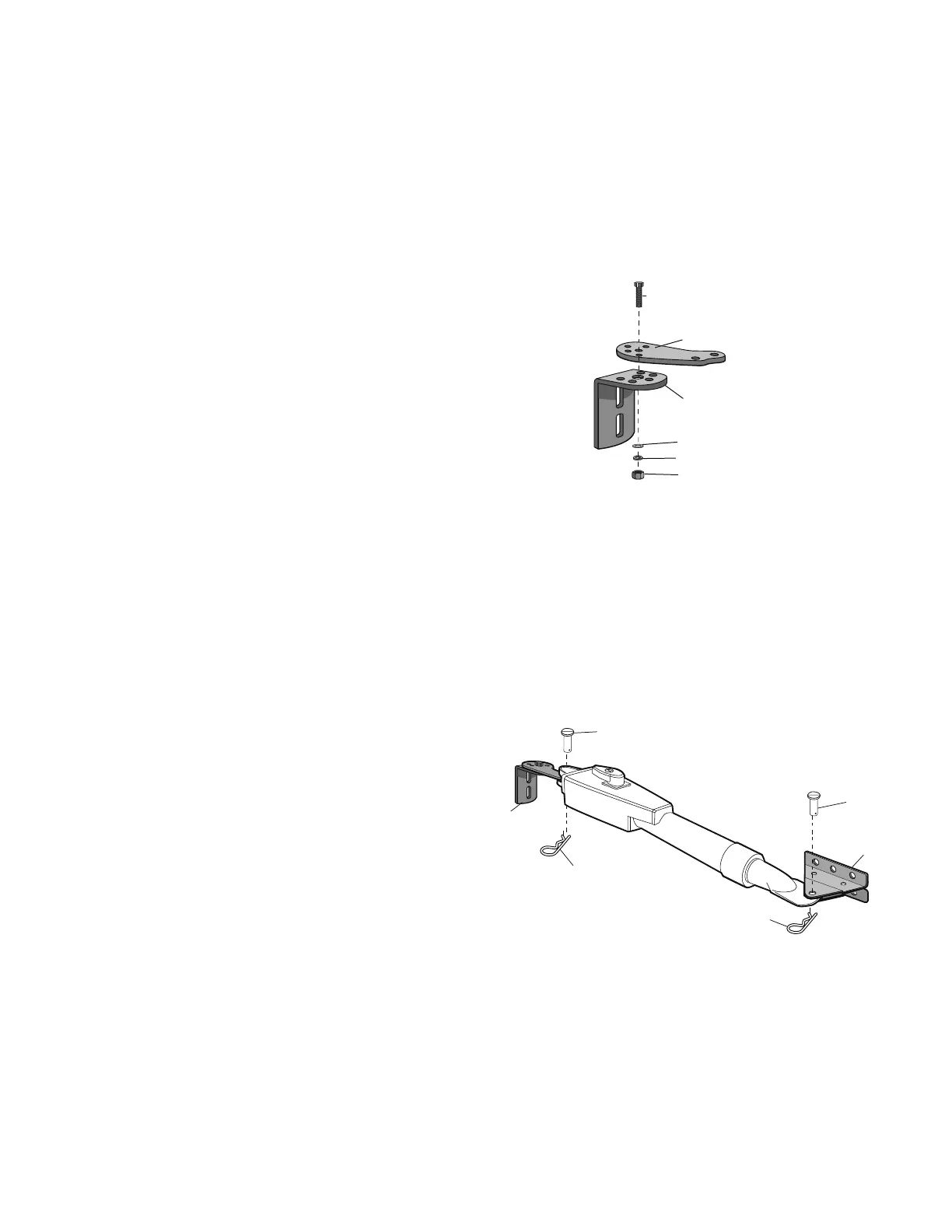
INSTALLATION » ASSEMBLE GATE POST BRACKET (PULL-TO-OPEN) + ATTACH BRACKETS TO GATE OPERATOR
All the illustrations on the following pages display a
typical Left-Hand Gate installation. For Push-to-Open
installations refer to instructions with Push-to-Open kit
50-19503.
Assemble gate post bracket by placing Pull-to-Open bracket on top of post
bracket.
ASSEMBLE GATE POST BRACKET (PULL-TO-OPEN)
Insert the bolt through both brackets and secure with washer, lock washer
and nut.
1
2
Lock Washer
Nut
Hex Bolt 3/8"
Extension
Bracket
Post Bracket
Washer
Hex Bolt 3/8"
Pull-to-Open Bracket
Post Bracket
Washer
Lock Washer
Nut
2
1
ATTACH BRACKETS TO GATE OPERATOR
Attach post bracket assembly to operator using pins and hairpin clips.
Attach gate bracket to operator using pins and hairpin clips.
1
1
2
2
Pin
Pin
Gate Bracket
Hairpin Clip
Hairpin Clip
Post Bracket Assembly













 To Next Page