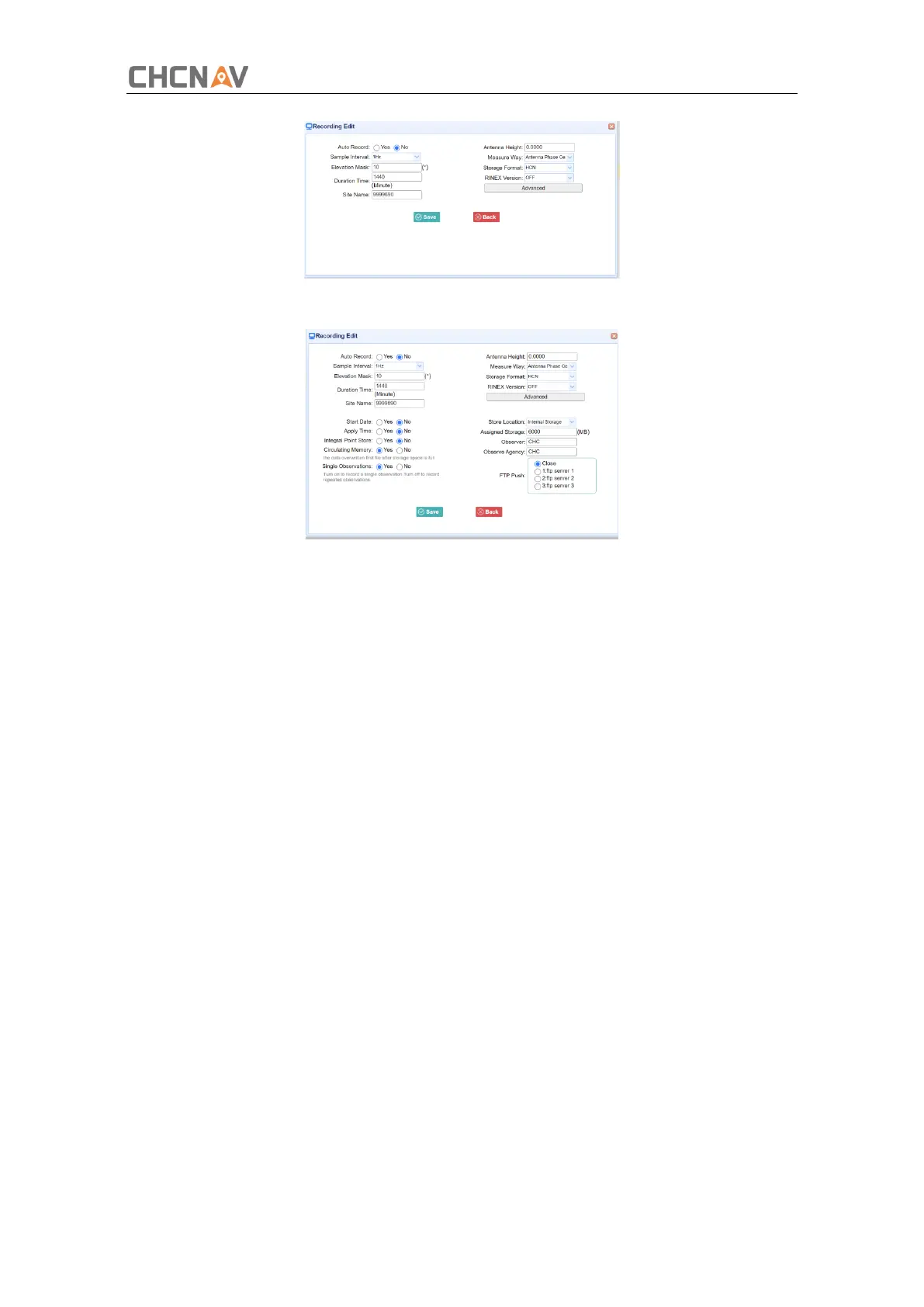
Click advanced to see more settings.
In this screen, you can configure all the data logging parameters, and determine whether the
recording files will be affected by the FTP Push. The parameters are mainly as follows:
➢
Auto Record: on or off.
➢
Sample Interval: Select the observable rate from the dropdown list.
➢
Elevation Mask: Enter the elevation mask.
➢
Duration Time: Set the duration of data logging.
➢
Site Name: Enter the name of the site.
➢
Antenna Height: the measured height value.
➢
Measure way: Antenna Phase Center, Vertical Height, Slant Height
➢
Storage Format: Select the format of the data store.
➢
RINEX Version: OFF, 3.02, 2.11
➢
Start Date: Select Yes or No option to determine whether to auto record start date.
➢
Apply Time: Select Yes or No option to determine whether to auto record apply
time.
➢
Integral Point Store: Select Yes or No option to determine whether to allow
receiver to save data every hour.
➢
Circulating Memory: Select Yes or No option to determine whether to auto delete old
files if the storage space is full.
➢
Repeat Observations: Select Yes or No option to determine whether to turn on to
record a single observation.
➢
Store Location: Internal Storage, External Storage.



 To Next Page