5000 Appliances Hardware
42 | Check Point 5000 Appliances Getting Started Guide
Dual Redundant BIOS
To ensure resilience in the event of a BIOS failure, 5000 Appliances are equipped with
dual redundant BIOS images.
If an appliance encounters a BIOS failure, it will boot up from a recovery, read-only
BIOS image that enables full functionality of the appliance.
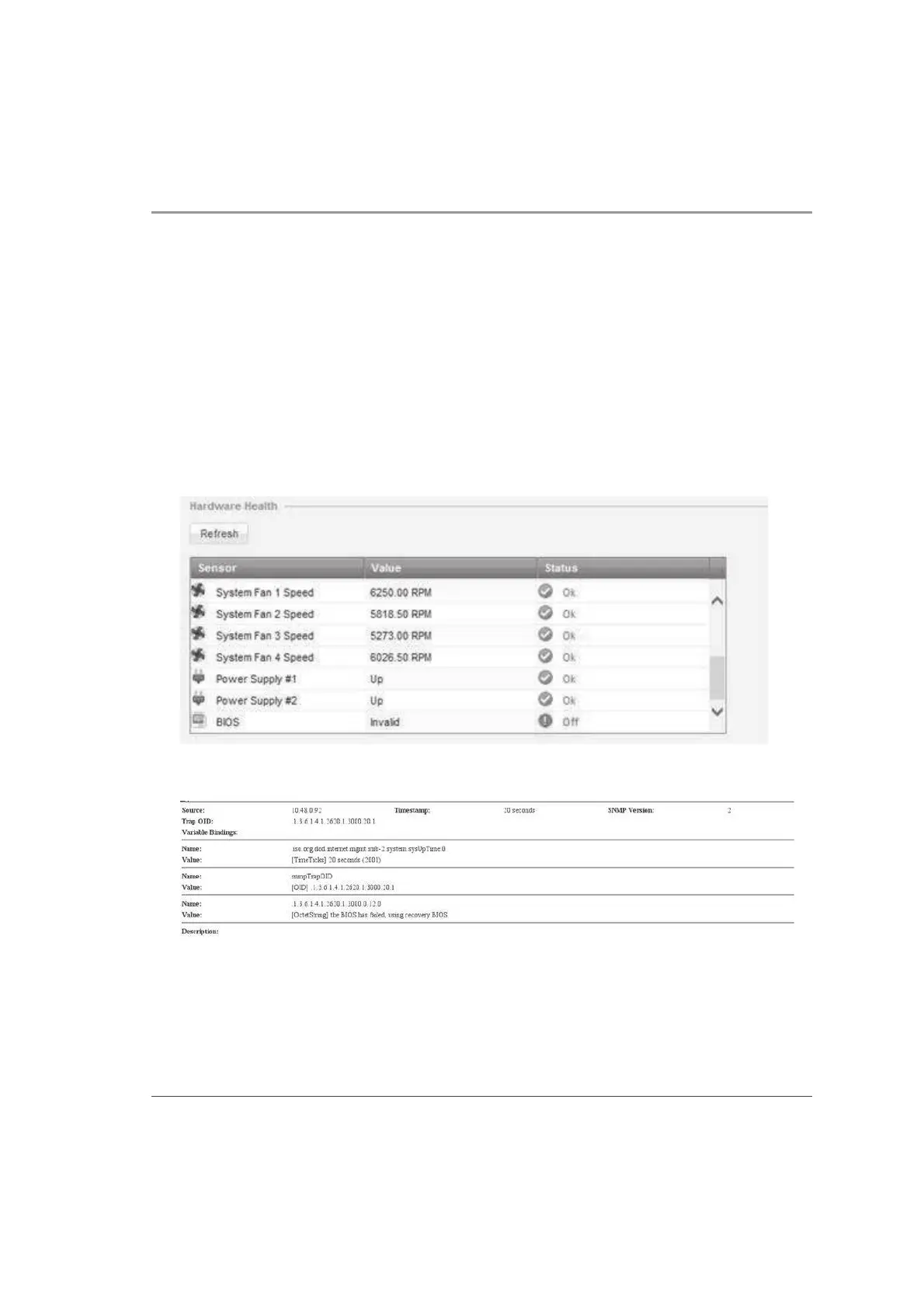
These notifications are shown in the event of a BIOS failure:
x The appliance's Alert LED on the front panel will blink red.
x The Gaia WebUI Hardware Health window shows that the BIOS sensor is Invalid
and its status is Off.
x An SNMP trap message (if the biosFailure trap was configured in the WebUI or
through clish).
To recover from a BIOS failure, see sk108517
(
http://supportcontent.checkpoint.com/solutions?id=sk108517) or contact Check Point
support. The appliance is fully functional until the BIOS recovery is completed.













 To Next Page