Automatic Transformer Test System 3300/3302 User’s Manual
resistance
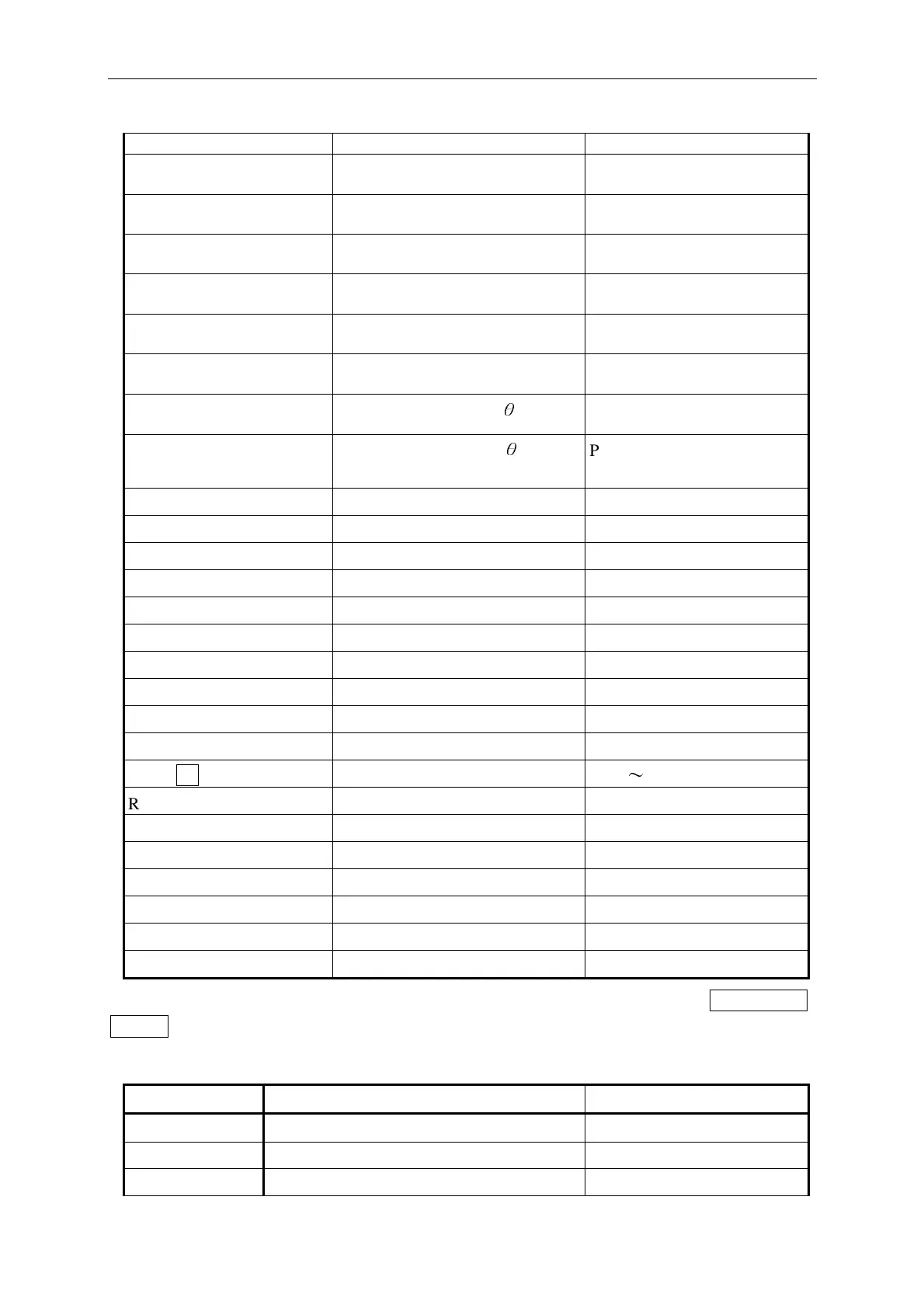
PARA:CPRP Set the parameter to Cp-Rp
Parallel capacitance and
parallel resistance
PARA:CPGP Set the parameter to Cp-Gp
Parallel capacitance and
parallel conductance
PARA:LPGP Set the parameter to Lp-Gp
Parallel inductance and parall
conductance
PARA:RSXS Set the parameter to Rs-Xs
Serial resistance and serial
reactance
PARA:RSQ Set the parameter to Rs-Q
Serial resistance and quality
factor
PARA:RPQ Set the parameter to Rp-Q
Parallel resistance and quality
factor
PARA:ZSP
Set the parameter to Zs-
θ
Parallel impedance and phase
degree
PARA:YPP
Set the parameter to Yp-
θ
Parallel admittance and phase
degree
PARA:DCR Set the parameter to DCR DC resistance
PAGE:000, Switch screen to page ‘000’
PAGE:001, Switch screen to page ‘001’
PAGE:002, Switch screen to page ‘002’
PAGE:LIMITS, Switch screen to LIMITS
PAGE:BINSET, Switch screen to BINSET
PAGE:BINNO, Switch screen to BINNO
PAGE:BINCOUNT, Switch screen to BINCOUNT
PAGE:TRANSID, Switch screen to TRANSID
PAGE:SYSTEM, Switch screen to SYSTEM
RANGN1
Set range
N1: 1
〜
8
RANG:AUTO, Set to auto selection mode
RANG:HOLD Set to manual selection mode
RATE:FAST Set to fast measurement
RATE:MEDIUM Set to medium measurement
RATE:SLOW Set to slow measurement
REMO:ON Set remote control ON
REMO:OFF Set remote control OFF
<Note> If error occurs when executing the command, the 33XX LCD screen will show COMMAND
ERROR.
Table 8-3 33XX Transformer Test Commands
Command Function Note
*IDN Inquiry the 33XX model name
I1 Turn on the RS-232 on-line function
I0 Turn off the RS-232 on-line function



 To Next Page