2-4 Installation
3902 Service Delivery Switch Hardware Installation and Start-up Manual
009-3205-001 Standard Revision D
Copyright
©
2013-2015 Ciena
®
Corporation July 2015
Installing the Power Supply
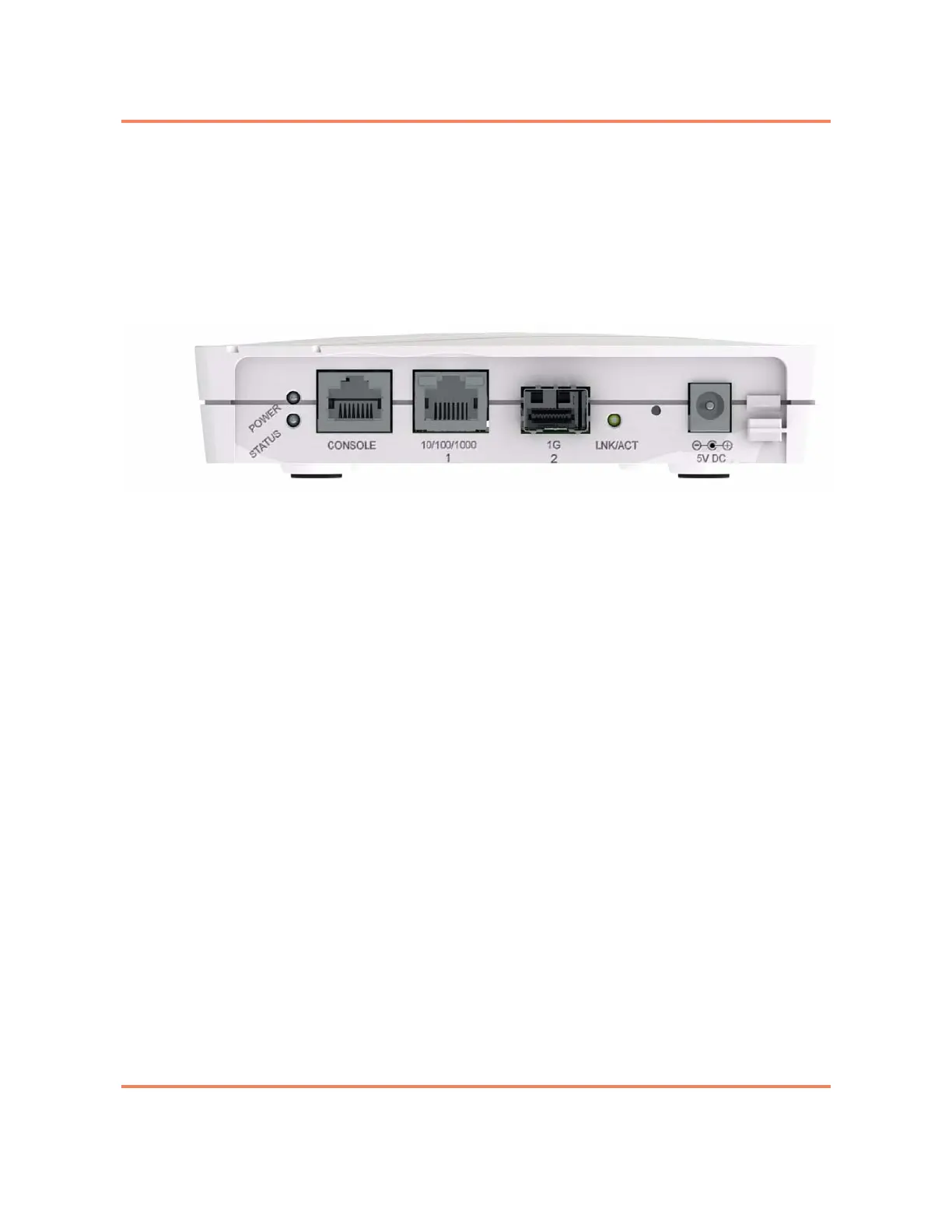
The 3902 uses a single external brick AC power supply. The power supply is
connected using a modular jack on the right side of the faceplate labeled
5V DC. See Figure 2-2.
Note: An external surge protection device is not required.
Figure 2-2
Front view of the 3902
For a procedure see “Installing Power to the 3902” on page 2-8.
Installing the SFP
The faceplate of the 3902 has a single connector which uses a pluggable SFP
optic. The SFP module provides the media-specific portion of an interface,
allowing it to support Ethernet using different media types. The SFP optic is
hot swappable. A reboot is not required after the optic is installed, the 3902
will discover the optic automatically.
Figure 2-3 shows a typical pluggable optic module and its parts. The list of
supported optics is provided in Packet Networking Transceivers Reference
(009-2011-602). Unsupported optics may not function. See “Gigabit Ethernet
Port LED” on page 4-3 for LED information.



 To Next Page