7-1
3902 Service Delivery Switch Hardware Installation and Start-up Manual
009-3205-001 Standard Revision D
Copyright
©
2013-2015 Ciena
®
Corporation July 2015
Reset Button 7-
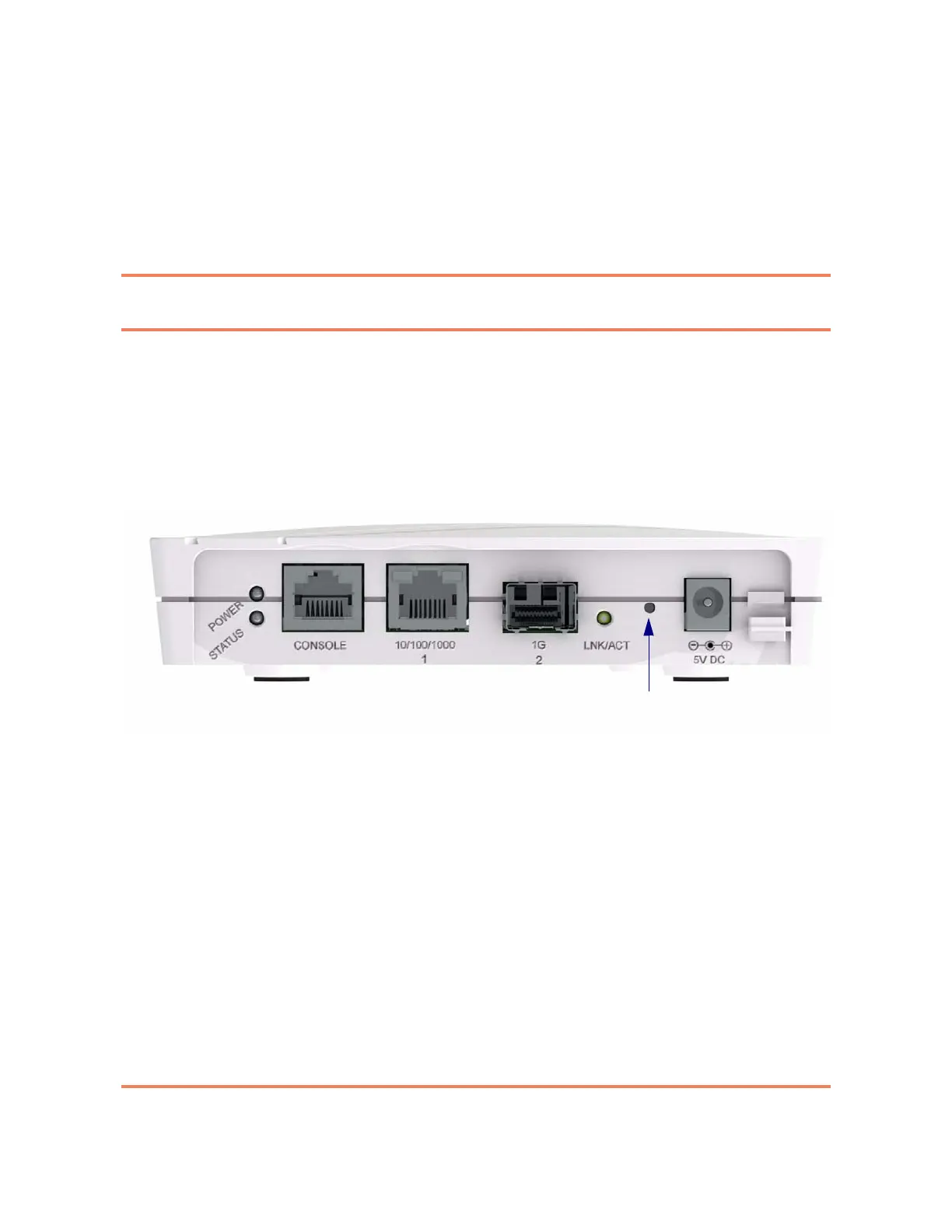
The 3902 has a reset button. To avoid accidentally triggering the reset button,
it is recessed behind the faceplate. You will need a straightened paper clip or
similar small tool to depress the reset button. The reset button is located
between the power connection and the NNI port. Figure 7-1 shows the
location of the reset button.
Figure 7-1
Location of the Reset Button on the 3902
There are two different types of resets available:
• Quick reset, which is accomplished by depressing the reset button for less
than three seconds. A quick reset reboots the system with the current
saved configuration.
• Hard reset, which is accomplished by depressing the reset button for three
seconds or more continuously. A hard reset erases the current
configuration and restores the unit to the factory default settings. See
39XX/51XX Product Fundamentals for more information about the factory
default settings.
Note: It is also possible to initiate soft resets of the system through the
local console port, or the management VLAN. Instructions for initiating a
soft reset are included in the 39XX/51XX Command Reference.



 To Next Page