2-10
Cisco Video Surveillance 5010/5011 Indoor Fixed HD IP Dome Camera User Guide
OL-22669-01
Chapter 2 Installation
Wiring
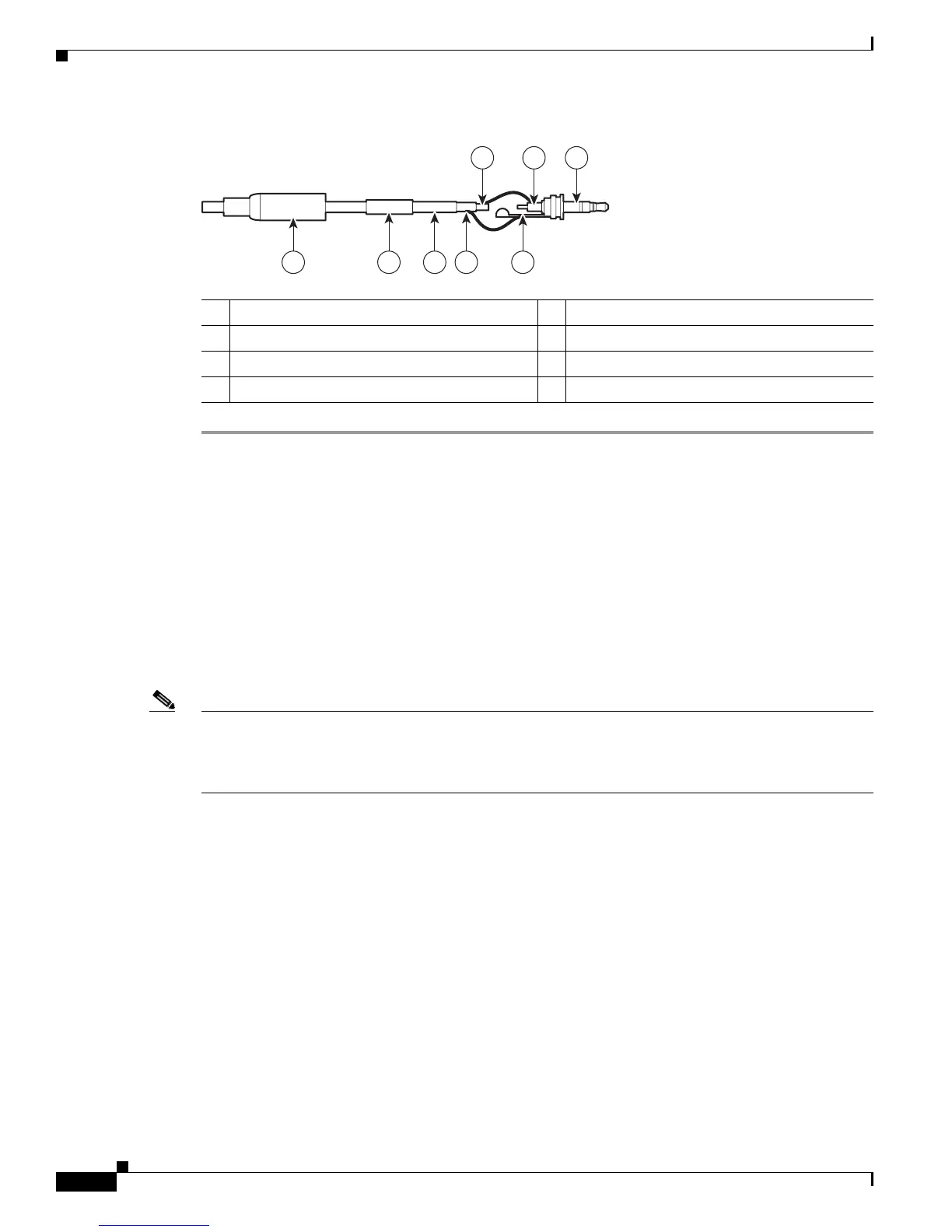
Figure 2-12 Attaching the 2.5 mm Monaural Headphone Plug
8 7 6 5 4
1 2 3
278793
1 2.5 mm Stereo Plug 5 Shrink Fit Tubing
2 Plug Shoulder Pin 6 Coaxial Cable
3 Center Conductor 7 Coaxial Braid Shield
4 Support Sleeve 8 Crimp Pin Arm
Wiring
Cat5 or Cat6 Cable
Connect a Cat5 or Cat 6 cable to the RJ-45 network port. The 8-pin connector includes video and PoE
for the camera. PoE (IEEE 802.3af Class 3) injects power over the same cabling that carries the network
data, eliminating the need for a separate power supply. This simplifies the installation and operation of
the camera without affecting network performance.
Note • The camera will autosense and configure itself to use either a crossover cable or a straight cable.
• A CAT5 is sufficient for 100 MHz transmission. Use a CAT6 cable for both 100 and 1000 MHz
transmission.













 To Next Page