14
Chapter 1 Setup
Part Names and Functions
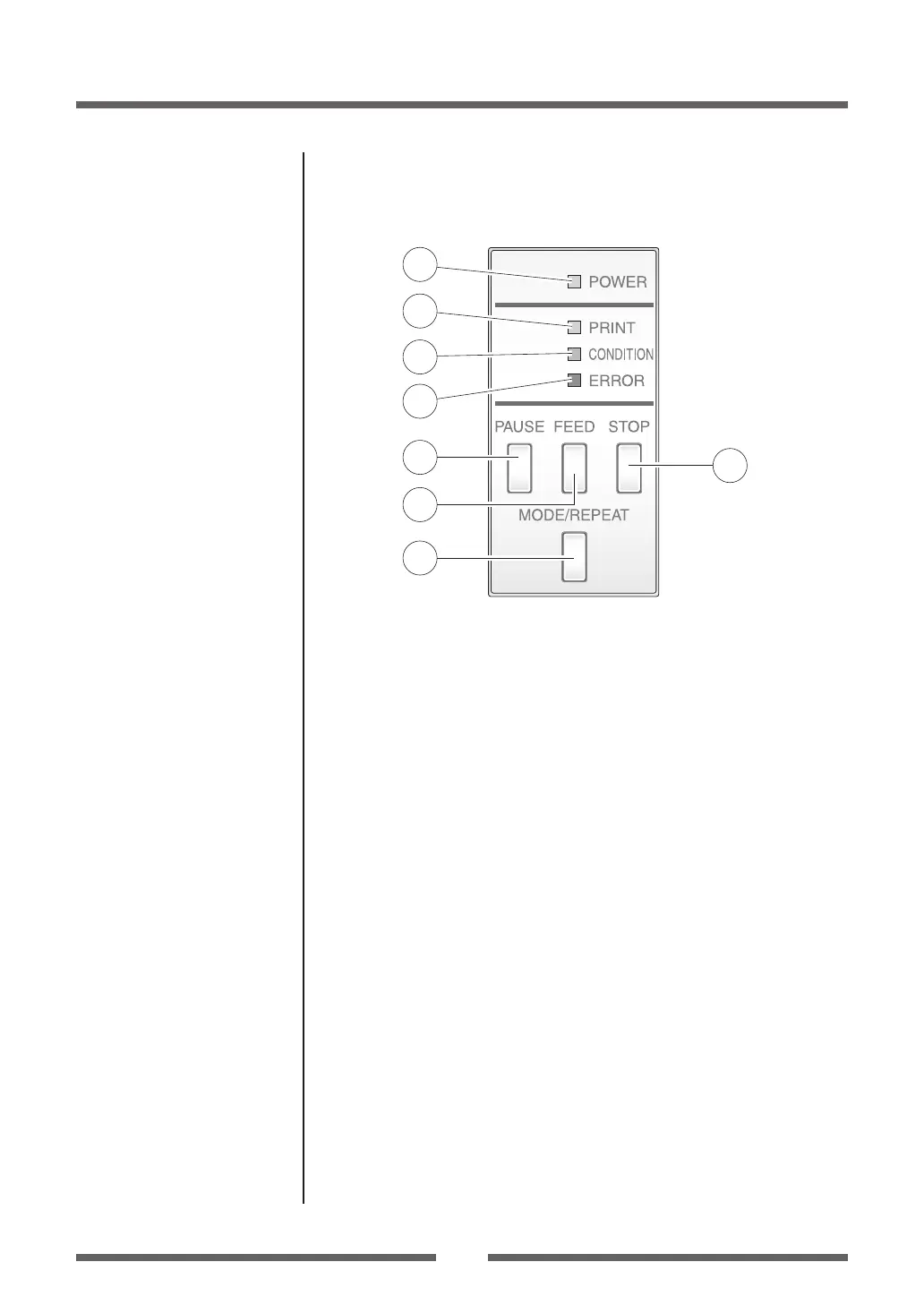
Operation Panel
1
2
3
4
5
6
8
7
1
POWER LED
This is lit when the printer power is on. (green)
2
PRINT LED
This is lit when the printer is able to print. (green)
3
CONDITION LED
This is on when selecting settings. (orange)
4
ERROR LED
This is lit or ashes when the printer is in an alarm or error status. (red)
5
PAUSE key
This temporarily stops printing.
6
FEED key
This key feeds the media to the top of the next label or form.
7
STOP key
This stops printing or cancels the alarm.
8
MODE/REPEAT key
This key exits current status in the menu setting mode or reprints the
nal label, depending on printer status.
LED Functions (p.20)
Normal Operating Mode (p.19)


 To Next Page