OPERATING MANUAL
800.749.2761 www.coachcomm.com
21
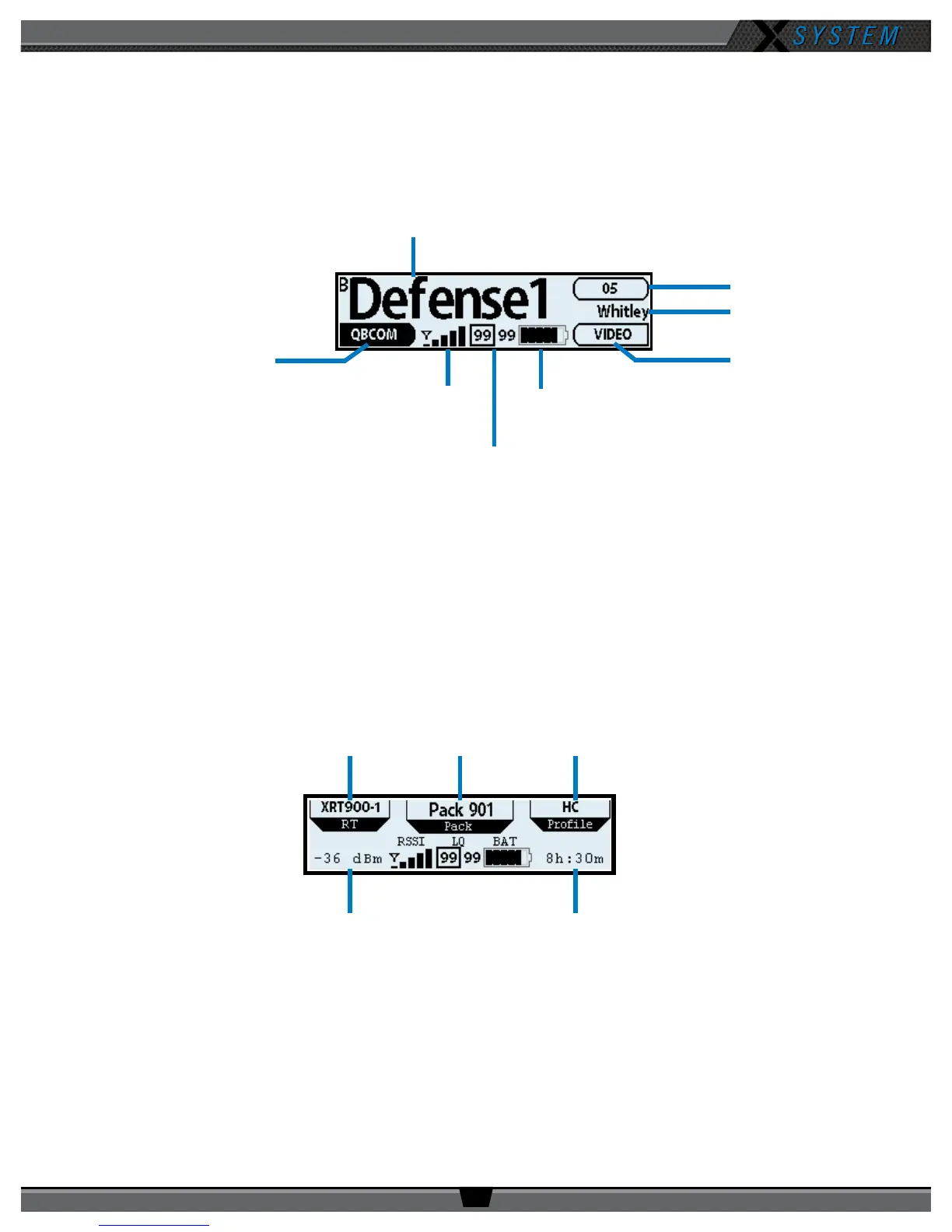
Radio Pack LCD
Home Operating Screen
Serves as the main operating screen and displays the status of the Radio Pack (RP) as well as talk, volume, and function
assignments.
Note: The Link Quality Indicator (LQ) provides a diagnostic measurement of actual packet transmission from
RP to Antenna and vice versa. The outlined LQ represents the Antenna’s LQ. (See Understanding Link
Quality on page 29 of this manual for more information.)
Secondary Operating Screen
Serves as a secondary operating screen and displays additional information about the status of the Radio Pack. Short press
the Menu button once to toggle between the Home and Secondary screens. After 60 seconds, the screen will time out and
revert back to the Home screen.
Note: Radio Signal Strength Value displays the actual value of the radio signal in dBm.
Volume Level
F2 Assignment
Battery Level
Link Quality
Radio Signal
Strength Indicator
F1 Assignment
Prole Name
Active Conference
Figure 23: RP-44 Home Operating Screen
Figure 24: RP Secondary Operating Screen Overview
RT Name Pack Name Prole Name
Radio Signal
Strength Value
Remaining Battery Time



 To Next Page