Code Blue
•
259 Hedcor Street
•
Holland, MI 49423 USA
•
800.205.7186
•
www.codeblue.com
GU-137-Hpage 34 of 67
IP1500 and IP2500 Series
Administrator Guide
Recordings Administration
Thespeakerphonerecordingcongurationismadeby:
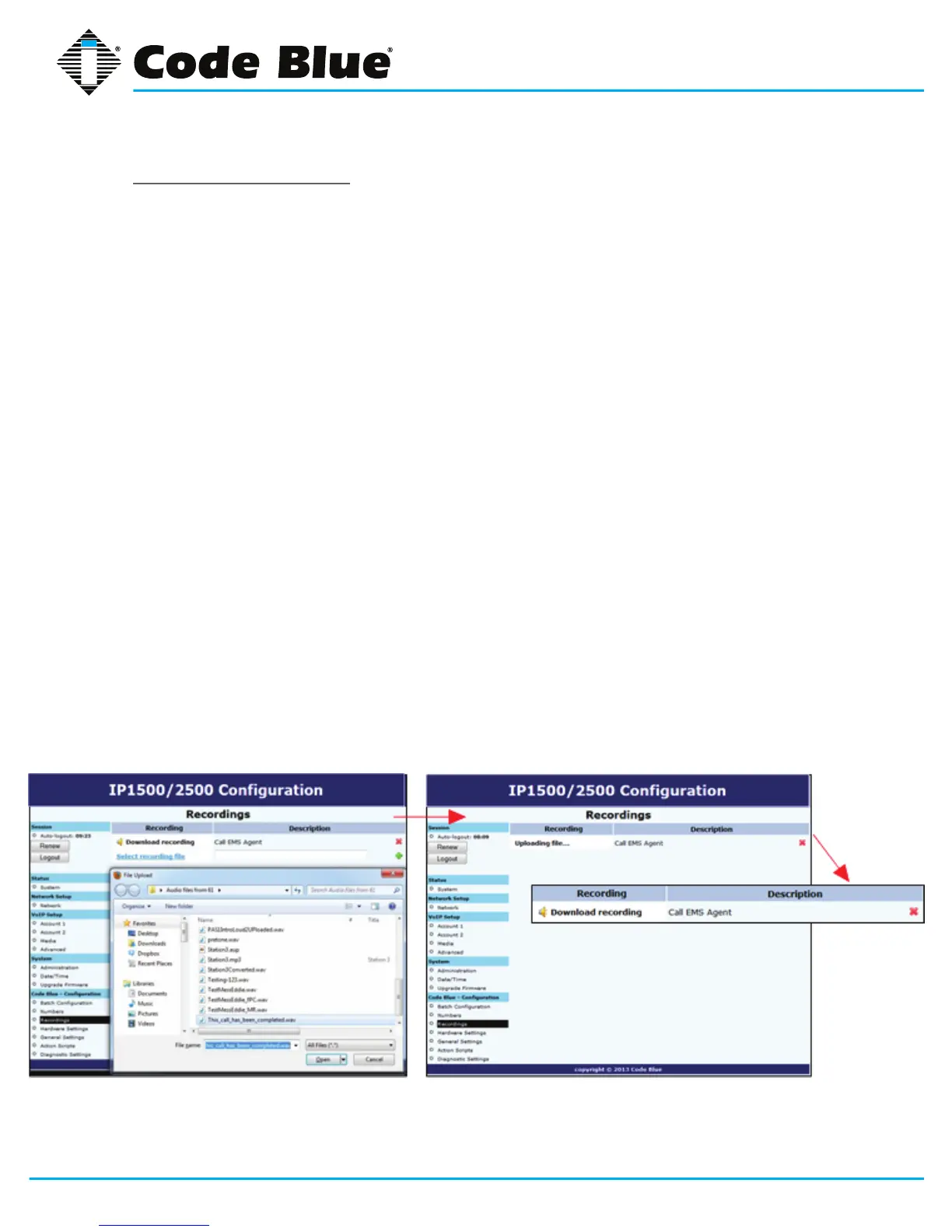
1. Selecting Recordings under Code Blue(seefarleft-handcolumn).
2. Click on Select recording leandchoosetheleyouwishtouploadtothespeakerphone.
Click Open.
3. EntertheDescriptionwithintheDescriptionField.
4. Click on the green plus signtoaddtherecordingandwaitforittonish.
DuringtheuploadprocessthescreenwilldisplayUploading le…
Atthispointdonotrefreshthepageorclickawayfromthepageorthelewillnotbe
uploaded.OncetheleuploadiscompleteyouwillseeDownload Recording and a new
lineforuploadingadditionalrecordings.
5. Todeleteanumber,simplyclickthered X.
6. Select the green check markwhenpromptedAre you sure.
Thespeakerphonesupportsthefollowingformatsandalllesmustcontainmono(singlechannel)
data.
• FilecontainingrawPCMuLawdata(extension.ulaw)
• Wavelecontainingmono8KHzor16KHzLinearPCMdata(extension.wav)
Note:Audioleswillconsumememoryspacewithinthe1MBsharedmemoryallocation.



 To Next Page