CQube MF & LF
12
OVERVIEW OF COMPONENTS
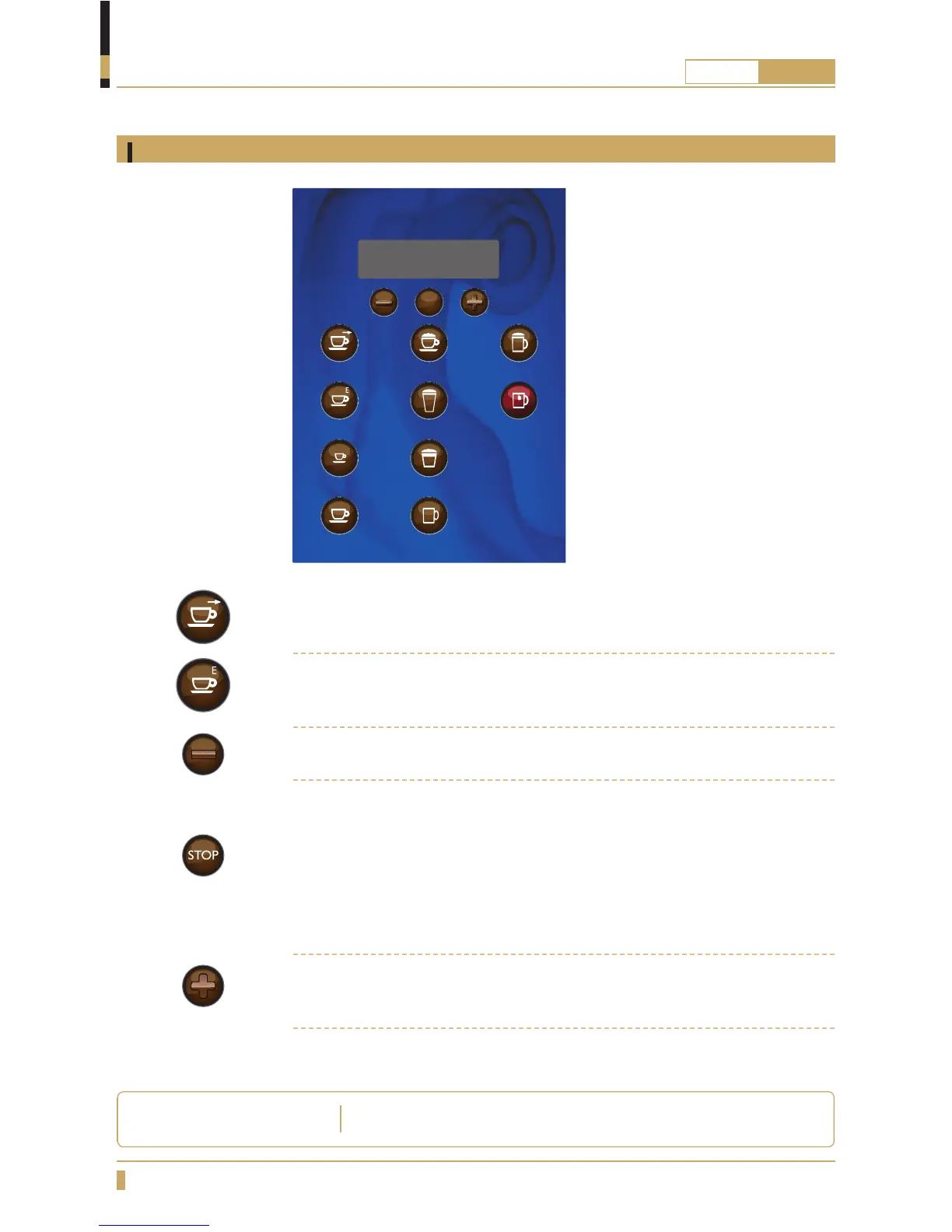
Membrane switch navigation
Button functions
Press the BACK button if you want to leave the submenu and go back in the
menu.
Press the ENTER button to select a menu function, con rm a set value or a
setting.
Press the MINUS button if you want to decrease a value or go back in the menu.
Press the STOP button if you want to return to the start menu.
To activate energy saving mode press and hold the STOP button for 5 seconds.
Display will show Energy Saving Mode.
You can abort jug process by pressing STOP.
To return to normal mode press and hold the STOP button for 5 seconds while
the machine is in energy saving mode.
Press the PLUS button if you want to increase a value or go forward in the
menu.
The machine decreases the temperature in the water tank to
65
0
C .
ENERGY SAVING MODE
STOP
CoffeeC appuccino Choco-milk
Small Coffee Caffè Latte Hot Water
Café Mocca
Café au Lait Chocolate
Espresso






 To Next Page