15
CQube MF & LF
INSTALLATION AND START-UP
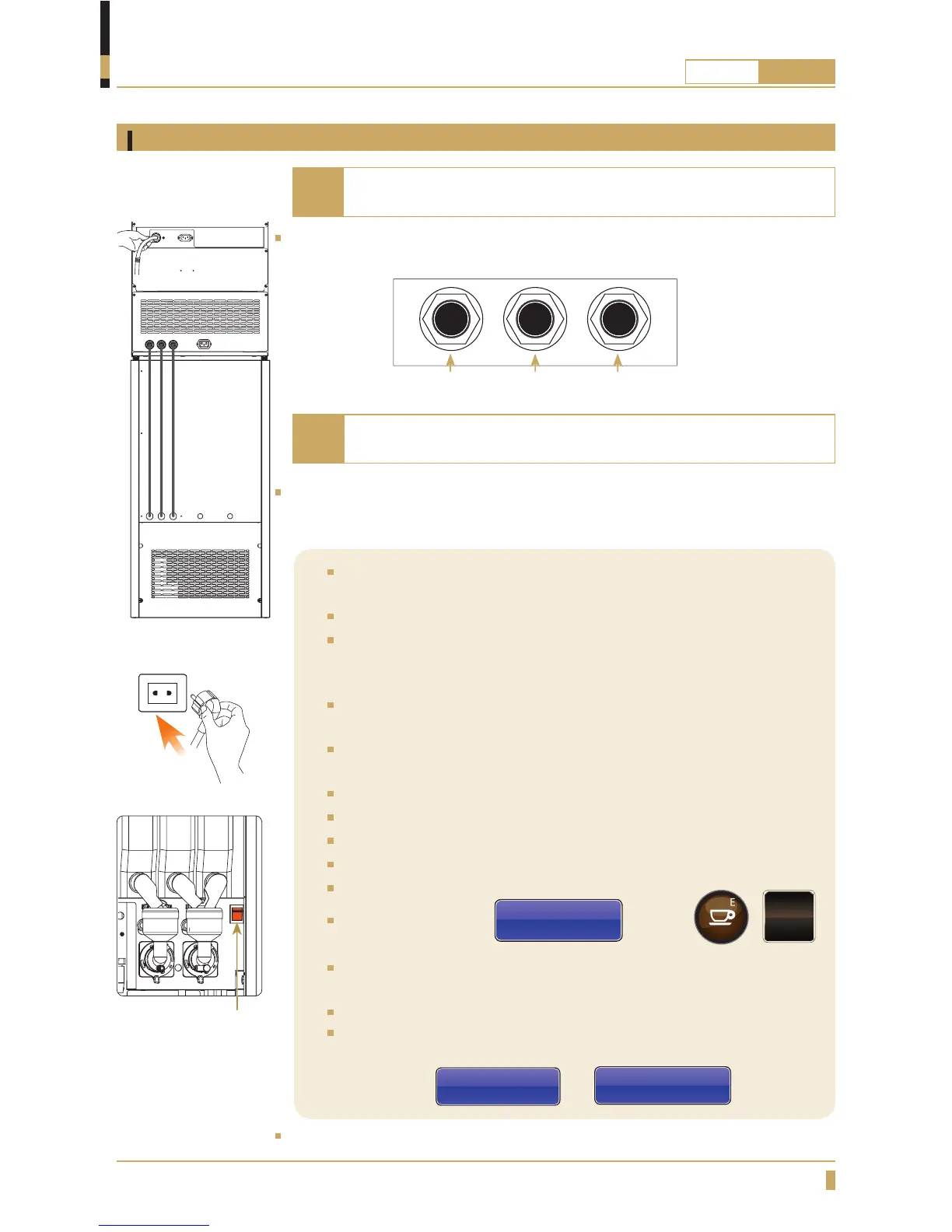
Connect the 8mm hoses 3 units. (A) parallel between the top and base cabinets,
from left to right.
Connect the carbon dioxide tube to the gas canister and open the tap, check
that the factory set pressure is c. 3.5bar. May be adjusted +0.5 -1.0 bar. Put the
gas canister in place inside the base cabinet.
Connect the mains cable to the machine (B) and insert the plug to a
earthed wall socket (C).
Connect the water to the top cabinet on the machine.
Connect the supplied water hose to the cold water connection using a
½’’ R-connection. When pushing the machine into position make sure
there is no interference to the hose to ensure proper water fl ow.
If the inlet hose is new, fl ush the system with water rst to remove
copper shavings. These can damage the inlet valve.
The new tube set supplied with the appliance must be used. Old tubes
may not be re-used. Connection to a closable valve is recommended.
Min. water pressure; 2 bar (200kPa).
Max. water pressure: 8 bar (800kPa).
Open the water tap.
Open the door and turn on the power switch. See gure.
Close the door
The display indicates
Low Water Level
Press Enter Key
Press the /
ENTER
button.
The water tank will now automatically ll with 5 litres of water. The
element will not be powered until the water reaches the level sensor.
Set temperature is 96º Celsius.
Once the water heating is complete “Low temp” text will disappear
from the display. (The display text will start to rotate between these
two screens
FRESHBREWED
FILTER COFFEE
and
SELECT PRODUCT
)
Shut off the machine, continue on next page.
Do not connect the electrical cable from the cold water unit
until the machine has heated up.
Start-up procedure for CQube ML & MF
Note
WATER IN COLD WATERCARBONATED
WATER
A
B
C
Switch
If the machine doesn’t have any cold water cabinet only follow
the steps in the colored section below.
Note
A






 To Next Page