CQube MF & LF
22
CLEANING PROGRAM
Repeat the cleaning procedures 2-3 times to get a better
cleaning effect.
Cleaning means
rinsing with water
and rotating the
whipper.
Cleaning of the
mixing bowl should
be performed once
per day.
Note
Automatic Cleaning
Automatic rinsing of the mixing bowl
Open the door.
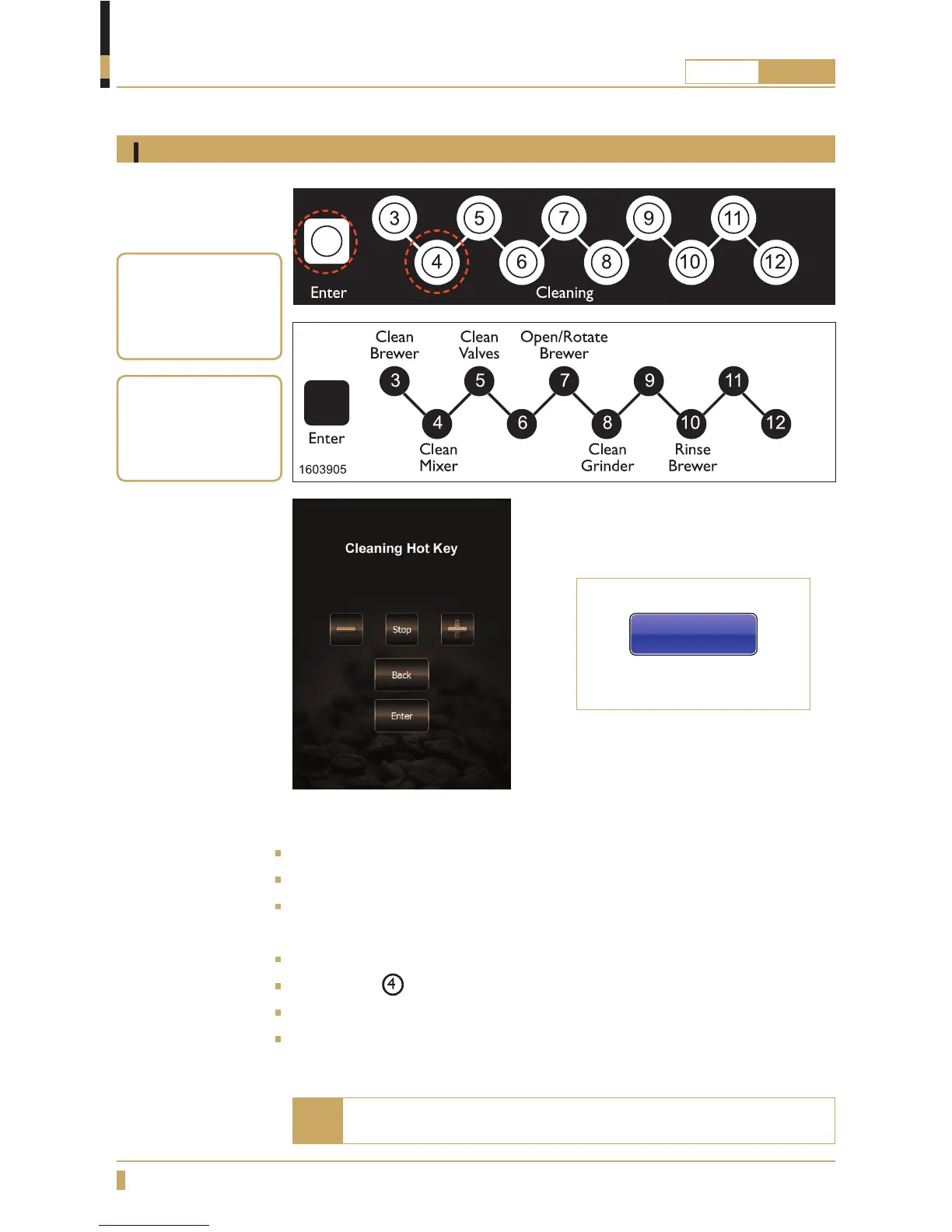
Press ENTER on the cleaning panel inside the door. (See g. A)
Cleaning Hot key appears on the display (cleaning panel is now active).
the display shows: see g. C or D.
Put a container that holds at least 0.5 litres under the outlet for hot drinks.
Press button
on the cleaning panel. (See g. B)
The machine will now clean the mixing bowl for 5 seconds.
Close the door to exit cleaning mode and return to normal mode.
A
B
C
For touchscreen
For membrane switch
Cleaning hot key
D






 To Next Page