25
CQube MF & LF
Open brewer function
CLEANING PROGRAM
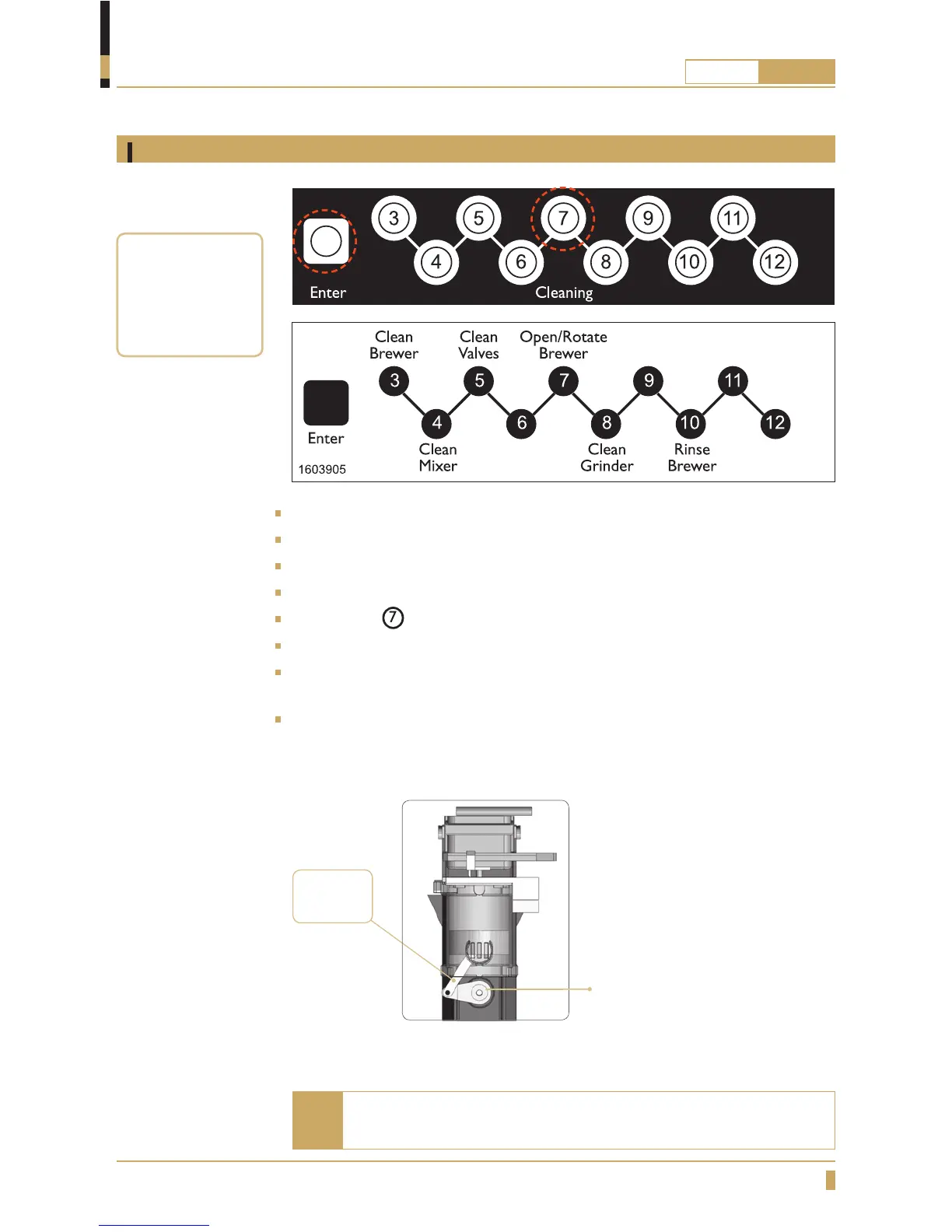
“The winder” should be in the 8 o’clock position, If not, remove
again and repeat the process.
Can be used to rotate the brewing
mechanism into the correct
position.
8 o’clock
position
Note
A tool to
disassemble the
coffee fi lter is
included with the
machine.
Open the door.
Press ENTER on the cleaning panel inside the door. (See g. A)
Cleaning Hot key appears on the display (cleaning panel is now active).
Put a container that holds at least 0.5 litres under the outlet for hot drinks.
Press button
on the cleaning panel. (See g. B)
The brewing mechanism rotates into position. (See g. C)
To close brewer press ENTER key on the cleaning panel, the brewer now rotates
to home position.
Close the door to exit cleaning mode and return to normal mode.
A
B
C
Automatic Cleaning






 To Next Page