CQube MF & LF
20
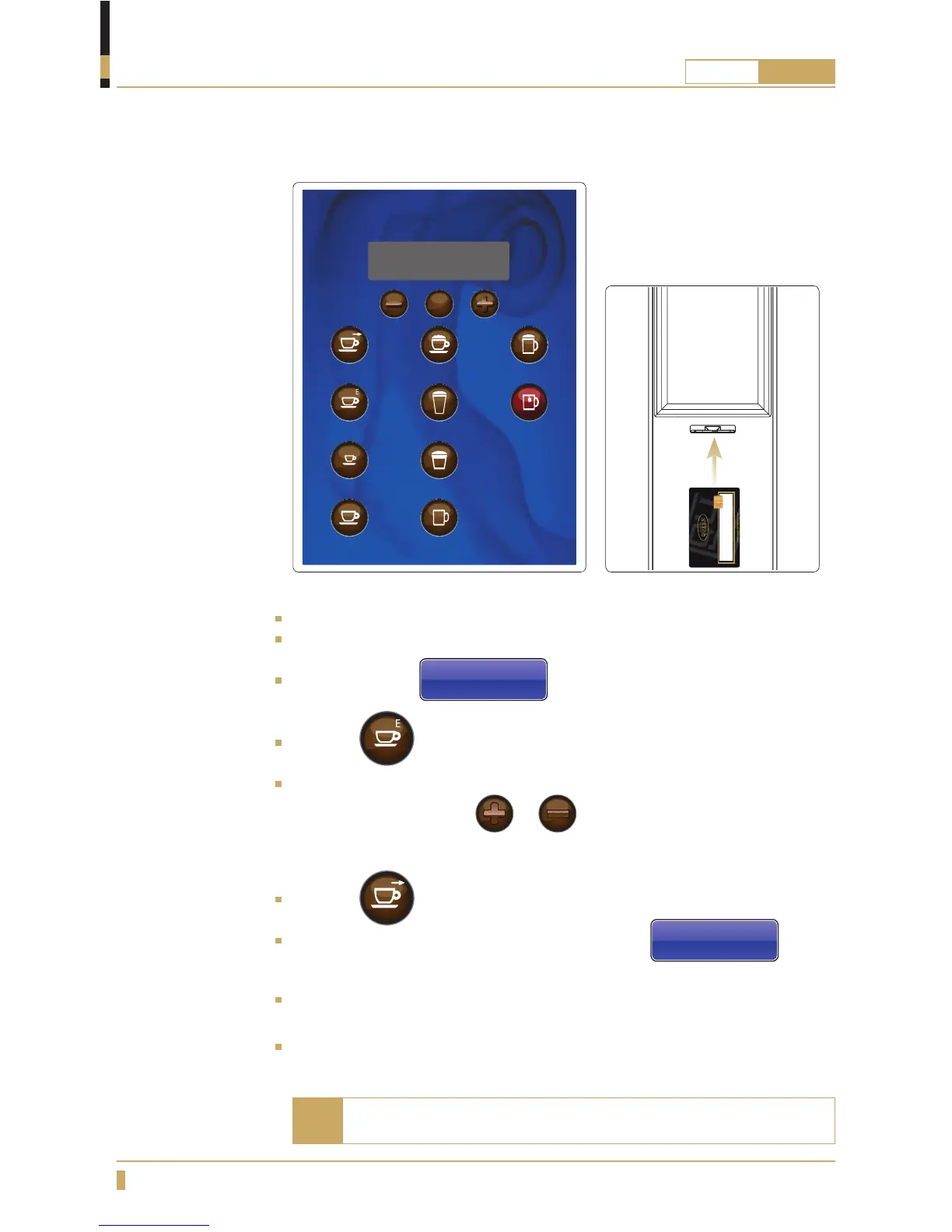
Brewing coffee in a jug (CQube with membrane switch)
OPERATION
Lift up the cup shelf and put a jug under the outlet for hot drinks.
Insert user card in the card reader(A)
The display shows
Service Menu
Jug Beverage
Press the button.
Change the number of cups you want to brew in your jug (6 cup brewing
is the default setting.) with
or button.
Brewing is possible for up to 12 cups or down to 1 cup.
Press the button for coffee.
Wait until the cup light switches off and the message
Please wait...
has disappeared from the display before removing the jug.
You can abort the jug process by pressing STOP button any time during the
process, it will nish the drink in process before complete stop.
Remove user card.
If no selection is made, remove the user card to abort. Machine
jups back to normal mode.
Note
STOP
CoffeeC appuccino Choco-milk
Small Coffee Caffè Latte Hot Water
Café Mocca
Café au Lait Chocolate
Espresso
A






 To Next Page