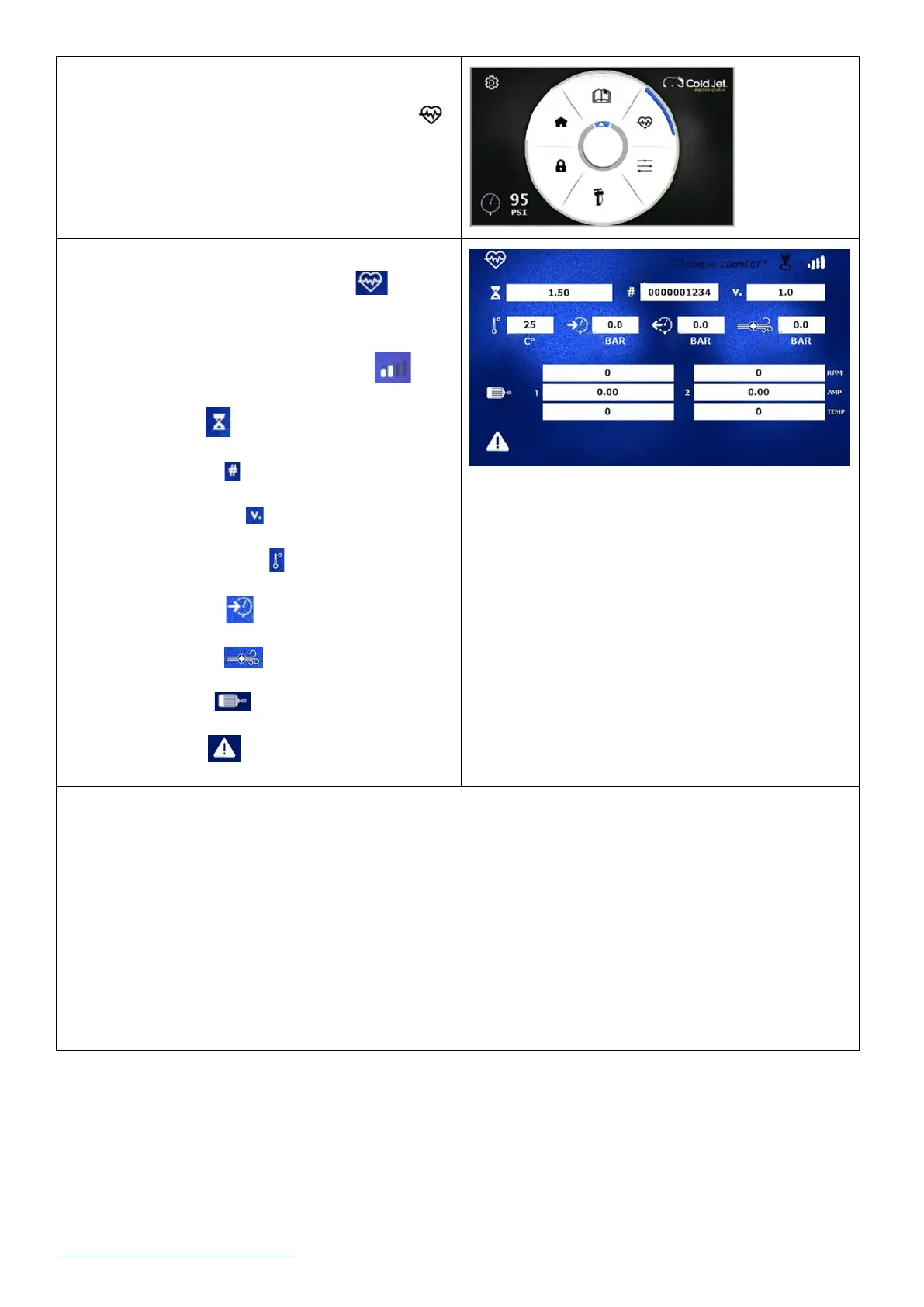
2. On the settings screen, use the rotary encoder
dial to navigate to the machine status icon
and press the dial once to view the machine
status page.
Machine Status Screen Legend:
1. Machine Status Screen Indication
2. Cellular Signal (if there are no signal bars the
machine will not be able to connect)
3. Hour Meter
4. Serial Number
5. Firmware Version
6. Trough Temperature
7. Air Pressure In
8. Blast Pressure
9. Motor Status
10. Error Codes
*NOTE: Through the machine’s control panel, you can initiate Diagnostic Mode when working with
Cold Jet’s technicians. This will send detailed operating data for help in evaluating technical issues.
o To initiate the diagnostic mode, hold the rotary encoder dial down for (8) seconds. The Cold Jet
CONNECT® icon will turn white, indicating that the diagnostic mode has been activated.
o The diagnostic mode will time-out after 5 minutes of inactivity with the machine (for example, no
motors have run). Note that the icon will turn black indicating that the diagnostic mode is no
longer active.



 To Next Page