Click to go to Top of Document
Advanced Settings
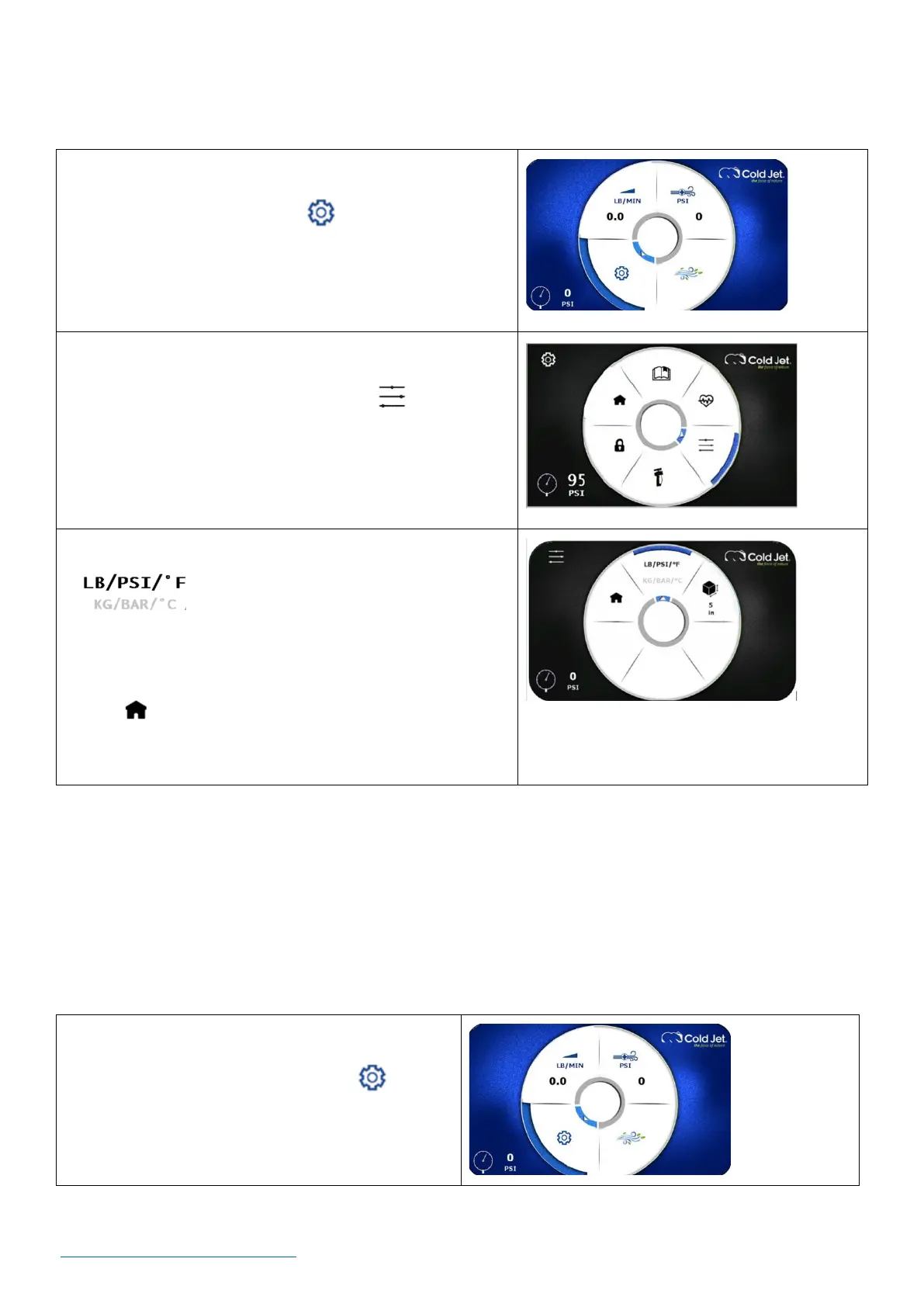
How to Set Units of Measurement – US Standard (LB/PSI/F) or Metric (KG/BAR/C)
1. On the home screen, use the rotary encoder dial to
navigate to the settings icon and press the dial
once to go to the settings screen.
2. On the settings screen, use the rotary encoder dial to
navigate to the advance settings icon and press
the dial once to go to the advanced settings screen.
3. Using the rotary encoder dial, navigate to the units
icon and press the dial to toggle between
US standard (LB | PSI | °F) or metric (KG | BAR | °C).
4. Use the rotary encoder dial to navigate to the home
icon and press the dial once to return to the home
screen.
How to View a Machine’s Operational Information (“Machine Status”)
Follow the steps in this section to learn how to access machine information such as:
• Machine serial number
• Firmware version
• Hours of operation
1. On the home screen, use the rotary encoder
dial to navigate to the settings icon and
press the dial once to go to the settings screen.



 To Next Page