Click to go to Top of Document
12. Disconnect the ground wire from the item that was cleaned.
• Transporting the Machine: Disconnect all cables and hoses and stow them in the cabinet.
• Storing the Machine –Disconnect all cables and hoses and stow them in the cabinet. Store the
machine in a dry space, free of dirt and debris. Keep out of direct sunlight.
Additional Features
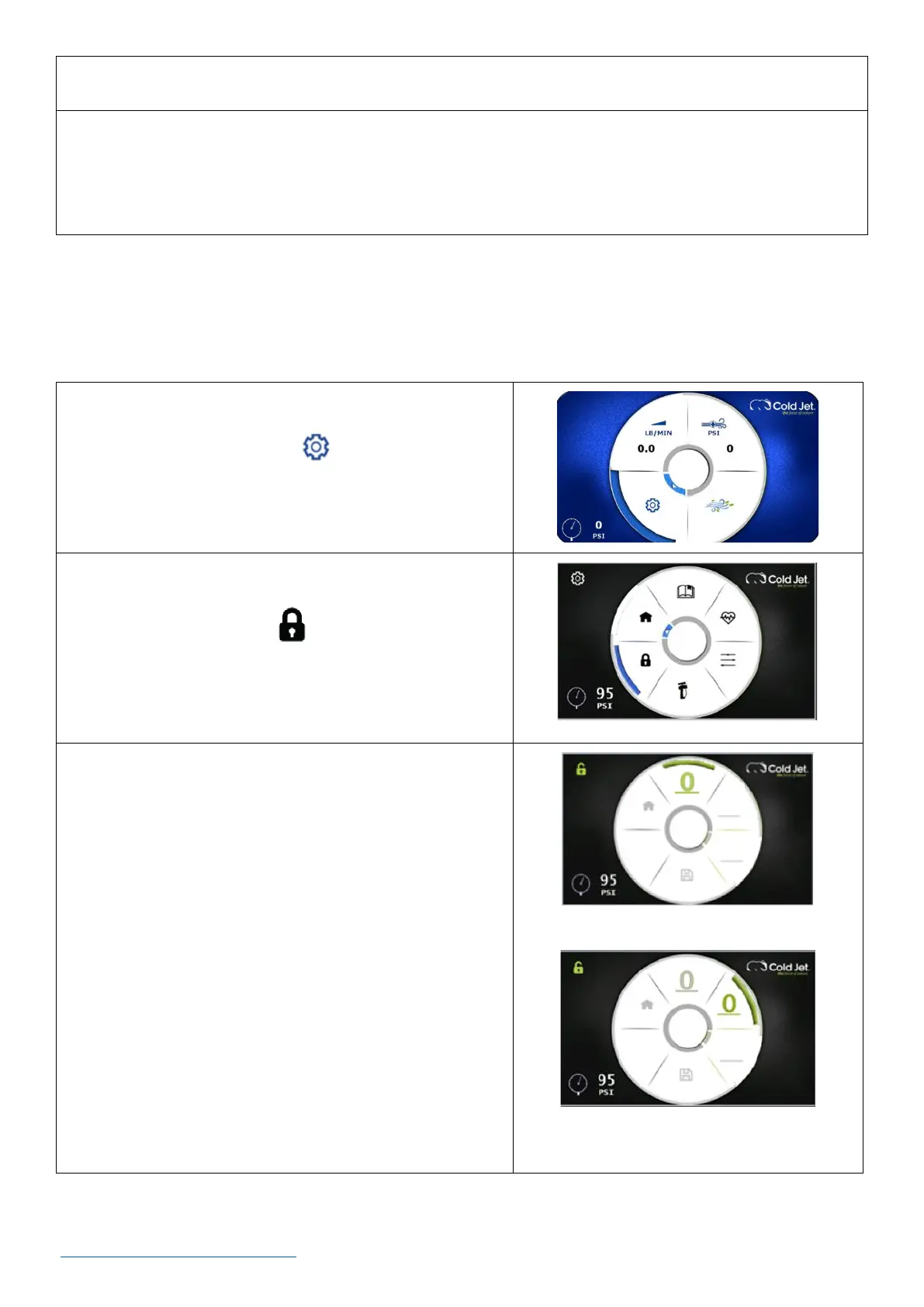
How to Set a Screen Lock Password [Optional] - A three-digit password can be entered to lock the
screen so that the blaster settings cannot be changed.
1. On the home screen, use the rotary encoder dial to
navigate to the settings icon and press the dial
once to go to the settings screen.
2. On the settings screen, use the rotary encoder dial to
navigate to the lock icon and press the dial once
to go to the password screen.
NOTE: Password contains three numbers.
3. Selecting the numbers for the password.
a. Use the rotary encoder dial to select the blank line
at the “12 o’clock” position and press the dial once.
This enables access to the first number of the
password.
b. Rotate the dial to select a number and press the
encoder dial to enter it.
c. Rotate clockwise to the next line & press the
encoder dial. This accesses the second number of
the password.
d. Rotate the dial to select a number and press the
encoder dial to enter it.



 To Next Page