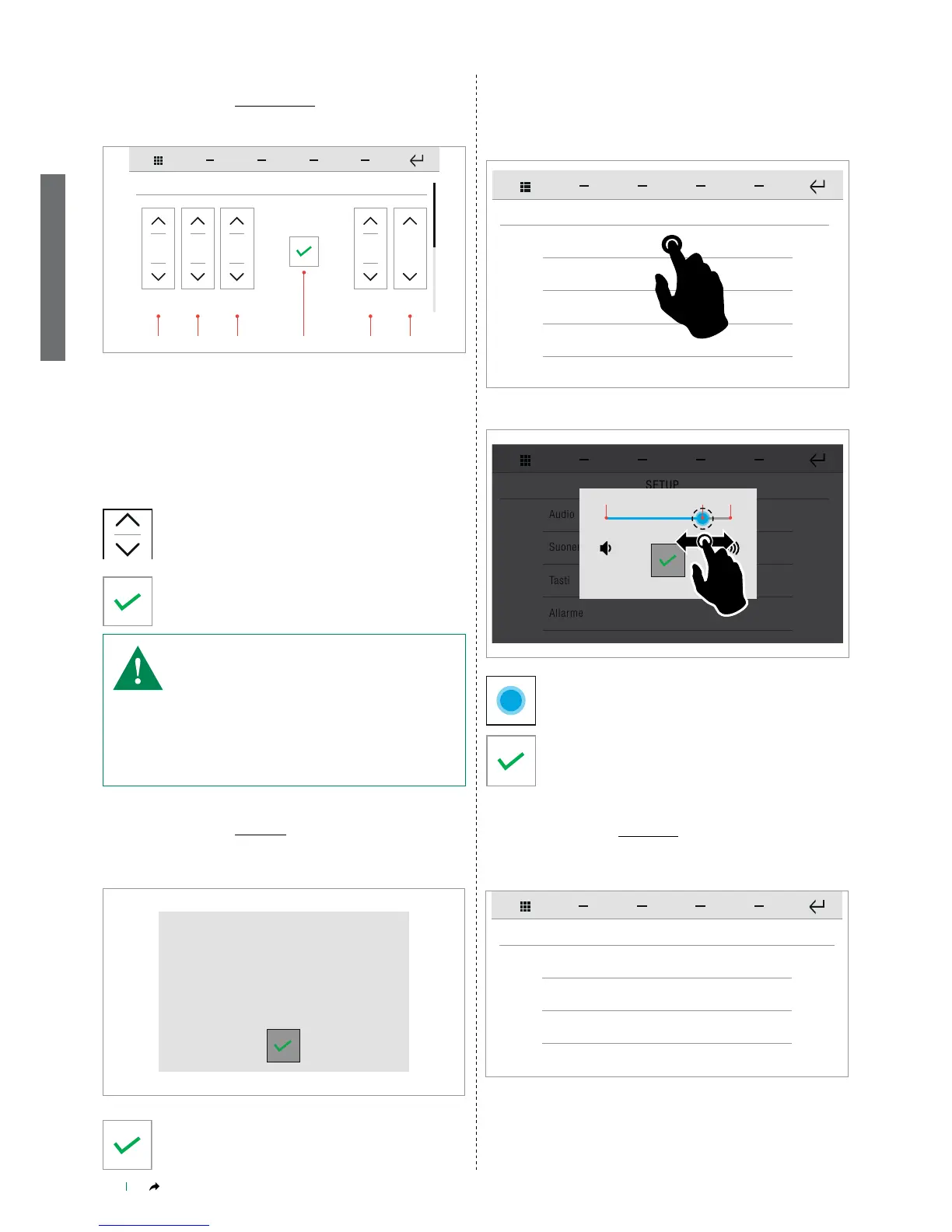
SET DATE AND TIME
DD
1 12 2014 17 13
MM YYYY HH MM
1 2 3 4 5 6
This function allows you to set the time and date of the device.
1. Day setting
2. Month setting
3. Year setting
4. Conrm icon
5. Hours setting
6. Minutes setting
√ If the system includes an alarm control panel, then setting the time
becomes a function of the alarm system; this requires the alarm
password and any changes made will be applied to the control panel.
• If the system includes a Vedo control panel, the device automatically
receives the time and date settings from the alarm control panel
(however, changes made will affect the device and any other connected
supervisors).
• Otherwise a function will be activated for setting automatic changeover
between summer/winter time, with the choice to customise the date or
use the European standard.
Set the desired values for day / month / year / hours /
minutes.
Save the conguration.
General parameters-Set date and time
SETUP-General parameters-Set date and time
General parameters-Information
SETUP-General parameters-Information
General parameters-Volume control
SETUP-General parameters-Volume control
VER.SW: 1.1
IP: 169.254.156.131 (x/24)
MAC: 00:25:29:03:AA:BB
GW: 192.168.1.1
ID: 00000101, SUB: 0
ICONA VIP
This menu provides technical information about the device (e.g. type
of device, versions, addresses, etc.).
Press the icon to exit the screen.
Audio
SETUP
Ringtone
Keys
Alarm
Audio
SETUP
Suoneria
Tasti
Allarme
VOL = 0 VOL = 9VOL = 7
7
The menu allows you to manage and control the audio volumes
associated with the various functions of the device.
Select the desired function.
Press and drag the cursor to adjust the volume.
Save the conguration.
External call
VIDEO DOOR ENTRY SETUP
Intercom call
Floor door call
Alarms
The menu allows you to manage the ringtones and control the audio
volumes associated with the call functions of the device.
Select the desired function.
General parameters-Set ringtones
SETUP-General parameters-Set ringtones


 To Next Page