CONTENTS
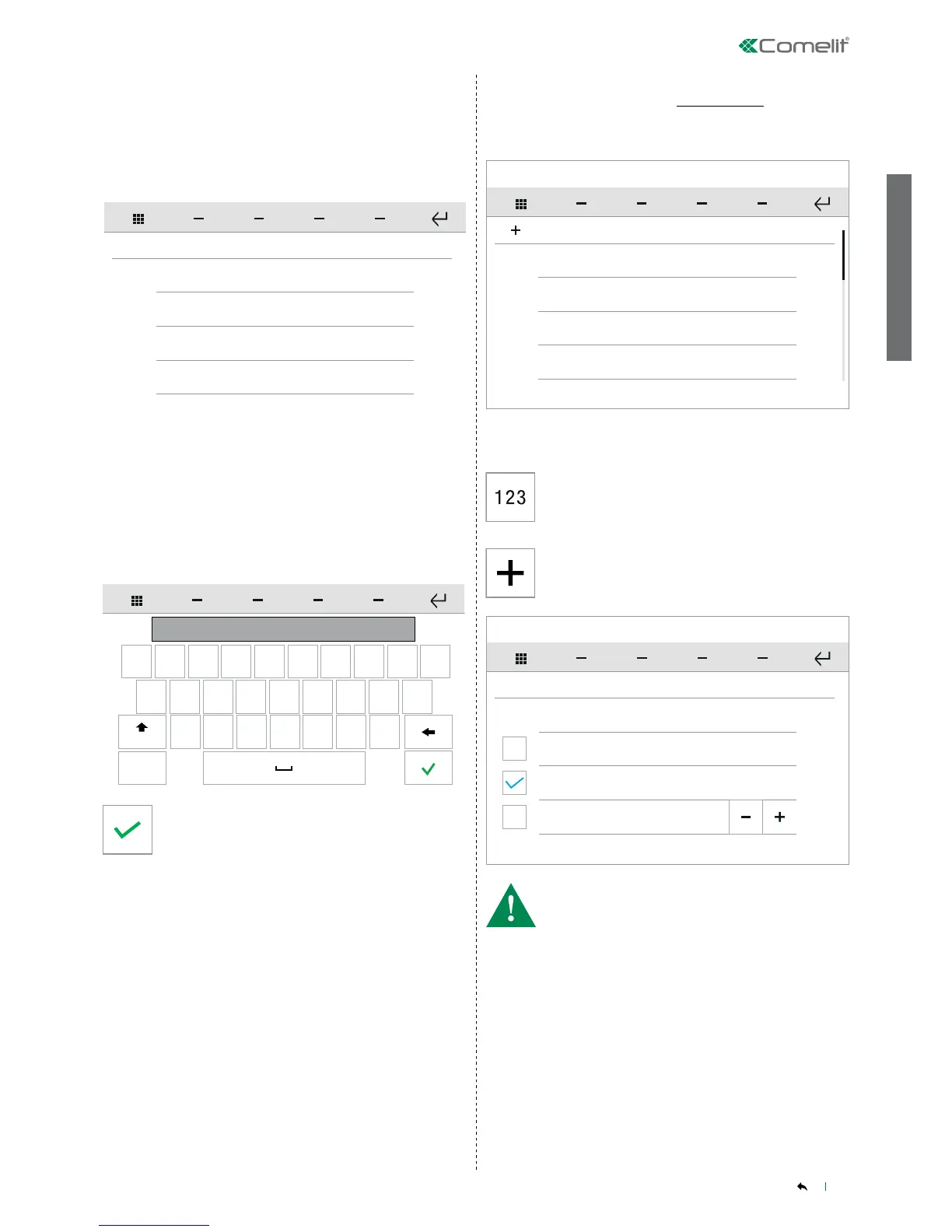
Press the icon (1) to move to the next mode.
ViP > RTSP
RTSP > ViP
√ RTSP MODE
Configure name
CAMERAS
RTSP
Configure RTSP address
Configure RTSP user name
Configure RTSP password
q w e r t y u i o p
a s d f
g
h
j
k
l
z
x c v b
n
m
123
Aa
value
• CONFIGURE NAME
see "CONFIGURE NAME" on page 16
• CONFIGURE VIP ADDRESS
• CONFIGURE RTSP USER NAME
• CONFIGURE RTSP PASSWORD
Enter the desired value, then confirm.
This function allows you to add and manage the intercoms connected
to the ViP system.
Door entry monitors - Intercoms directory
SETUP-ADVANCED-Door entry monitors-Intercoms directory
Intercom 1
INTERCOMS
Intercom 2
Intercom 3
Intercom 4
123
Configure name
INTERCOMS
Configure ViP address
Master
Slave
1
Press on the name of the intercom, then confirm the operation to
start the call.
Press the icon to add a new element.
Press the icon to call a specic ViP address.
Enter the address in the eld to start the communication.
• CONFIGURE NAME
see "CONFIGURE NAME" on page 16
• CONFIGURE VIP ADDRESS
see "CONFIGURE VIP ADDRESS" on page 16
• The options CONFIGURE VIP ADDRESS, MASTER and SLAVE
are mutually exclusive.
• If CONFIGURE VIP ADDRESS is selected (and an address is
entered), the call will be directed to entire system of the apartment
(MainAddress)
• If Master is selected (from a slave device), the call will be directed
to the system designated the MASTER DEVICE
• If Slave is selected and the sub address is specified (from the
Master or another Slave device), the call will be directed to the
SLAVE DEVICE in the same system identified by the specified sub
address.


 To Next Page