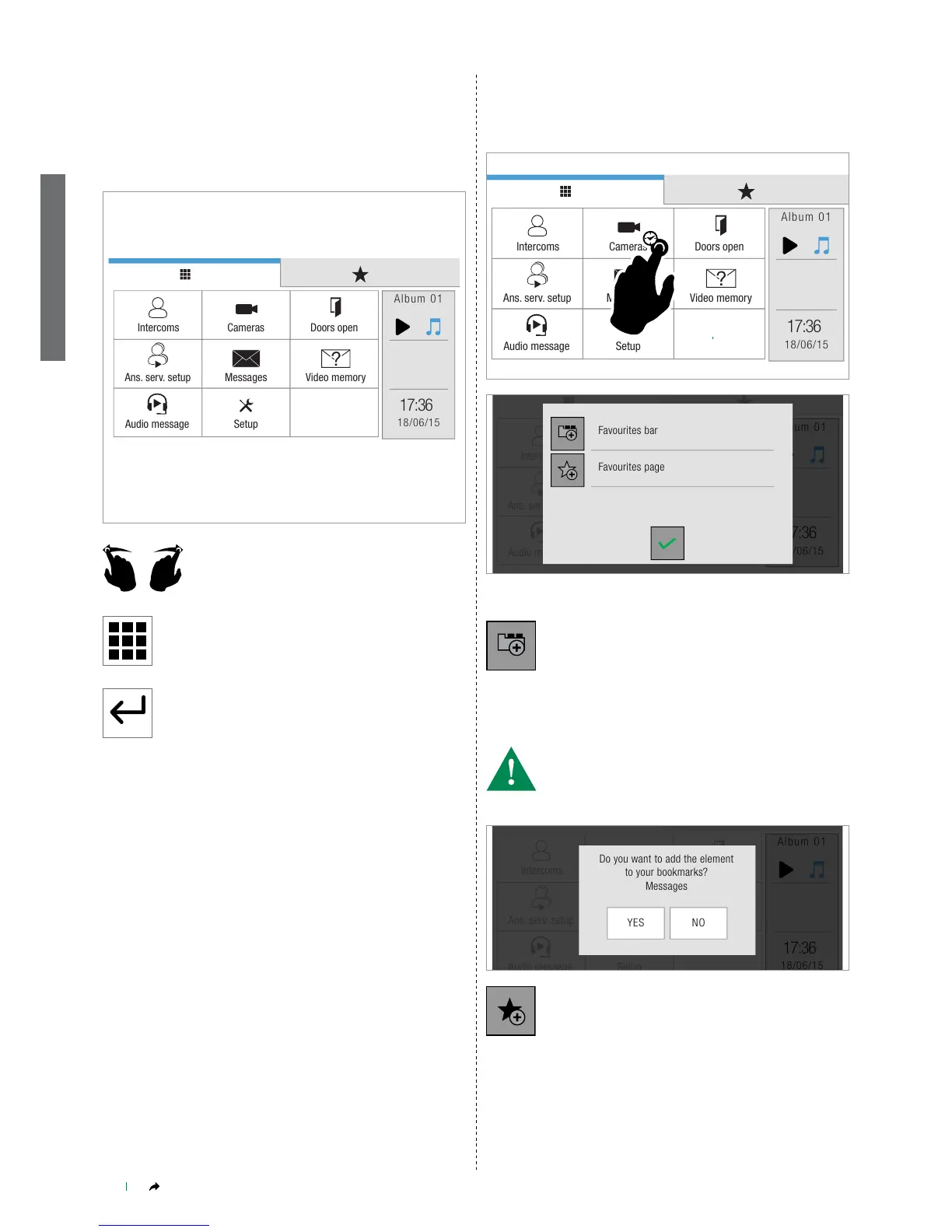
ICONA ViP MENU
The icons in the Icona ViP menu vary according to the type of system
installed and the functions available.
To navigate the menu, simply use your nger to touch the icon
corresponding to the desired function.
Touch the display to access the main menu.
Navigate through the available screens by
swiping with your nger to the left or right.
Press the icon to immediately return to the main menu.
Press the icon to return to the previous screen.
FAVOURITES BAR, FAVOURITES PAGE
AND ADVANCED INFO
Hold pressed one of the icons in the main menu to open the
corresponding favourites bar / favourites page / advanced info
panel.
FAVOURITES
Select the Favourites bar to create a link to the selected
function in the favourites bar.
» The link allows you to display the corresponding page simply by
pressing the icon in the top bar from any screen page.
• You can create a link to a function or to a room.
• CAUTION! You cannot create a link to a single element!
• Maximum number of links in the favourites bar = 4
Select the Favourites page icon to create a link to the
selected function in the favourites page.
» The link allows you to display the relative page simply by pressing
the icon in the favourites page.
» Maximum number of links in Favourites page = 18
If there are more than 9 links, they will be displayed over 2 screens.
Navigate through the available screens by swiping with your nger
to the left or right


 To Next Page