CONTENTS
3
INTRODUCTION
• See SETUP menu-General parameters-Soft touch keys
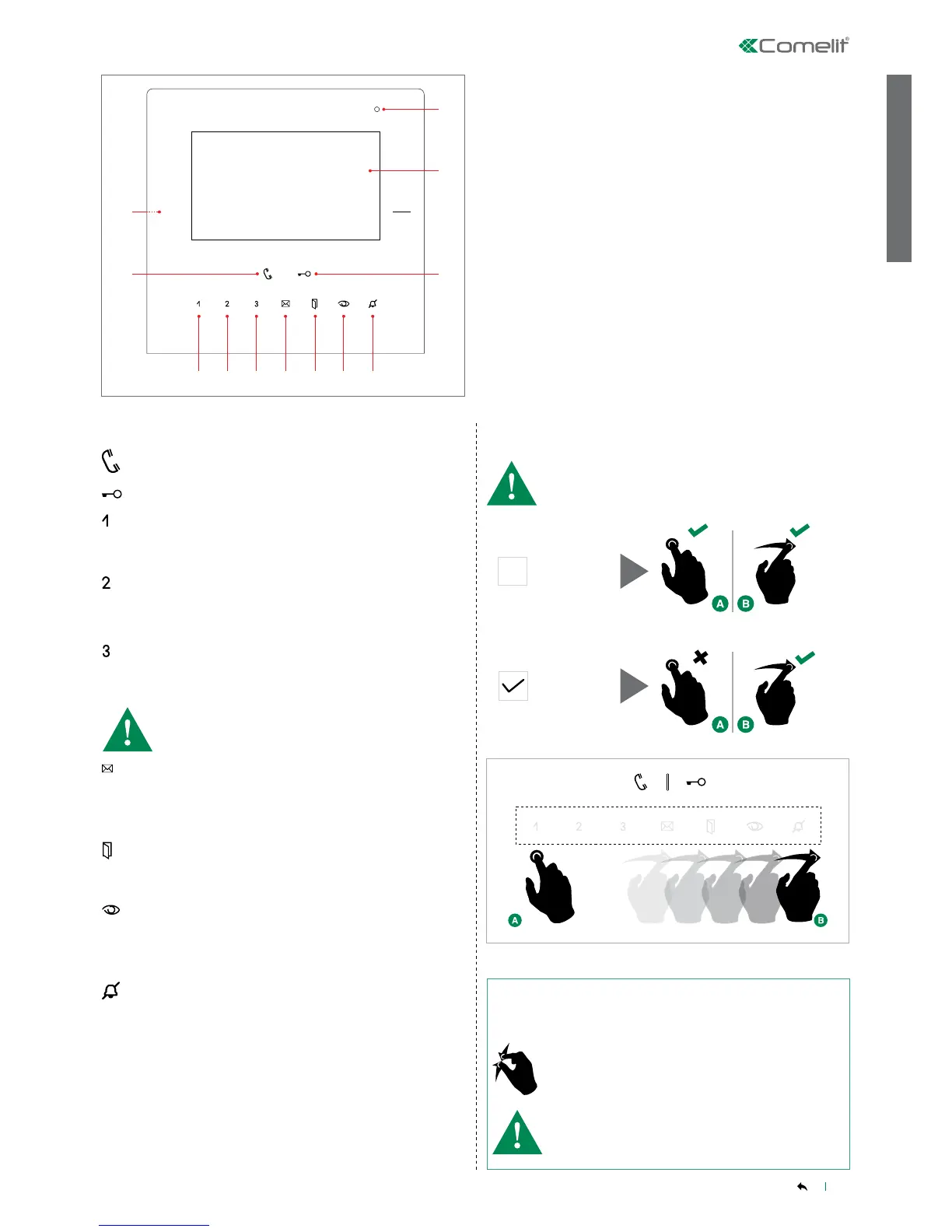
1. Microphone
2. 4.3" touch screen
3. Door lock key [programmable]
4. Privacy / Doctor key [programmable]
5. Self-ignition key [programmable]
6. Open doors key
7. Video memory key
8. Key "3" [programmable]
9. Key "2" [programmable]
10. Key "1" [programmable]
11. Audio key
12. Micro SD card port
1
2
3
45678910
11
12
• If the device is displaying a screen where the gesture
is associated with a specic function, the screen
switch-off function will be automatically disabled.
√ The screen on the device is switched on.
Use the zoom out gesture to switch off the screen.
SWITCHING OFF THE SCREEN
FUNCTION KEYS
Video memory key:
PRESSED allows access to the messages section.
LIT STEADILY video memory or absent message active.
FLASHING new message waiting.
Open doors key:
LIT STEADILY signals the opening of one or more of the doors
listed in the directory
PRESSED allows access to the open doors section.
Self ignition key: switches on the monitor and displays video
from an external unit.
[
intercom / self-ignition / lock-release / call priority 1-4 / actuators /
activate output
Privacy / Doctor function key
• The PRIVACY function disables calls from the external unit and
from the switchboard.
• The DOCTOR function enables automatic activation of the lock-
release in response to a call from the external unit.
• The PRIVACY + DOCTOR function, in addition to disabling
the door-entry phone ringtone in the same way as the Privacy
function, also enables automatic activation of the lock-release in
response to a call from the external unit.
Audio key: activates or deactivates conversation with the
external unit.
Door lock key: opens the corresponding door lock.
[
intercom / self-ignition / lock-release / call priority 1-4 /
actuators / activate output
intercom / self-ignition / lock-release / call priority 1-4 /
actuators / activate output
default
= deactivated
intercom / self-ignition / lock-release / call priority 1-4 /
actuators / activate output
default
= deactivated
• In ADDITION to the programmable functions for keys 1 - 2 - 3 it
is possible to assign one SCENARIO that will be activated at the
same time as the associated function is activated by pressing the
corresponding key (1 - 2 - 3).
Soft touch keys
Soft touch keys
MONITOR DESCRIPTION
SOFT-TOUCH KEY ACTIVATION


 To Next Page