CONTENTS
The section allows you to manage the parameters of the door entry
monitor system.
This function allows you set the Vip address of the device.
This function allows you to add and manage actuators connected to
the ViP system.
Door entry monitors
SETUP-ADVANCED-Door entry monitors
Door entry monitors - Addresses
SETUP-ADVANCED-Door entry monitors-Addresses
Addresses
VIDEO SYSTEM
Actuator directory
Cameras directory
Intercom Directory
Configure ViP address
ADDRESS
Master
Slave 1
Actuator 1
ACTUATORS
Actuator 2
Actuator 3
Actuator 4
Configure name
ACTUATORS
Configure ViP address
Module
Output
255
1
1
00000001
2 3
4 5 6
7 8 9
0
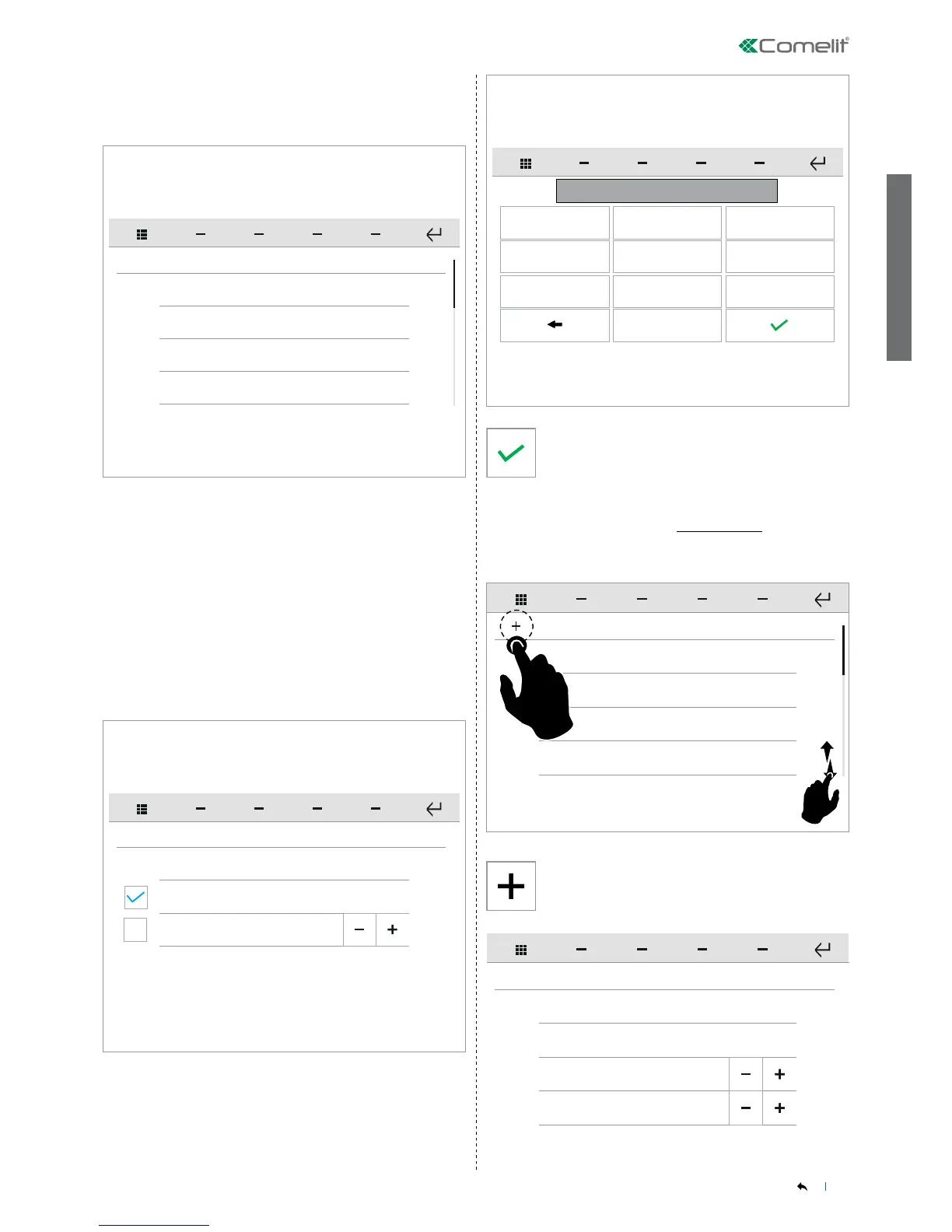
To access the desired function, press the corresponding icon.
» The available options are: Addresses / Actuators directory /
Cameras directory / Intercoms directory / Doors directory / Set tone
repetition / Set call times / Call divert / Alarms / Activate output /
Import audio messages / Hands-free / Always record / Congure
multiple addresses.
Swipe your nger up or down to view all the available menu options.
Press CONFIGURE VIP ADDRESS to open the panel in which you
can enter the ViP address.
Select the device category of MASTER or SLAVE.
Enter the desired value, then confirm.
Press the icon to add a new element.
This function allows you to add and manage actuators connected to
the ViP system.
Door entry monitors - Actuators directory
SETUP-ADVANCED-Door entry monitors-Actuators directory
Actuator 1
ACTUATORS
Actuator 2
Actuator 3
Actuator 4
Configure name
ACTUATORS
Configure ViP address
Module
Output
255
1
Press the icon to add a new element.


 To Next Page