CONTENTS
Melody 1
VIDEO DOOR ENTRY SETUP
Melody 2
Melody 3
Melody 4
21
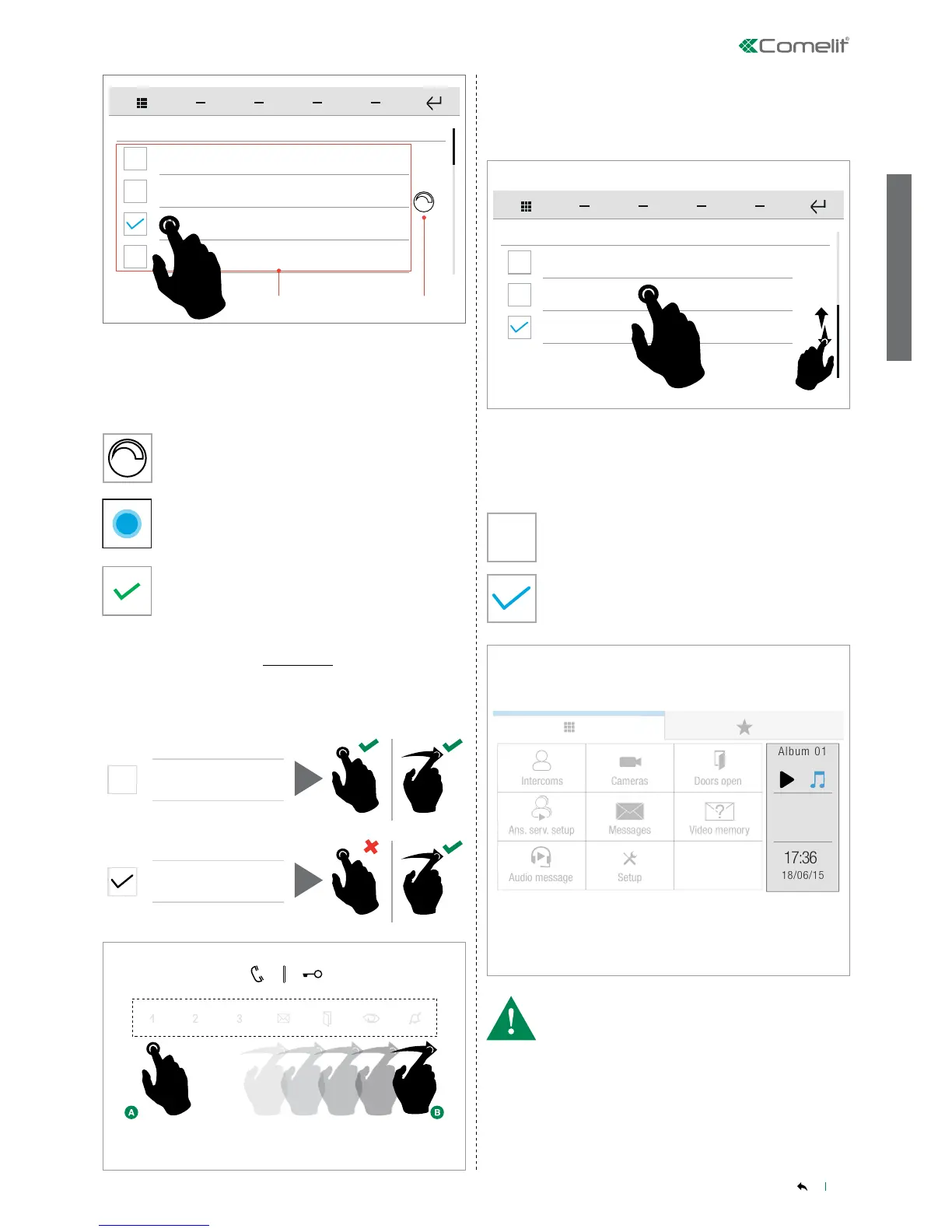
This function allows you to decide how to activate the device's soft
touch keys (short press/swipe).
Press the name of the melody hear a preview.
Press the icon to open the volume control panel.
Press and drag the cursor to adjust the volume (as
described in "General parameters-Volume control" on
page 10)
Save the conguration.
Select/deselect the desired option by pressing the corresponding
box.
The menu allows you to select which widgets are to be shown on the
HOME page.
Swipe your nger up or down to view all the available menu options.
Meter 1
SETUP
Thermo 1
Alarm
Option DESELECTED
Option SELECTED
Select/deselect the desired option by pressing the corresponding
box.
General parameters-Soft touch keys
SETUP menu-General parameters-Soft touch keys
SETUP-Widgets
SETUP-Widgets
• MAX number of widgets that can be selected simultaneously = 2
Swipe keys
Swipe keys


 To Next Page