CONTENTS
SETUP - Congure event messages SETUP - Advanced
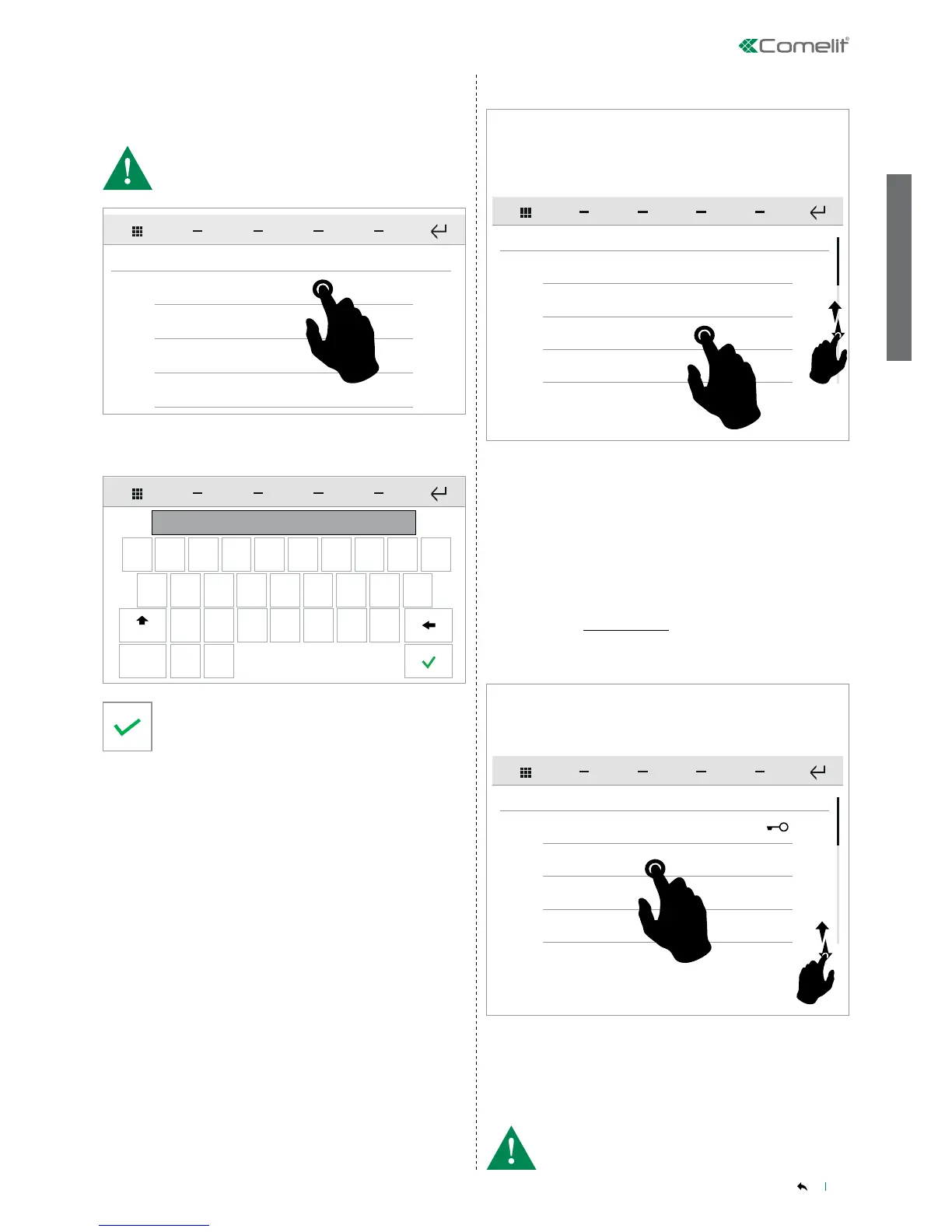
From this menu you can congure the email addresses of the
recipients of automatic messages sent on activation of a previously
congured input.
From this menu you can assign one of the available functions to each
of the PROGRAMMABLE KEYS.
Programming keys
SETUP-ADVANCED-Programming keys
Enter the address and conrm.
Press on the desired recipient to enter or edit the address.
Configure recipient 1
SETUP
Configure recipient 2
Configure recipient 3
Configure recipient 4
q w e r t y u i o p
a s d f
g
h
j
k
l
z
. @
x c v b
n
m
123
Aa
indirizzo@comelit.it
• Maximum of 4 recipients!
• For a list of the available functions that can be associated, refer
to"FUNCTION KEYS" on page 3.
Prog. Keys
ADVANCED SETUP
Total reset
Update configurations
Import/Export
Key
KEY SETUP
Key 1
Key 2
Key 3
To access the desired sub-menu, press the corresponding icon.
To access the desired sub-menu, press the corresponding icon.
» The available options are: Programming keys / Total reset / Import/
Export / Door entry monitors.
Swipe your nger up or down to view all the available menu options.
Swipe your nger up or down to view all the available menu options.


 To Next Page