16
3.5.2. JP2, door status report options
DG1
DG2
External chime
POWER
AC24V or
DC24V 1A
[Figure 1]
DG1
DG2
External chime
[Figure 2]
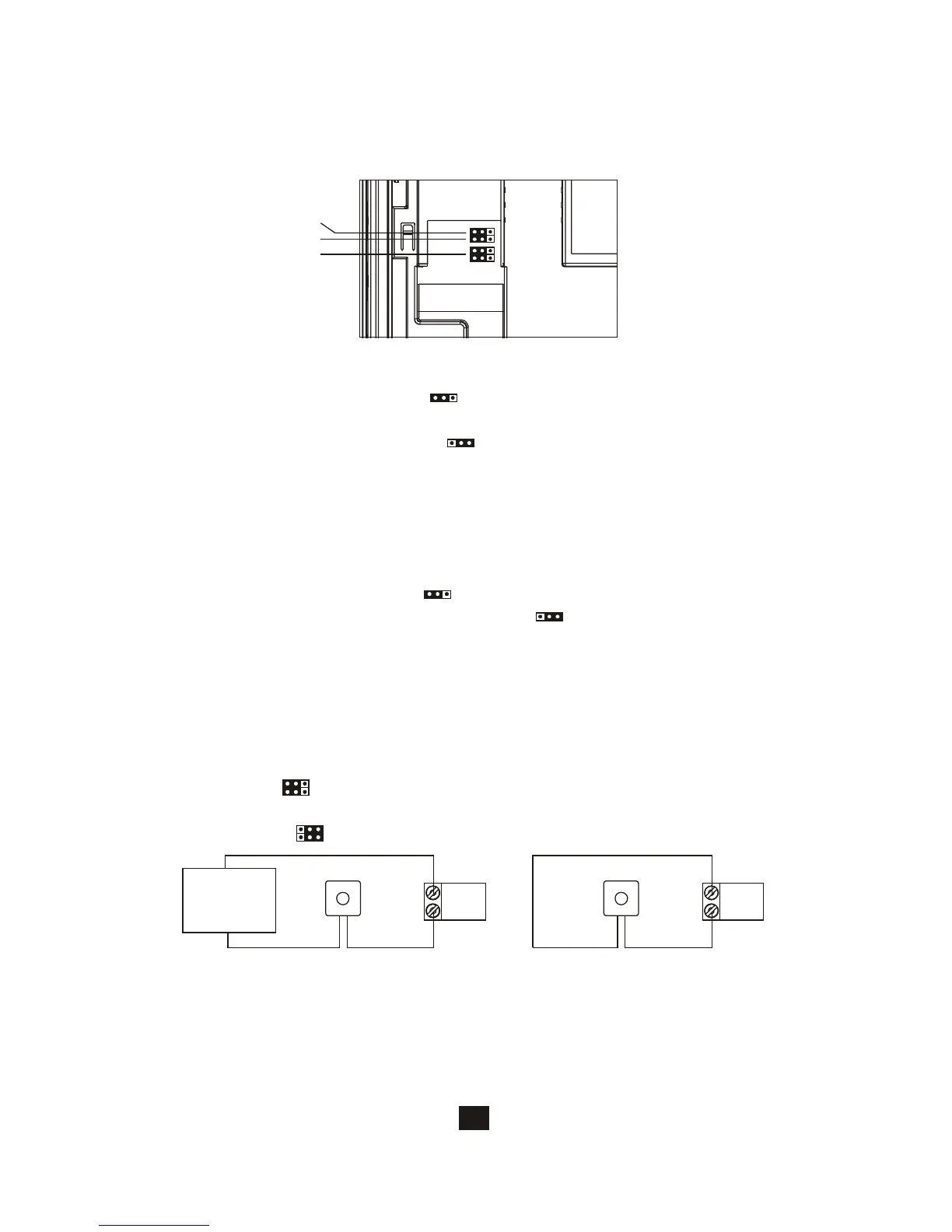
3.5. Jumper function on main monitor
JP1
JP2
JP3
3.5.1. JP1, video display option during door release operation
A. DG1/DG2 trigger a N.O. device to synchronize with doorbell trigger
and react as JP3 options. Wrong setting may cause damage to the
equipment.
B. DG1(+) and DG2(-) have polarity.
C. JP3 on left( ) for N.O. dry contact (default) (allow bypass current of
24VDC/1A) (figure 1).
D. JP3 on right( ) for 12VDC150mA current output (figure 2).
A.Enable video display (JP1 left ) (default) if door release is dry contact
output.
B.Disable video display (JP1 right ) if door release is 12VDC/300mA
direct current output
A.PT1/PT2 connect a N.C. switch sensor to detect door status and react as
JP2 options
B. Bell tone indication (JP2 left ) (default)
C. LED light on Door Open Button (JP2 right )
3.5.3. JP3, external doorbell trigger options






 To Next Page